%22%20fill%3D%22rgb(0%2C0%2C0)%22%20d%3D%22M%201708.71%2032.0719%20L%201711.17%2032.1726%20L%201711.48%2033.8726%20C%201698.63%2068.7557%201678.15%20111.062%201663.25%20146.038%20L%201610.27%20270.222%20C%201600.68%20293.044%201548.56%20422.248%201540.04%20431.57%20C%201533.67%20438.547%201128.18%20599.98%201082.51%20618.503%20L%20896.13%20695.087%20C%20861.529%20708.971%20827.042%20723.139%20792.674%20737.591%20C%20773.372%20745.745%20749.086%20754.449%20732.134%20766.537%20C%20692.666%20794.684%20697.752%20841.911%20698.601%20884.356%20C%20699.702%20939.367%20740.841%20953.958%20782.454%20976.677%20L%20861.67%201020.18%20L%201099.89%201152.37%20C%201107.22%201156.5%201119.88%201164.35%201127.14%201167.58%20C%201169.86%201186.61%201146.74%201195.41%201117.9%201208.29%20C%201100.37%201216.11%201079.03%201225.42%201060.64%201233.58%20C%201010.18%201256.26%20959.538%201278.54%20908.726%201300.43%20C%20894.529%201306.71%20881.754%201312.22%20867.258%201317.69%20C%20862.804%201316.04%20858.4%201314.27%20854.051%201312.36%20C%20836.181%201304.32%20811.094%201289.47%20793.048%201279.86%20L%20667.457%201213.33%20L%20559.157%201156.4%20C%20524.558%201137.94%20487.124%201123.47%20472.687%201083.79%20C%20469.558%201074.97%20467.621%201065.77%20466.927%201056.43%20C%20465.765%201038.59%20466.66%201011.98%20466.668%20993.332%20L%20466.359%20873.615%20C%20465.984%20815.652%20463.947%20757.728%20465.485%20699.747%20C%20465.795%20688.052%20466.054%20675.662%20467.175%20664.054%20C%20469.31%20640.858%20475.406%20618.2%20485.2%20597.064%20C%20517.254%20527.676%20568.707%20508.151%20633.929%20480.324%20L%20726.507%20441.167%20L%201040.13%20310.018%20L%201452.31%20137.782%20L%201616.93%2069.4204%20C%201646.93%2057.0612%201678.5%2043.152%201708.71%2032.0719%20z%22%2F%3E%0D%0A%3Cpath%20transform%3D%22translate(0%2C0)%22%20fill%3D%22rgb(0%2C0%2C0)%22%20d%3D%22M%201180.36%20731.182%20C%201195.24%20733.945%201233.7%20756.876%201248.98%20765.026%20L%201364.16%20826.126%20L%201484.37%20889.381%20C%201498.57%20896.955%201532.42%20914.303%201544.52%20923.261%20C%201557.39%20932.823%201567.44%20945.681%201573.6%20960.477%20C%201577.74%20970.613%201580.28%20981.333%201581.12%20992.25%20C%201582.2%201006.88%201581.3%201032.21%201581.31%201047.95%20L%201581.63%201160.97%20C%201582.26%201211.62%201582.57%201262.29%201582.57%201312.95%20C%201582.44%201333.48%201582.84%201362.18%201581%201382.38%20C%201579.14%201403.66%201573.97%201424.53%201565.69%201444.23%20C%201551.08%201479.78%201525.53%201509.75%201492.74%201529.79%20C%201460.17%201549.9%201412.55%201568.06%201376.2%201583.68%20C%201297.89%201617.01%201219.4%201649.9%201140.72%201682.34%20L%20334.313%202018.15%20C%20339.936%202006.05%20344.516%201995.06%20349.5%201982.67%20C%20380.898%201908.42%20413.985%201834.57%20445.11%201760.02%20C%20459.052%201725.94%20473.375%201692.02%20488.076%201658.26%20C%20492.996%201647.05%20502.305%201624.37%20508.527%201614.93%20C%20525.371%201606.59%20557.563%201594.41%20575.732%201586.98%20L%20705.864%201534%20C%20845.58%201478.27%20984.961%201421.71%201124%201364.32%20L%201246.78%201313.94%20C%201290.4%201295.55%201343.27%201280.12%201348.5%201224.17%20C%201350.49%201202.85%201351.54%201164.6%201346.69%201143.96%20C%201344.6%201134.87%201340.77%201126.27%201335.41%201118.63%20C%201321.45%201099.1%201289.07%201084.29%201267.79%201072.67%20L%201188.51%201029.14%20L%20997.495%20923.267%20L%20933.233%20887.54%20C%20924.86%20882.894%20890.238%20867.795%20898.045%20858.391%20C%20907.874%20846.549%20953.243%20829.416%20967.235%20823.263%20L%201064.01%20780.291%20C%201087.5%20769.837%201111.05%20759.524%201134.65%20749.351%20C%201147.99%20743.555%201166.91%20734.741%201180.36%20731.182%20z%22%2F%3E%0D%0A%3C%2Fsvg%3E)
%22%20fill%3D%22rgb(255%2C255%2C255)%22%20d%3D%22M%201708.71%2032.0719%20L%201711.17%2032.1726%20L%201711.48%2033.8726%20C%201698.63%2068.7557%201678.15%20111.062%201663.25%20146.038%20L%201610.27%20270.222%20C%201600.68%20293.044%201548.56%20422.248%201540.04%20431.57%20C%201533.67%20438.547%201128.18%20599.98%201082.51%20618.503%20L%20896.13%20695.087%20C%20861.529%20708.971%20827.042%20723.139%20792.674%20737.591%20C%20773.372%20745.745%20749.086%20754.449%20732.134%20766.537%20C%20692.666%20794.684%20697.752%20841.911%20698.601%20884.356%20C%20699.702%20939.367%20740.841%20953.958%20782.454%20976.677%20L%20861.67%201020.18%20L%201099.89%201152.37%20C%201107.22%201156.5%201119.88%201164.35%201127.14%201167.58%20C%201169.86%201186.61%201146.74%201195.41%201117.9%201208.29%20C%201100.37%201216.11%201079.03%201225.42%201060.64%201233.58%20C%201010.18%201256.26%20959.538%201278.54%20908.726%201300.43%20C%20894.529%201306.71%20881.754%201312.22%20867.258%201317.69%20C%20862.804%201316.04%20858.4%201314.27%20854.051%201312.36%20C%20836.181%201304.32%20811.094%201289.47%20793.048%201279.86%20L%20667.457%201213.33%20L%20559.157%201156.4%20C%20524.558%201137.94%20487.124%201123.47%20472.687%201083.79%20C%20469.558%201074.97%20467.621%201065.77%20466.927%201056.43%20C%20465.765%201038.59%20466.66%201011.98%20466.668%20993.332%20L%20466.359%20873.615%20C%20465.984%20815.652%20463.947%20757.728%20465.485%20699.747%20C%20465.795%20688.052%20466.054%20675.662%20467.175%20664.054%20C%20469.31%20640.858%20475.406%20618.2%20485.2%20597.064%20C%20517.254%20527.676%20568.707%20508.151%20633.929%20480.324%20L%20726.507%20441.167%20L%201040.13%20310.018%20L%201452.31%20137.782%20L%201616.93%2069.4204%20C%201646.93%2057.0612%201678.5%2043.152%201708.71%2032.0719%20z%22%2F%3E%0D%0A%3Cpath%20transform%3D%22translate(0%2C0)%22%20fill%3D%22rgb(255%2C255%2C255)%22%20d%3D%22M%201180.36%20731.182%20C%201195.24%20733.945%201233.7%20756.876%201248.98%20765.026%20L%201364.16%20826.126%20L%201484.37%20889.381%20C%201498.57%20896.955%201532.42%20914.303%201544.52%20923.261%20C%201557.39%20932.823%201567.44%20945.681%201573.6%20960.477%20C%201577.74%20970.613%201580.28%20981.333%201581.12%20992.25%20C%201582.2%201006.88%201581.3%201032.21%201581.31%201047.95%20L%201581.63%201160.97%20C%201582.26%201211.62%201582.57%201262.29%201582.57%201312.95%20C%201582.44%201333.48%201582.84%201362.18%201581%201382.38%20C%201579.14%201403.66%201573.97%201424.53%201565.69%201444.23%20C%201551.08%201479.78%201525.53%201509.75%201492.74%201529.79%20C%201460.17%201549.9%201412.55%201568.06%201376.2%201583.68%20C%201297.89%201617.01%201219.4%201649.9%201140.72%201682.34%20L%20334.313%202018.15%20C%20339.936%202006.05%20344.516%201995.06%20349.5%201982.67%20C%20380.898%201908.42%20413.985%201834.57%20445.11%201760.02%20C%20459.052%201725.94%20473.375%201692.02%20488.076%201658.26%20C%20492.996%201647.05%20502.305%201624.37%20508.527%201614.93%20C%20525.371%201606.59%20557.563%201594.41%20575.732%201586.98%20L%20705.864%201534%20C%20845.58%201478.27%20984.961%201421.71%201124%201364.32%20L%201246.78%201313.94%20C%201290.4%201295.55%201343.27%201280.12%201348.5%201224.17%20C%201350.49%201202.85%201351.54%201164.6%201346.69%201143.96%20C%201344.6%201134.87%201340.77%201126.27%201335.41%201118.63%20C%201321.45%201099.1%201289.07%201084.29%201267.79%201072.67%20L%201188.51%201029.14%20L%20997.495%20923.267%20L%20933.233%20887.54%20C%20924.86%20882.894%20890.238%20867.795%20898.045%20858.391%20C%20907.874%20846.549%20953.243%20829.416%20967.235%20823.263%20L%201064.01%20780.291%20C%201087.5%20769.837%201111.05%20759.524%201134.65%20749.351%20C%201147.99%20743.555%201166.91%20734.741%201180.36%20731.182%20z%22%2F%3E%0D%0A%3C%2Fsvg%3E)

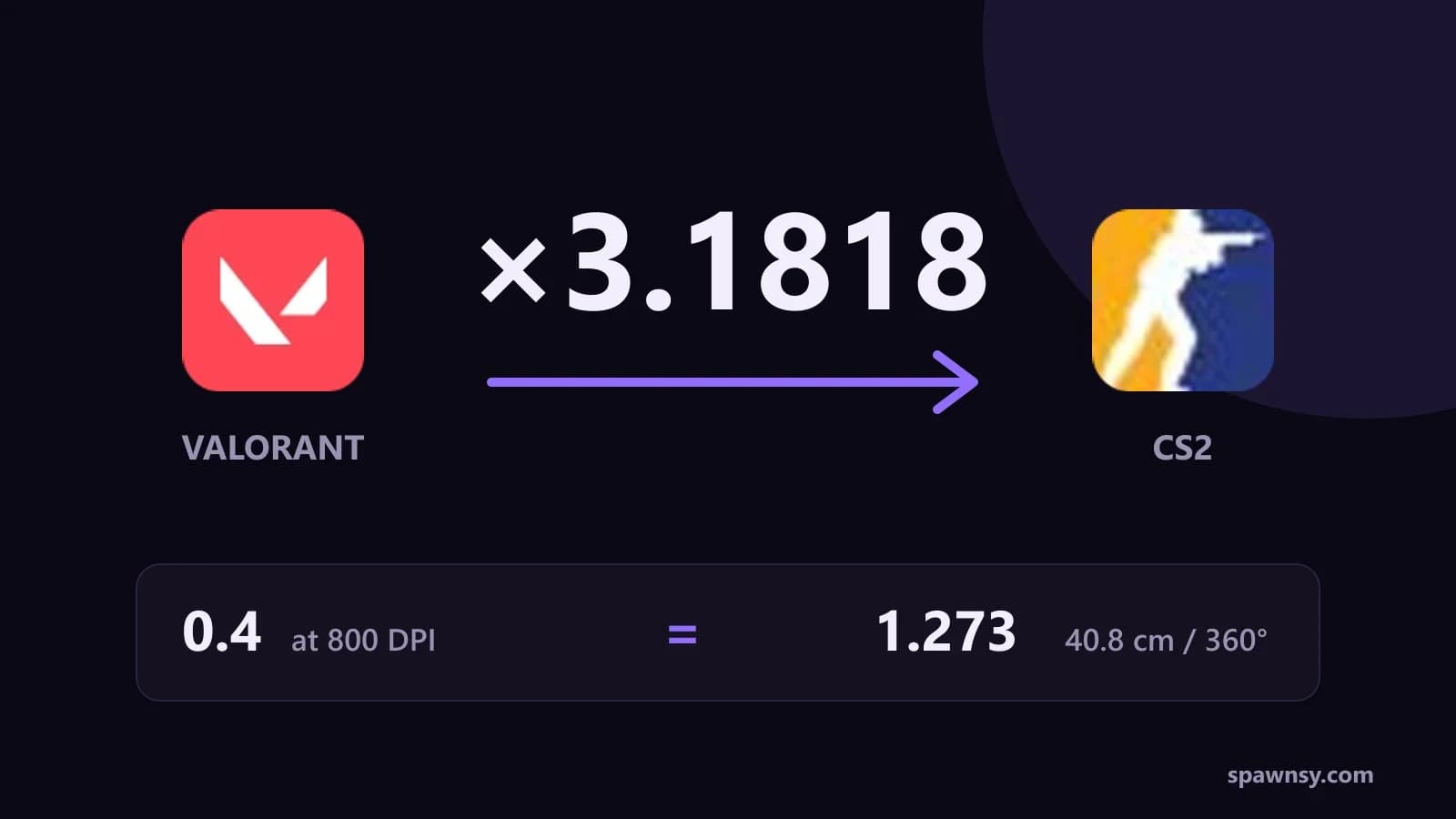
Valorant 0.4 at 800 DPI is 1.273 in CS2. Type your 0.4 into CS2 and you turn more than three times slower than you are used to. Type 4 and you turn three times faster, while your hand still remembers the old distance. The two games turn the view by a different angle for the same mouse step, so you cannot copy the number from one menu to the other. Below is the whole method, with multipliers for Valorant, Apex Legends, Overwatch 2, Fortnite, Rainbow Six Siege and Call of Duty, plus data on where the converted number lands among CS2 pros.
You can do the maths in our sensitivity converter, which went live together with this guide. Here we explain where the numbers come from and what else you have to check for a converted sensitivity to hold up.
Why 0.4 in one game is not 0.4 in another
Every game turns the view by a fixed number of degrees per mouse count at sensitivity 1. That value is called yaw. CS2 uses 0.022, Valorant 0.07, Overwatch 2 and Call of Duty 0.0066. The sensitivity in your menu is a multiplier on top of it, so 0.4 in Valorant turns the view 0.028° per count and 0.4 in CS2 only 0.0088°.
Your hand remembers distance: how many centimetres you drag the mouse to spin a full 360°. That is cm/360, and you get it from 360 ÷ (yaw × sensitivity × DPI) × 2.54. Converting between games means finding the number in the new game that keeps cm/360 the same. Valorant 0.4 at 800 DPI is 40.8 cm per turn, and the same 40.8 cm in CS2 comes from a sensitivity of 1.273.
Multipliers between games
The multiplier is the ratio of the two yaw values. With the same DPI in both games you multiply the sensitivity from the game you play now and get the one for the game you are moving to. Here are the multipliers to CS2 and back.
Apex is the odd one out because it runs a modified Source engine with the same yaw as CS2. Your Apex sensitivity goes into CS2 unchanged as long as the DPI matches. Fortnite counts sensitivity in percent and has separate X and Y sliders, so we convert the X slider and you set Y to the same value. Siege takes whole numbers in its menu, so the result has to be rounded, and at low values rounding can shift your cm/360 by a few percent.
Worked example: Valorant to CS2 in five steps
If you run a different DPI in CS2 than in Valorant, switch on "I use a different DPI in this game" in the converter and enter the second value. Without it the result is twice too slow or twice too fast whenever one game runs at 400 and the other at 800. At 1600 DPI in CS2 and the same distance you need half the sensitivity, which is 0.636.
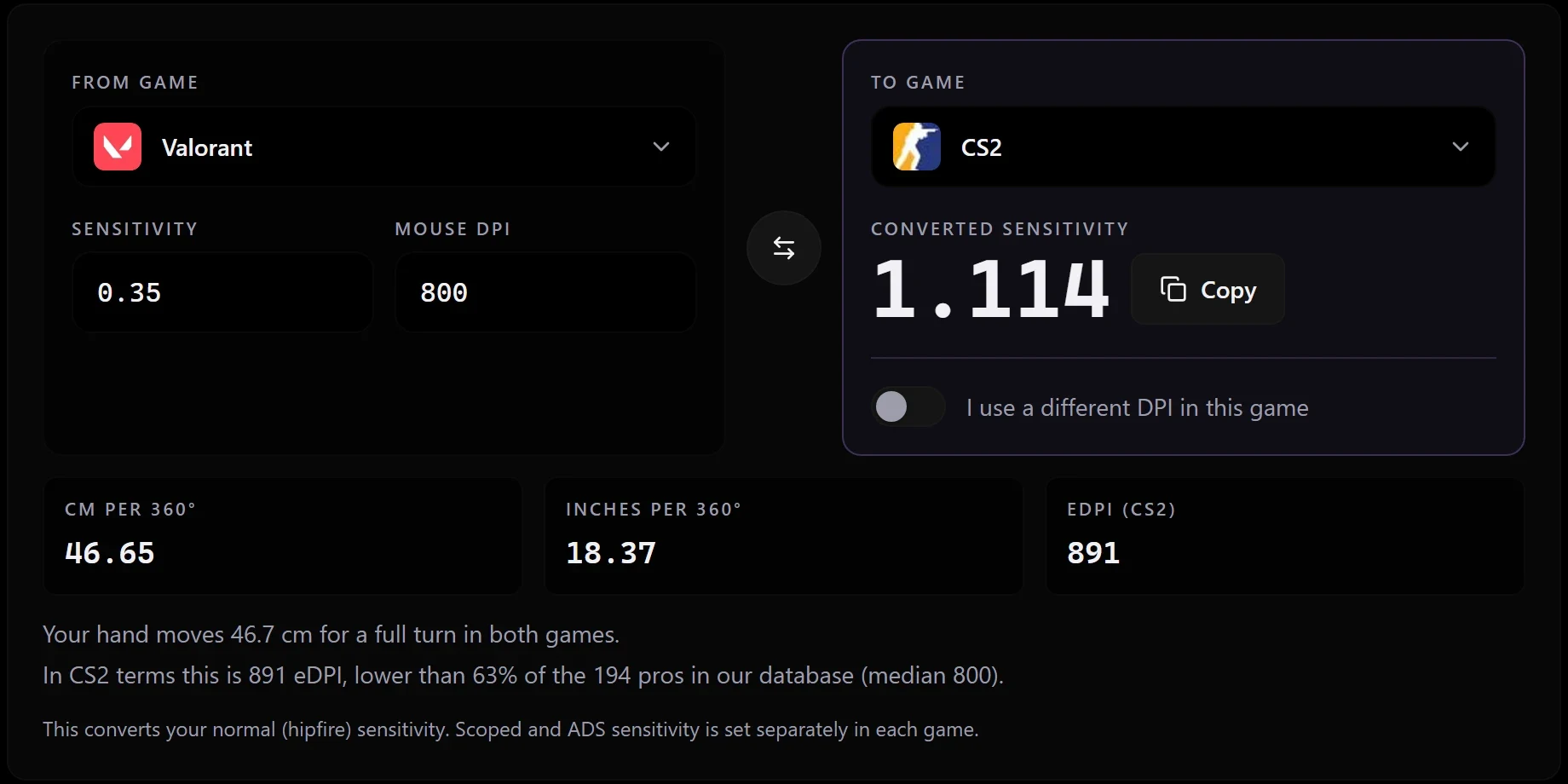
Common Valorant sensitivities in CS2
If you would rather skip the converter, here are ready conversions for the Valorant sensitivities that show up most often. All at 800 DPI in both games.
From other games: four examples
Overwatch 2 at sensitivity 5 and 800 DPI is 34.6 cm per turn, which is 1.5 in CS2. Call of Duty shares the yaw, so 7 in Warzone is 2.1 in CS2. Fortnite 7.92% on the X slider gives 2.0, and Rainbow Six Siege 10 gives 2.604. Apex Legends 1.6 stays 1.6. In every case the number on screen goes up or down while the distance your hand travels for a full turn stays the same.
Entering it in CS2 and checking it with a ruler
In CS2 you set sensitivity in the keyboard and mouse tab of the settings, or in the console with sensitivity 1.273. The game stores the value in your config. It is worth checking once that what you typed really gives the cm per turn you calculated: load a practice map, pick a clear point on a wall and drag the mouse along a ruler by the calculated distance. If one smooth sweep brings you back to the same point after a full turn, the sensitivity is right. The test takes a minute and catches most problems, including a wrong DPI profile in your mouse software.
That leaves the DPI question: you do not need to change it when you switch games. In our database 96 of 185 pros play at 800 DPI and 81 at 400, so both are ordinary. Changing DPI at the same eDPI leaves cm per turn untouched and only changes how densely the sensor samples your movement. If you play at 800, stay at 800.
Where you land among CS2 pros
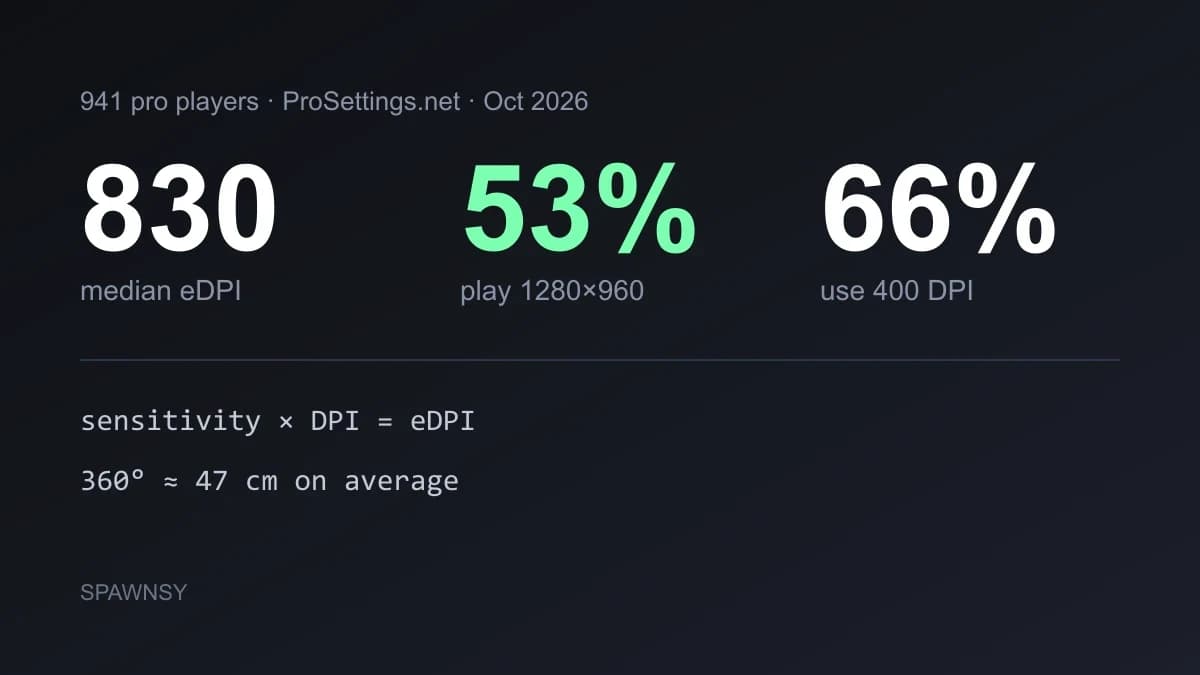
The median of the 185 pros in our database with a recorded DPI and sensitivity is 800 eDPI, or 51.95 cm per turn. The middle half of the field plays between 720 and 960 eDPI, which is 43.3 to 57.7 cm per turn. The full breakdown is in our report on pro settings, and every profile in the crosshair database shows one player's sensitivity.
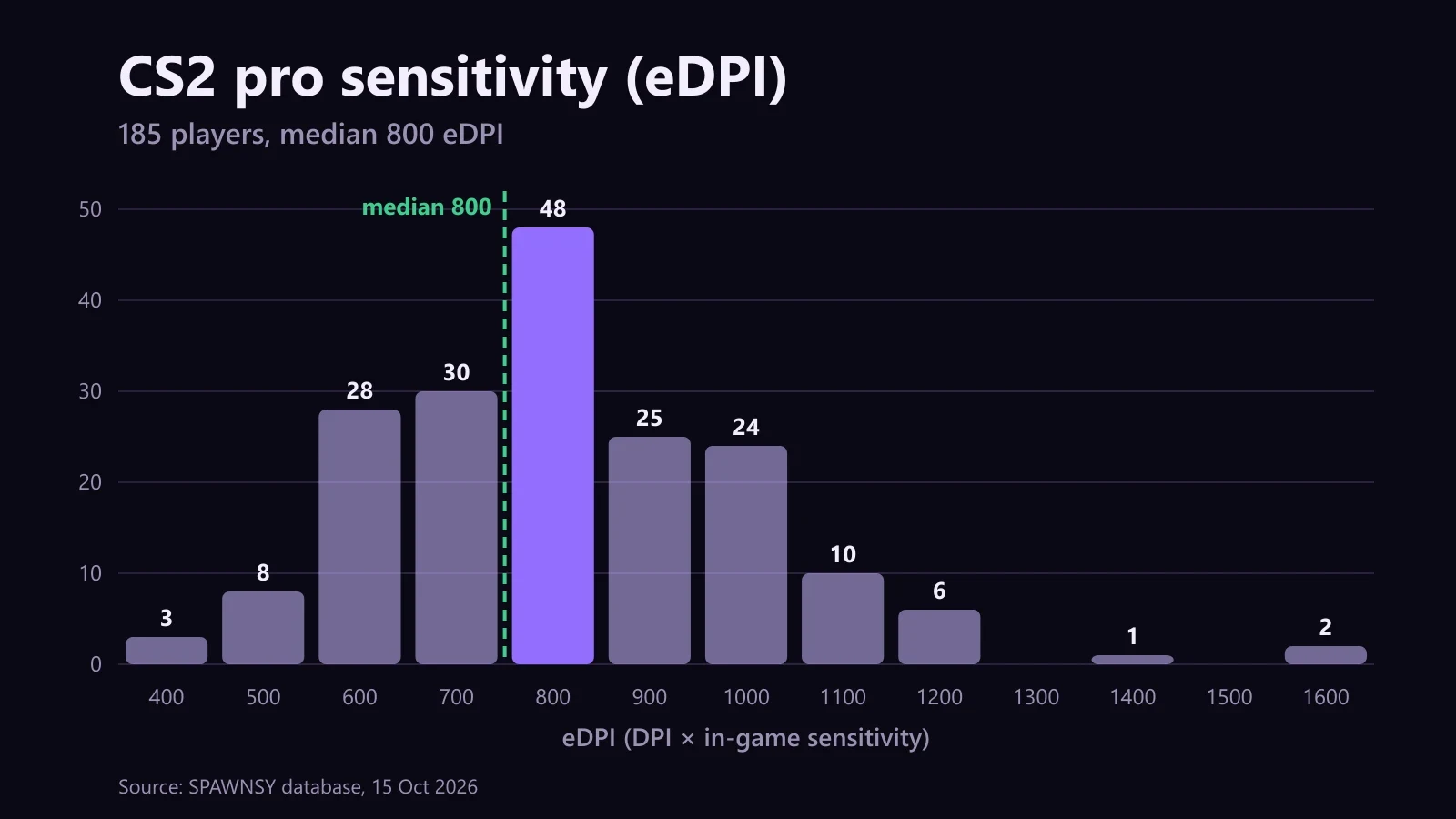
Valorant 0.4 at 800 DPI works out to 1018 eDPI in CS2, between the third quartile and the ninth decile of the field: you turn faster than more than three quarters of the pros. That is no problem, but it is worth knowing that in CS2 the elite plays slower than you do. The eDPI calculator shows exactly what share of pros has a lower eDPI than yours.
What spoils a converted sensitivity
Mouse acceleration. In Windows pointer options, check that "Enhance pointer precision" is off and pointer speed sits at 6 of 11. In games, turn on raw input when it is offered. With acceleration on, your cm/360 changes with how fast you move, and no converter can fix that.
Mismatched DPI. The most common slip is entering the DPI from one game and forgetting that the mouse behaves differently in the other because of a profile in its software. Check which DPI is actually active while you play.
Field of view. Valorant shows a different picture than CS2, and weapon models and movement differ too. A converted sensitivity gives the same hand distance, but the image moves across the screen at another speed. Give yourself a few sessions before adjusting, then change the sensitivity by about 5% at a time.
Scopes and ADS. The converter handles normal sensitivity. In CS2 scopes multiply the turn by zoom_sensitivity_ratio_mouse times the scope FOV divided by 90, and the ratio that gives 1:1 at the centre of the screen is 0.818933 for the first AWP zoom. You can work out every value for the AWP, SSG 08 and AUG in the CS2 scope sensitivity calculator. Other games have no published formulas, so set ADS there by hand.
What is missing and why
The converter covers seven games, because only for those is the yaw confirmed by at least three independent sources or by the game itself. We left out PUBG, Marvel Rivals and Deadlock. Three different values circulate for PUBG, and some sources say its slider is not linear. Marvel Rivals has four values in circulation whose extremes differ by 25%. For Deadlock one source gives twice the CS2 yaw while another gives the same. Picking one blindly would hand some players a sensitivity off by a quarter or by half, so we are waiting for an in-game measurement.
On 16 October 2026 we checked the arithmetic against the three largest public converters: for all seven games their results match ours down to rounding. The table of yaw values and how each was confirmed sits at the bottom of the converter page, and if you spot a mismatch, tell us through the contact form.

Comments
Discussion
Join the conversation around this story.
Join the discussion
Sign in to comment and reply to other readers.
Sign inNo comments yet
Start the discussion first.