%22%20fill%3D%22rgb(0%2C0%2C0)%22%20d%3D%22M%201708.71%2032.0719%20L%201711.17%2032.1726%20L%201711.48%2033.8726%20C%201698.63%2068.7557%201678.15%20111.062%201663.25%20146.038%20L%201610.27%20270.222%20C%201600.68%20293.044%201548.56%20422.248%201540.04%20431.57%20C%201533.67%20438.547%201128.18%20599.98%201082.51%20618.503%20L%20896.13%20695.087%20C%20861.529%20708.971%20827.042%20723.139%20792.674%20737.591%20C%20773.372%20745.745%20749.086%20754.449%20732.134%20766.537%20C%20692.666%20794.684%20697.752%20841.911%20698.601%20884.356%20C%20699.702%20939.367%20740.841%20953.958%20782.454%20976.677%20L%20861.67%201020.18%20L%201099.89%201152.37%20C%201107.22%201156.5%201119.88%201164.35%201127.14%201167.58%20C%201169.86%201186.61%201146.74%201195.41%201117.9%201208.29%20C%201100.37%201216.11%201079.03%201225.42%201060.64%201233.58%20C%201010.18%201256.26%20959.538%201278.54%20908.726%201300.43%20C%20894.529%201306.71%20881.754%201312.22%20867.258%201317.69%20C%20862.804%201316.04%20858.4%201314.27%20854.051%201312.36%20C%20836.181%201304.32%20811.094%201289.47%20793.048%201279.86%20L%20667.457%201213.33%20L%20559.157%201156.4%20C%20524.558%201137.94%20487.124%201123.47%20472.687%201083.79%20C%20469.558%201074.97%20467.621%201065.77%20466.927%201056.43%20C%20465.765%201038.59%20466.66%201011.98%20466.668%20993.332%20L%20466.359%20873.615%20C%20465.984%20815.652%20463.947%20757.728%20465.485%20699.747%20C%20465.795%20688.052%20466.054%20675.662%20467.175%20664.054%20C%20469.31%20640.858%20475.406%20618.2%20485.2%20597.064%20C%20517.254%20527.676%20568.707%20508.151%20633.929%20480.324%20L%20726.507%20441.167%20L%201040.13%20310.018%20L%201452.31%20137.782%20L%201616.93%2069.4204%20C%201646.93%2057.0612%201678.5%2043.152%201708.71%2032.0719%20z%22%2F%3E%0D%0A%3Cpath%20transform%3D%22translate(0%2C0)%22%20fill%3D%22rgb(0%2C0%2C0)%22%20d%3D%22M%201180.36%20731.182%20C%201195.24%20733.945%201233.7%20756.876%201248.98%20765.026%20L%201364.16%20826.126%20L%201484.37%20889.381%20C%201498.57%20896.955%201532.42%20914.303%201544.52%20923.261%20C%201557.39%20932.823%201567.44%20945.681%201573.6%20960.477%20C%201577.74%20970.613%201580.28%20981.333%201581.12%20992.25%20C%201582.2%201006.88%201581.3%201032.21%201581.31%201047.95%20L%201581.63%201160.97%20C%201582.26%201211.62%201582.57%201262.29%201582.57%201312.95%20C%201582.44%201333.48%201582.84%201362.18%201581%201382.38%20C%201579.14%201403.66%201573.97%201424.53%201565.69%201444.23%20C%201551.08%201479.78%201525.53%201509.75%201492.74%201529.79%20C%201460.17%201549.9%201412.55%201568.06%201376.2%201583.68%20C%201297.89%201617.01%201219.4%201649.9%201140.72%201682.34%20L%20334.313%202018.15%20C%20339.936%202006.05%20344.516%201995.06%20349.5%201982.67%20C%20380.898%201908.42%20413.985%201834.57%20445.11%201760.02%20C%20459.052%201725.94%20473.375%201692.02%20488.076%201658.26%20C%20492.996%201647.05%20502.305%201624.37%20508.527%201614.93%20C%20525.371%201606.59%20557.563%201594.41%20575.732%201586.98%20L%20705.864%201534%20C%20845.58%201478.27%20984.961%201421.71%201124%201364.32%20L%201246.78%201313.94%20C%201290.4%201295.55%201343.27%201280.12%201348.5%201224.17%20C%201350.49%201202.85%201351.54%201164.6%201346.69%201143.96%20C%201344.6%201134.87%201340.77%201126.27%201335.41%201118.63%20C%201321.45%201099.1%201289.07%201084.29%201267.79%201072.67%20L%201188.51%201029.14%20L%20997.495%20923.267%20L%20933.233%20887.54%20C%20924.86%20882.894%20890.238%20867.795%20898.045%20858.391%20C%20907.874%20846.549%20953.243%20829.416%20967.235%20823.263%20L%201064.01%20780.291%20C%201087.5%20769.837%201111.05%20759.524%201134.65%20749.351%20C%201147.99%20743.555%201166.91%20734.741%201180.36%20731.182%20z%22%2F%3E%0D%0A%3C%2Fsvg%3E)
%22%20fill%3D%22rgb(255%2C255%2C255)%22%20d%3D%22M%201708.71%2032.0719%20L%201711.17%2032.1726%20L%201711.48%2033.8726%20C%201698.63%2068.7557%201678.15%20111.062%201663.25%20146.038%20L%201610.27%20270.222%20C%201600.68%20293.044%201548.56%20422.248%201540.04%20431.57%20C%201533.67%20438.547%201128.18%20599.98%201082.51%20618.503%20L%20896.13%20695.087%20C%20861.529%20708.971%20827.042%20723.139%20792.674%20737.591%20C%20773.372%20745.745%20749.086%20754.449%20732.134%20766.537%20C%20692.666%20794.684%20697.752%20841.911%20698.601%20884.356%20C%20699.702%20939.367%20740.841%20953.958%20782.454%20976.677%20L%20861.67%201020.18%20L%201099.89%201152.37%20C%201107.22%201156.5%201119.88%201164.35%201127.14%201167.58%20C%201169.86%201186.61%201146.74%201195.41%201117.9%201208.29%20C%201100.37%201216.11%201079.03%201225.42%201060.64%201233.58%20C%201010.18%201256.26%20959.538%201278.54%20908.726%201300.43%20C%20894.529%201306.71%20881.754%201312.22%20867.258%201317.69%20C%20862.804%201316.04%20858.4%201314.27%20854.051%201312.36%20C%20836.181%201304.32%20811.094%201289.47%20793.048%201279.86%20L%20667.457%201213.33%20L%20559.157%201156.4%20C%20524.558%201137.94%20487.124%201123.47%20472.687%201083.79%20C%20469.558%201074.97%20467.621%201065.77%20466.927%201056.43%20C%20465.765%201038.59%20466.66%201011.98%20466.668%20993.332%20L%20466.359%20873.615%20C%20465.984%20815.652%20463.947%20757.728%20465.485%20699.747%20C%20465.795%20688.052%20466.054%20675.662%20467.175%20664.054%20C%20469.31%20640.858%20475.406%20618.2%20485.2%20597.064%20C%20517.254%20527.676%20568.707%20508.151%20633.929%20480.324%20L%20726.507%20441.167%20L%201040.13%20310.018%20L%201452.31%20137.782%20L%201616.93%2069.4204%20C%201646.93%2057.0612%201678.5%2043.152%201708.71%2032.0719%20z%22%2F%3E%0D%0A%3Cpath%20transform%3D%22translate(0%2C0)%22%20fill%3D%22rgb(255%2C255%2C255)%22%20d%3D%22M%201180.36%20731.182%20C%201195.24%20733.945%201233.7%20756.876%201248.98%20765.026%20L%201364.16%20826.126%20L%201484.37%20889.381%20C%201498.57%20896.955%201532.42%20914.303%201544.52%20923.261%20C%201557.39%20932.823%201567.44%20945.681%201573.6%20960.477%20C%201577.74%20970.613%201580.28%20981.333%201581.12%20992.25%20C%201582.2%201006.88%201581.3%201032.21%201581.31%201047.95%20L%201581.63%201160.97%20C%201582.26%201211.62%201582.57%201262.29%201582.57%201312.95%20C%201582.44%201333.48%201582.84%201362.18%201581%201382.38%20C%201579.14%201403.66%201573.97%201424.53%201565.69%201444.23%20C%201551.08%201479.78%201525.53%201509.75%201492.74%201529.79%20C%201460.17%201549.9%201412.55%201568.06%201376.2%201583.68%20C%201297.89%201617.01%201219.4%201649.9%201140.72%201682.34%20L%20334.313%202018.15%20C%20339.936%202006.05%20344.516%201995.06%20349.5%201982.67%20C%20380.898%201908.42%20413.985%201834.57%20445.11%201760.02%20C%20459.052%201725.94%20473.375%201692.02%20488.076%201658.26%20C%20492.996%201647.05%20502.305%201624.37%20508.527%201614.93%20C%20525.371%201606.59%20557.563%201594.41%20575.732%201586.98%20L%20705.864%201534%20C%20845.58%201478.27%20984.961%201421.71%201124%201364.32%20L%201246.78%201313.94%20C%201290.4%201295.55%201343.27%201280.12%201348.5%201224.17%20C%201350.49%201202.85%201351.54%201164.6%201346.69%201143.96%20C%201344.6%201134.87%201340.77%201126.27%201335.41%201118.63%20C%201321.45%201099.1%201289.07%201084.29%201267.79%201072.67%20L%201188.51%201029.14%20L%20997.495%20923.267%20L%20933.233%20887.54%20C%20924.86%20882.894%20890.238%20867.795%20898.045%20858.391%20C%20907.874%20846.549%20953.243%20829.416%20967.235%20823.263%20L%201064.01%20780.291%20C%201087.5%20769.837%201111.05%20759.524%201134.65%20749.351%20C%201147.99%20743.555%201166.91%20734.741%201180.36%20731.182%20z%22%2F%3E%0D%0A%3C%2Fsvg%3E)

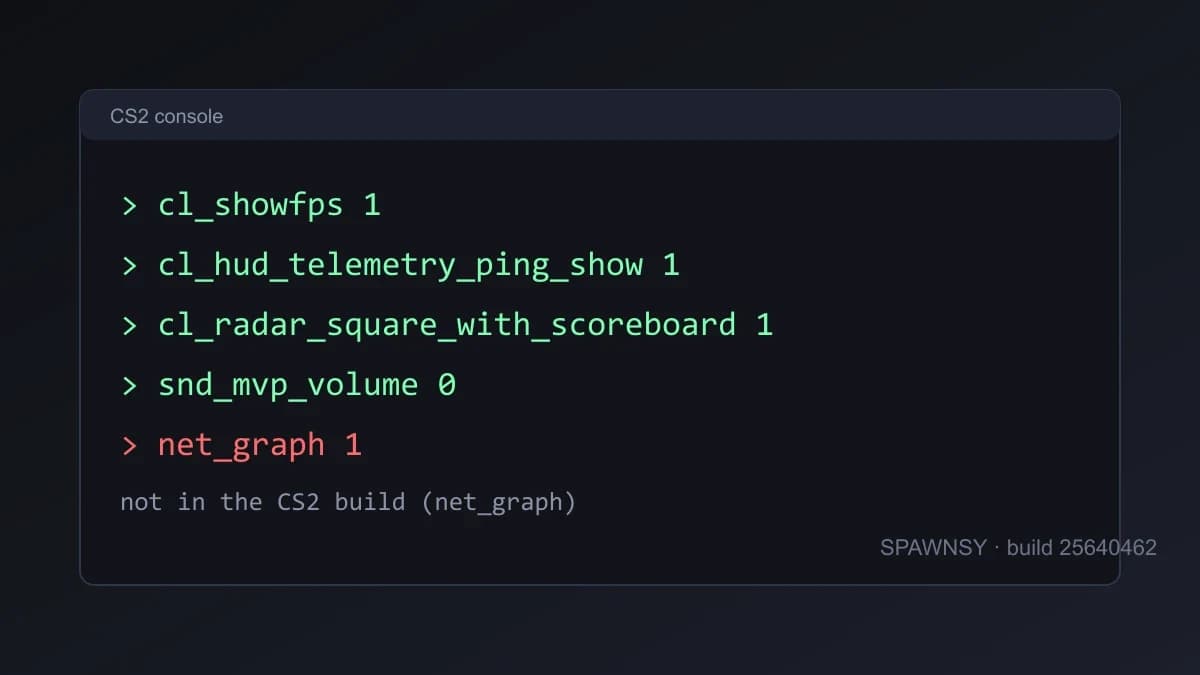
Lists of CS2 console commands share one flaw: they copy each other, and with them they copy commands the game has not recognised for years. Instead of another list like that, we checked every command in this piece against the game files of the 1 October 2026 build (build 25640462). Command names are stored in them as plain text, so it is possible to verify whether a command is registered at all and, for some of them, to read the description Valve wrote. What is left below exists in that version, plus a list of popular commands that are gone.
One caveat about the method. A name missing from the files means the command is not in this version of the game, but a name being present says nothing about which values make sense. Where Valve's description was readable we quote it. Where there was none we say so and do not guess.
How to open the console and where to save commands
The console is enabled in the game settings, on the Game tab, with the developer console option. Behind it is the con_enable command, which the game describes as allowing the console to be activated. The tilde key then opens it. Commands typed in the console vanish after a restart unless the game saves them with your settings, so the ones you want permanently belong in a file.
That file is autoexec.cfg in the game\csgo\cfg folder of the game directory. The engine2.dll file shows plainly that the engine runs exec autoexec.cfg by itself at startup, so no Steam launch option is needed. It is a plain text file, one command per line, with comments starting with //. Settings you change in the game menu go to a separate file, cs2_user_convars_0_slot0.vcfg, in Steam\userdata\<your id>\730\local\cfg, and sync through Steam Cloud. Do not edit it by hand while the game is running, because the game writes it itself.
// example autoexec.cfg
fps_max 400
cl_showfps 1
bind "Q" "+knife"
FPS and diagnostics
fps_max <number> caps the frame rate, and fps_max 0 removes the cap. cl_showfps draws a counter at the top of the screen and has four modes according to the in-game description: 1 is FPS, 2 is smoothed FPS, 3 is server latency in milliseconds, and 4 shows FPS and logs it to a file. cl_showpos 1 draws your current position at the top of the screen.
The old net_graph does not exist in this version. Its job was taken over by the HUD telemetry: cl_hud_telemetry_frametime_show, cl_hud_telemetry_ping_show, cl_hud_telemetry_net_misdelivery_show (the share of user commands and server snapshots that are missed) and cl_hud_telemetry_net_quality_graph_show (jitter and packet loss). According to Valve's descriptions each takes 0, 1 or 2: never, only in poor conditions, or always. A value of 1 is a sensible everyday setting, since the indicator appears only when something is wrong.
cl_hud_telemetry_ping_show 1
cl_hud_telemetry_frametime_show 1
cl_hud_telemetry_net_misdelivery_show 1
HUD and radar
cl_hud_color changes the HUD colour, and the list in the game's description is: 0 team colour, 1 white, 2 bright white, 3 light blue, 4 blue, 5 purple, 6 red, 7 orange, 8 yellow, 9 green, 10 aqua, 11 pink, 12 teammate colour. Radar size is set with cl_hud_radar_scale, and the scale of the map itself with cl_radar_scale.
cl_radar_always_centered 0: the radar uses the whole area instead of keeping you centred even at the edges of the map.cl_radar_rotate: rotates the radar with the player.cl_radar_icon_scale_min: minimum icon size, valid values 0.4 to 1.25.cl_radar_square_with_scoreboard 1: the radar turns square while you hold the scoreboard.cl_hud_radar_blur_background: blurs the radar background.cl_teamid_overhead_mode: markers over teammates, 0 off, 1 pips, 2 plus name, 3 plus equipment.cl_deathnotices_show_numbers: 0 default, 1 names shown as numbers only, 2 number appended to the name.
Viewmodel
CS2 has viewmodel_fov, viewmodel_offset_x, viewmodel_offset_y and viewmodel_offset_z, plus viewmodel_presetpos with ready-made layouts. A typical set that recurs among pros is viewmodel_fov 68 with small offsets, but the values come down to taste and how much of the weapon you want on screen. The preset numbering is inconsistent: the description in the game lists only two layouts, Desktop and Classic, while guides give three and number them differently, so for this command check the result in the game instead of trusting tables.
Sound
Music and cues that drown out footsteps are muted with separate commands. The game describes them as the volume of, respectively, MVP music, round start music, ten-second warnings, action music, death camera timers, map objective music and menu music. A value of 0 silences that element.
snd_mvp_volume 0
snd_roundstart_volume 0
snd_roundaction_volume 0
snd_tensecondwarning_volume 0
snd_deathcamera_volume 0
snd_mapobjective_volume 0
snd_menumusic_volume 0
Each of them also has per-mode variants in the files, Rush among them, for example snd_mvp_volume_rush, so if the game does not sound the way you set it, check the variant for the mode you play. There is also snd_mute_losefocus, which by its name mutes the game when the window loses focus.
Gameplay
cl_use_opens_buy_menu 1: the use key opens the buy menu in a buy zone, just as the buy key does.cl_sniper_auto_rezoom: snipers zoom in again after a shot.cl_debounce_zoom: disables cycling zoom levels by holding secondary fire.cl_player_ping_mute: per the game's description, at 1 player pings make a sound and at 0 they are silent, even though the name suggests the opposite.cl_grenadecrosshair_keepusercrosshair: keeps your crosshair on screen while the grenade throw crosshair is shown.gameinstructor_enable: lessons for new players, which you can turn off.
Crosshair
Since the Rush Hour update the crosshair has its own commands with values in pixels: cl_crosshair_length, cl_crosshair_thickness, cl_crosshair_gap and cl_crosshair_screen_height, the screen height those pixels were set for. Colour is cl_crosshaircolor_r, _g, _b and _a, and the outline colour, added on 30 September, is cl_crosshairoutline_r, _g, _b and _a. The outline is switched on with cl_crosshair_drawoutline, where 2 means a half outline. Older commands such as cl_crosshairsize are still in the files, but they are leftovers. Our crosshair code converter generates the code and commands for an old crosshair, and the change is described in a separate guide.
Practice on your own server
The commands below work only where you can turn on sv_cheats 1, that is on your own server or offline. They do nothing in a ranked match and should not. All of them exist in this version of the game.
sv_cheats 1
sv_infinite_ammo 1
sv_grenade_trajectory_prac_pipreview 1
sv_grenade_trajectory_prac_trailtime 5
sv_showimpacts 1
mp_roundtime 60
mp_freezetime 0
mp_buytime 9999
mp_startmoney 16000
mp_maxmoney 16000
mp_restartgame 1
bot_kick
The 22 September patch also changed ammo_grenade_limit_total: the setting now also covers the total number of grenades that can be bought in a round, rather than just the limit for a single type. host_timescale slows down or speeds up the game, which helps when practising throws, and demo_timescale does the same in a demo being played back.
Launch options that keep appearing in FPS guides are gone too. The text -novid, -threads or -nojoy is not in the game files, which agrees with reports that the intro was removed together with the move to Source 2. What does exist is -vulkan and -dx11, -insecure and -allow_third_party_software. According to guides, the last one launches the game in an untrusted mode so that software such as OBS can hook into it, and it may affect Trust Factor, so do not add it just in case.
Three groups of commands are worth the most: diagnostics (cl_showfps and the telemetry), the radar and HUD, and muting music. The rest comes down to taste and practice. If your autoexec still holds commands from CS:GO, go through it with the table above, because most of the equivalents are simply gone and the game does not report an error, it just skips them.
Do not build a config on commands you see in a single guide if they are not in the game. The quickest test of whether a command exists is to type its name in the console: a known command prints its value, an unknown one says it does not recognise it.
If you spot a command we should add or remove here, hold it to the same test: does it exist in the current build or not. We will repeat the check after the next major patch, because Valve changed the crosshair system twice within a single week.


Comments
Discussion
Join the conversation around this story.
Join the discussion
Sign in to comment and reply to other readers.
Sign inNo comments yet
Start the discussion first.