%22%20fill%3D%22rgb(0%2C0%2C0)%22%20d%3D%22M%201708.71%2032.0719%20L%201711.17%2032.1726%20L%201711.48%2033.8726%20C%201698.63%2068.7557%201678.15%20111.062%201663.25%20146.038%20L%201610.27%20270.222%20C%201600.68%20293.044%201548.56%20422.248%201540.04%20431.57%20C%201533.67%20438.547%201128.18%20599.98%201082.51%20618.503%20L%20896.13%20695.087%20C%20861.529%20708.971%20827.042%20723.139%20792.674%20737.591%20C%20773.372%20745.745%20749.086%20754.449%20732.134%20766.537%20C%20692.666%20794.684%20697.752%20841.911%20698.601%20884.356%20C%20699.702%20939.367%20740.841%20953.958%20782.454%20976.677%20L%20861.67%201020.18%20L%201099.89%201152.37%20C%201107.22%201156.5%201119.88%201164.35%201127.14%201167.58%20C%201169.86%201186.61%201146.74%201195.41%201117.9%201208.29%20C%201100.37%201216.11%201079.03%201225.42%201060.64%201233.58%20C%201010.18%201256.26%20959.538%201278.54%20908.726%201300.43%20C%20894.529%201306.71%20881.754%201312.22%20867.258%201317.69%20C%20862.804%201316.04%20858.4%201314.27%20854.051%201312.36%20C%20836.181%201304.32%20811.094%201289.47%20793.048%201279.86%20L%20667.457%201213.33%20L%20559.157%201156.4%20C%20524.558%201137.94%20487.124%201123.47%20472.687%201083.79%20C%20469.558%201074.97%20467.621%201065.77%20466.927%201056.43%20C%20465.765%201038.59%20466.66%201011.98%20466.668%20993.332%20L%20466.359%20873.615%20C%20465.984%20815.652%20463.947%20757.728%20465.485%20699.747%20C%20465.795%20688.052%20466.054%20675.662%20467.175%20664.054%20C%20469.31%20640.858%20475.406%20618.2%20485.2%20597.064%20C%20517.254%20527.676%20568.707%20508.151%20633.929%20480.324%20L%20726.507%20441.167%20L%201040.13%20310.018%20L%201452.31%20137.782%20L%201616.93%2069.4204%20C%201646.93%2057.0612%201678.5%2043.152%201708.71%2032.0719%20z%22%2F%3E%0D%0A%3Cpath%20transform%3D%22translate(0%2C0)%22%20fill%3D%22rgb(0%2C0%2C0)%22%20d%3D%22M%201180.36%20731.182%20C%201195.24%20733.945%201233.7%20756.876%201248.98%20765.026%20L%201364.16%20826.126%20L%201484.37%20889.381%20C%201498.57%20896.955%201532.42%20914.303%201544.52%20923.261%20C%201557.39%20932.823%201567.44%20945.681%201573.6%20960.477%20C%201577.74%20970.613%201580.28%20981.333%201581.12%20992.25%20C%201582.2%201006.88%201581.3%201032.21%201581.31%201047.95%20L%201581.63%201160.97%20C%201582.26%201211.62%201582.57%201262.29%201582.57%201312.95%20C%201582.44%201333.48%201582.84%201362.18%201581%201382.38%20C%201579.14%201403.66%201573.97%201424.53%201565.69%201444.23%20C%201551.08%201479.78%201525.53%201509.75%201492.74%201529.79%20C%201460.17%201549.9%201412.55%201568.06%201376.2%201583.68%20C%201297.89%201617.01%201219.4%201649.9%201140.72%201682.34%20L%20334.313%202018.15%20C%20339.936%202006.05%20344.516%201995.06%20349.5%201982.67%20C%20380.898%201908.42%20413.985%201834.57%20445.11%201760.02%20C%20459.052%201725.94%20473.375%201692.02%20488.076%201658.26%20C%20492.996%201647.05%20502.305%201624.37%20508.527%201614.93%20C%20525.371%201606.59%20557.563%201594.41%20575.732%201586.98%20L%20705.864%201534%20C%20845.58%201478.27%20984.961%201421.71%201124%201364.32%20L%201246.78%201313.94%20C%201290.4%201295.55%201343.27%201280.12%201348.5%201224.17%20C%201350.49%201202.85%201351.54%201164.6%201346.69%201143.96%20C%201344.6%201134.87%201340.77%201126.27%201335.41%201118.63%20C%201321.45%201099.1%201289.07%201084.29%201267.79%201072.67%20L%201188.51%201029.14%20L%20997.495%20923.267%20L%20933.233%20887.54%20C%20924.86%20882.894%20890.238%20867.795%20898.045%20858.391%20C%20907.874%20846.549%20953.243%20829.416%20967.235%20823.263%20L%201064.01%20780.291%20C%201087.5%20769.837%201111.05%20759.524%201134.65%20749.351%20C%201147.99%20743.555%201166.91%20734.741%201180.36%20731.182%20z%22%2F%3E%0D%0A%3C%2Fsvg%3E)
%22%20fill%3D%22rgb(255%2C255%2C255)%22%20d%3D%22M%201708.71%2032.0719%20L%201711.17%2032.1726%20L%201711.48%2033.8726%20C%201698.63%2068.7557%201678.15%20111.062%201663.25%20146.038%20L%201610.27%20270.222%20C%201600.68%20293.044%201548.56%20422.248%201540.04%20431.57%20C%201533.67%20438.547%201128.18%20599.98%201082.51%20618.503%20L%20896.13%20695.087%20C%20861.529%20708.971%20827.042%20723.139%20792.674%20737.591%20C%20773.372%20745.745%20749.086%20754.449%20732.134%20766.537%20C%20692.666%20794.684%20697.752%20841.911%20698.601%20884.356%20C%20699.702%20939.367%20740.841%20953.958%20782.454%20976.677%20L%20861.67%201020.18%20L%201099.89%201152.37%20C%201107.22%201156.5%201119.88%201164.35%201127.14%201167.58%20C%201169.86%201186.61%201146.74%201195.41%201117.9%201208.29%20C%201100.37%201216.11%201079.03%201225.42%201060.64%201233.58%20C%201010.18%201256.26%20959.538%201278.54%20908.726%201300.43%20C%20894.529%201306.71%20881.754%201312.22%20867.258%201317.69%20C%20862.804%201316.04%20858.4%201314.27%20854.051%201312.36%20C%20836.181%201304.32%20811.094%201289.47%20793.048%201279.86%20L%20667.457%201213.33%20L%20559.157%201156.4%20C%20524.558%201137.94%20487.124%201123.47%20472.687%201083.79%20C%20469.558%201074.97%20467.621%201065.77%20466.927%201056.43%20C%20465.765%201038.59%20466.66%201011.98%20466.668%20993.332%20L%20466.359%20873.615%20C%20465.984%20815.652%20463.947%20757.728%20465.485%20699.747%20C%20465.795%20688.052%20466.054%20675.662%20467.175%20664.054%20C%20469.31%20640.858%20475.406%20618.2%20485.2%20597.064%20C%20517.254%20527.676%20568.707%20508.151%20633.929%20480.324%20L%20726.507%20441.167%20L%201040.13%20310.018%20L%201452.31%20137.782%20L%201616.93%2069.4204%20C%201646.93%2057.0612%201678.5%2043.152%201708.71%2032.0719%20z%22%2F%3E%0D%0A%3Cpath%20transform%3D%22translate(0%2C0)%22%20fill%3D%22rgb(255%2C255%2C255)%22%20d%3D%22M%201180.36%20731.182%20C%201195.24%20733.945%201233.7%20756.876%201248.98%20765.026%20L%201364.16%20826.126%20L%201484.37%20889.381%20C%201498.57%20896.955%201532.42%20914.303%201544.52%20923.261%20C%201557.39%20932.823%201567.44%20945.681%201573.6%20960.477%20C%201577.74%20970.613%201580.28%20981.333%201581.12%20992.25%20C%201582.2%201006.88%201581.3%201032.21%201581.31%201047.95%20L%201581.63%201160.97%20C%201582.26%201211.62%201582.57%201262.29%201582.57%201312.95%20C%201582.44%201333.48%201582.84%201362.18%201581%201382.38%20C%201579.14%201403.66%201573.97%201424.53%201565.69%201444.23%20C%201551.08%201479.78%201525.53%201509.75%201492.74%201529.79%20C%201460.17%201549.9%201412.55%201568.06%201376.2%201583.68%20C%201297.89%201617.01%201219.4%201649.9%201140.72%201682.34%20L%20334.313%202018.15%20C%20339.936%202006.05%20344.516%201995.06%20349.5%201982.67%20C%20380.898%201908.42%20413.985%201834.57%20445.11%201760.02%20C%20459.052%201725.94%20473.375%201692.02%20488.076%201658.26%20C%20492.996%201647.05%20502.305%201624.37%20508.527%201614.93%20C%20525.371%201606.59%20557.563%201594.41%20575.732%201586.98%20L%20705.864%201534%20C%20845.58%201478.27%20984.961%201421.71%201124%201364.32%20L%201246.78%201313.94%20C%201290.4%201295.55%201343.27%201280.12%201348.5%201224.17%20C%201350.49%201202.85%201351.54%201164.6%201346.69%201143.96%20C%201344.6%201134.87%201340.77%201126.27%201335.41%201118.63%20C%201321.45%201099.1%201289.07%201084.29%201267.79%201072.67%20L%201188.51%201029.14%20L%20997.495%20923.267%20L%20933.233%20887.54%20C%20924.86%20882.894%20890.238%20867.795%20898.045%20858.391%20C%20907.874%20846.549%20953.243%20829.416%20967.235%20823.263%20L%201064.01%20780.291%20C%201087.5%20769.837%201111.05%20759.524%201134.65%20749.351%20C%201147.99%20743.555%201166.91%20734.741%201180.36%20731.182%20z%22%2F%3E%0D%0A%3C%2Fsvg%3E)


400 DPI in Counter-Strike has the reputation of a setting from the CRT era, ball mice, and early LAN tournaments. Yet it still appears in professional setups. That does not happen because modern sensors fail at 800 or 1600 DPI. 400 DPI has survived because Counter-Strike rewards a repeatable setup more than a catalogue advantage that a player has never learned to trust.
Higher CPI values have a technical case. They report more small movement steps over the same distance and provide a denser input signal during very slow motion. That does not make 400 DPI a handicap, and moving to 1600 DPI will not repair someone’s aim overnight. In a tactical shooter, the gap between a useful setting and somebody else’s setting is often simple: one is familiar, the other only looks better in a spec table.

400 DPI is still part of Counter-Strike’s shared language
Mouse settings have always been part of the culture around Counter-Strike. Players trade DPI, sensitivity, zoom sensitivity, and resolution as naturally as they discuss roles on a map. 400 DPI became a familiar reference point early, when lower values were common among CS 1.6 and later CS:GO professionals. It remained useful because new generations learned from existing configs and built thousands of hours around the same scale.
Current public pro-settings databases still show three values appearing far more often than the rest: 400, 800, and 1600 DPI. That does not turn 400 into a secret aim code. It makes it the oldest and most recognizable reference point. When a player says they use 400 DPI at 2.0 sensitivity, anyone who knows the game immediately understands the range. At 1600 DPI, the number needs context before it means anything.
There is a practical benefit to that familiarity. At a bootcamp, on a new PC, or after changing mice, a player does not want to spend a day wondering whether a driver profile reproduced an old setup correctly. They want to enter a known value, queue a server, and know that the chain between hand and crosshair has not changed without permission. That feeling of control is worth more than a tiny paper advantage.
eDPI explains more than DPI on its own
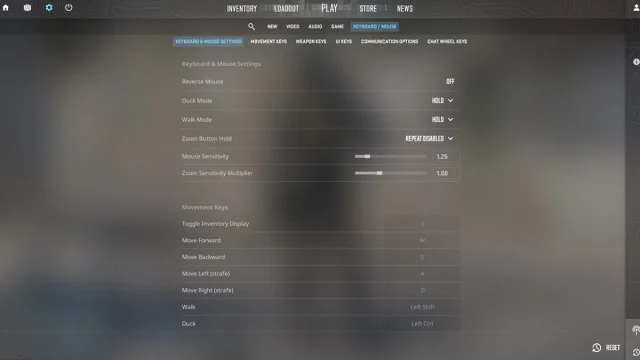
The common mistake is treating DPI as a full description of sensitivity. It is not. DPI tells you how many counts the sensor sends over a physical distance, while the game sensitivity decides how those counts move the camera. Their product, eDPI, gives a much better picture of the movement a player will actually feel.
400 DPI at 2.0 sensitivity equals 800 eDPI. So does 800 DPI at 1.0 sensitivity. 1600 DPI at 0.5 sensitivity does too. A broad movement, including a 180-degree turn, can therefore require a very similar amount of desk space in all three cases. This is why “everyone should just use 1600 DPI” is not serious advice until someone explains whether they are changing eDPI or only changing the granularity of the signal feeding the game.
Higher DPI does produce a denser input signal. During extremely slow motion, it gives the game more small movement steps to work with and can reduce quantization at the start of movement. That is a legitimate technical advantage. Its size in normal CS2 play is much less dramatic than peripheral marketing suggests. It does not improve decision-making, erase bad crosshair placement, or create reliable aim from a setting that a player does not understand.
400 DPI is not a biological hand-tremor filter
Low DPI attracts a lot of appealing explanations. One of them says that 400 DPI works as a physical filter for hand tremors because the sensor ignores tiny movement. That description is too literal. A sensor does not know whether a movement is deliberate. It reports movement at its configured resolution and the game scales it through sensitivity.
If you preserve the same eDPI, the extra reports produced at 1600 DPI are offset by lower in-game sensitivity. A small hand tremor should not turn into four times the camera movement simply because the player changed DPI and adjusted sensitivity correctly. Some people do feel a different crosshair response during the slowest corrections, but that is about input granularity and habit, not a universal hardware filter.
You do not need to turn higher DPI into a villain to defend 400. A player who has controlled a crosshair at 400 DPI for years does not need to hunt for a problem they never felt. Someone building a new setup can choose 800 or 1600, set a comfortable eDPI, and lose none of their supposed stability. Both outcomes are normal.
Smaller movement steps are real, but they are not a religion
At 400 DPI, the sensor needs to register more physical travel before it sends another count. At 1600 DPI, that unit is four times smaller. During a very slow movement, that gives the higher value finer granularity. This is the honest case for higher DPI: a more detailed representation of motion under specific conditions.
CS2 uses raw input, and a modern sensor has no difficulty operating at 400 DPI. At the sensitivities used by most professionals, a player is not watching a crosshair jump across several pixels at a time. When someone sees obvious stepping, the cause is more likely to be unsuitable sensitivity, an odd driver profile, or the combination of resolution and game settings. 400 DPI alone is not the automatic culprit.
Polling rate also needs to stay separate from DPI. A mouse running at 400 DPI can report at 1000, 4000, or 8000 Hz if its hardware supports it. Very high polling can have a CPU cost in some systems, especially at extreme frame rates. Changing from 400 to 1600 DPI is not the cure for that. If 8K hurts frame-time stability, evaluate polling rate rather than inventing a story about low DPI sending too little data.
Why pros rarely touch a working configuration
A professional player does not relearn their aim after every firmware update. The important relationship is between hand movement, mousepad friction, sensor position, in-game sensitivity, and the image on screen. When that system works, changing one part has a cost. Even a minor difference needs to be absorbed in practice, scrims, and official matches.
That is why 400 DPI keeps appearing in conversations about veteran CS2 players. It is not proof that experienced players do not understand new sensors. It is proof that they have fewer reasons to disturb a setting that has not harmed their game for years. A veteran can use a new mouse, a 4K receiver, and a 540 Hz monitor while keeping 400 DPI because their reference point matters more than the number in a manufacturer app.
Newer players often make the same decision with 800 or 1600 because that is what they started with. The scene is not frozen in time. It simply does not abandon 400 DPI for reasons that do not translate into results. The setting does not lose a match by itself. A needless change made a week before an event can.
How to test a higher DPI value without wrecking the rest of your setup
Moving from 400 to 800 DPI does not require a dramatic reset. Divide your CS2 sensitivity by two. Moving to 1600 means dividing it by four. That preserves roughly the same eDPI and lets you see whether the change in fine corrections is actually useful. Do not also change polling rate, Windows sensitivity, resolution, and sensor height. If you change five things at once, you cannot tell what caused the new feeling.
Use a few days of deathmatch and regular games rather than one flick on an aim map. If 1600 DPI gives you no clear benefit, there is no reason to force the switch. If it helps your slow corrections without making the setup feel unfamiliar, keep it. There is no prize for using the number that looks most modern.
Windows settings, acceleration, and driver profiles can matter more than the DPI number
In CS2, the useful goal is a simple input chain. Keep Windows sensitivity at its normal default, turn off mouse acceleration, and make sure the mouse software does not switch profiles when the game starts. When somebody says that 400 DPI suddenly stopped feeling right, the cause is often there: a different profile, an accidental sensitivity change, or a receiver setting they never checked after a firmware update.
The same applies when changing mice. A new sensor does not change the physical meaning of eDPI, but a different shape, sensor position, skates, and weight can change the feel more than moving from 400 to 800 DPI. Play a few maps on the old number before rebuilding the whole setup. That is the only way to tell whether the input signal is actually the problem or your hand is simply adjusting to a different shell.


Comments
Discussion
Join the conversation around this story.
Join the discussion
Sign in to comment and reply to other readers.
Sign inNo comments yet
Start the discussion first.