%22%20fill%3D%22rgb(0%2C0%2C0)%22%20d%3D%22M%201708.71%2032.0719%20L%201711.17%2032.1726%20L%201711.48%2033.8726%20C%201698.63%2068.7557%201678.15%20111.062%201663.25%20146.038%20L%201610.27%20270.222%20C%201600.68%20293.044%201548.56%20422.248%201540.04%20431.57%20C%201533.67%20438.547%201128.18%20599.98%201082.51%20618.503%20L%20896.13%20695.087%20C%20861.529%20708.971%20827.042%20723.139%20792.674%20737.591%20C%20773.372%20745.745%20749.086%20754.449%20732.134%20766.537%20C%20692.666%20794.684%20697.752%20841.911%20698.601%20884.356%20C%20699.702%20939.367%20740.841%20953.958%20782.454%20976.677%20L%20861.67%201020.18%20L%201099.89%201152.37%20C%201107.22%201156.5%201119.88%201164.35%201127.14%201167.58%20C%201169.86%201186.61%201146.74%201195.41%201117.9%201208.29%20C%201100.37%201216.11%201079.03%201225.42%201060.64%201233.58%20C%201010.18%201256.26%20959.538%201278.54%20908.726%201300.43%20C%20894.529%201306.71%20881.754%201312.22%20867.258%201317.69%20C%20862.804%201316.04%20858.4%201314.27%20854.051%201312.36%20C%20836.181%201304.32%20811.094%201289.47%20793.048%201279.86%20L%20667.457%201213.33%20L%20559.157%201156.4%20C%20524.558%201137.94%20487.124%201123.47%20472.687%201083.79%20C%20469.558%201074.97%20467.621%201065.77%20466.927%201056.43%20C%20465.765%201038.59%20466.66%201011.98%20466.668%20993.332%20L%20466.359%20873.615%20C%20465.984%20815.652%20463.947%20757.728%20465.485%20699.747%20C%20465.795%20688.052%20466.054%20675.662%20467.175%20664.054%20C%20469.31%20640.858%20475.406%20618.2%20485.2%20597.064%20C%20517.254%20527.676%20568.707%20508.151%20633.929%20480.324%20L%20726.507%20441.167%20L%201040.13%20310.018%20L%201452.31%20137.782%20L%201616.93%2069.4204%20C%201646.93%2057.0612%201678.5%2043.152%201708.71%2032.0719%20z%22%2F%3E%0D%0A%3Cpath%20transform%3D%22translate(0%2C0)%22%20fill%3D%22rgb(0%2C0%2C0)%22%20d%3D%22M%201180.36%20731.182%20C%201195.24%20733.945%201233.7%20756.876%201248.98%20765.026%20L%201364.16%20826.126%20L%201484.37%20889.381%20C%201498.57%20896.955%201532.42%20914.303%201544.52%20923.261%20C%201557.39%20932.823%201567.44%20945.681%201573.6%20960.477%20C%201577.74%20970.613%201580.28%20981.333%201581.12%20992.25%20C%201582.2%201006.88%201581.3%201032.21%201581.31%201047.95%20L%201581.63%201160.97%20C%201582.26%201211.62%201582.57%201262.29%201582.57%201312.95%20C%201582.44%201333.48%201582.84%201362.18%201581%201382.38%20C%201579.14%201403.66%201573.97%201424.53%201565.69%201444.23%20C%201551.08%201479.78%201525.53%201509.75%201492.74%201529.79%20C%201460.17%201549.9%201412.55%201568.06%201376.2%201583.68%20C%201297.89%201617.01%201219.4%201649.9%201140.72%201682.34%20L%20334.313%202018.15%20C%20339.936%202006.05%20344.516%201995.06%20349.5%201982.67%20C%20380.898%201908.42%20413.985%201834.57%20445.11%201760.02%20C%20459.052%201725.94%20473.375%201692.02%20488.076%201658.26%20C%20492.996%201647.05%20502.305%201624.37%20508.527%201614.93%20C%20525.371%201606.59%20557.563%201594.41%20575.732%201586.98%20L%20705.864%201534%20C%20845.58%201478.27%20984.961%201421.71%201124%201364.32%20L%201246.78%201313.94%20C%201290.4%201295.55%201343.27%201280.12%201348.5%201224.17%20C%201350.49%201202.85%201351.54%201164.6%201346.69%201143.96%20C%201344.6%201134.87%201340.77%201126.27%201335.41%201118.63%20C%201321.45%201099.1%201289.07%201084.29%201267.79%201072.67%20L%201188.51%201029.14%20L%20997.495%20923.267%20L%20933.233%20887.54%20C%20924.86%20882.894%20890.238%20867.795%20898.045%20858.391%20C%20907.874%20846.549%20953.243%20829.416%20967.235%20823.263%20L%201064.01%20780.291%20C%201087.5%20769.837%201111.05%20759.524%201134.65%20749.351%20C%201147.99%20743.555%201166.91%20734.741%201180.36%20731.182%20z%22%2F%3E%0D%0A%3C%2Fsvg%3E)
%22%20fill%3D%22rgb(255%2C255%2C255)%22%20d%3D%22M%201708.71%2032.0719%20L%201711.17%2032.1726%20L%201711.48%2033.8726%20C%201698.63%2068.7557%201678.15%20111.062%201663.25%20146.038%20L%201610.27%20270.222%20C%201600.68%20293.044%201548.56%20422.248%201540.04%20431.57%20C%201533.67%20438.547%201128.18%20599.98%201082.51%20618.503%20L%20896.13%20695.087%20C%20861.529%20708.971%20827.042%20723.139%20792.674%20737.591%20C%20773.372%20745.745%20749.086%20754.449%20732.134%20766.537%20C%20692.666%20794.684%20697.752%20841.911%20698.601%20884.356%20C%20699.702%20939.367%20740.841%20953.958%20782.454%20976.677%20L%20861.67%201020.18%20L%201099.89%201152.37%20C%201107.22%201156.5%201119.88%201164.35%201127.14%201167.58%20C%201169.86%201186.61%201146.74%201195.41%201117.9%201208.29%20C%201100.37%201216.11%201079.03%201225.42%201060.64%201233.58%20C%201010.18%201256.26%20959.538%201278.54%20908.726%201300.43%20C%20894.529%201306.71%20881.754%201312.22%20867.258%201317.69%20C%20862.804%201316.04%20858.4%201314.27%20854.051%201312.36%20C%20836.181%201304.32%20811.094%201289.47%20793.048%201279.86%20L%20667.457%201213.33%20L%20559.157%201156.4%20C%20524.558%201137.94%20487.124%201123.47%20472.687%201083.79%20C%20469.558%201074.97%20467.621%201065.77%20466.927%201056.43%20C%20465.765%201038.59%20466.66%201011.98%20466.668%20993.332%20L%20466.359%20873.615%20C%20465.984%20815.652%20463.947%20757.728%20465.485%20699.747%20C%20465.795%20688.052%20466.054%20675.662%20467.175%20664.054%20C%20469.31%20640.858%20475.406%20618.2%20485.2%20597.064%20C%20517.254%20527.676%20568.707%20508.151%20633.929%20480.324%20L%20726.507%20441.167%20L%201040.13%20310.018%20L%201452.31%20137.782%20L%201616.93%2069.4204%20C%201646.93%2057.0612%201678.5%2043.152%201708.71%2032.0719%20z%22%2F%3E%0D%0A%3Cpath%20transform%3D%22translate(0%2C0)%22%20fill%3D%22rgb(255%2C255%2C255)%22%20d%3D%22M%201180.36%20731.182%20C%201195.24%20733.945%201233.7%20756.876%201248.98%20765.026%20L%201364.16%20826.126%20L%201484.37%20889.381%20C%201498.57%20896.955%201532.42%20914.303%201544.52%20923.261%20C%201557.39%20932.823%201567.44%20945.681%201573.6%20960.477%20C%201577.74%20970.613%201580.28%20981.333%201581.12%20992.25%20C%201582.2%201006.88%201581.3%201032.21%201581.31%201047.95%20L%201581.63%201160.97%20C%201582.26%201211.62%201582.57%201262.29%201582.57%201312.95%20C%201582.44%201333.48%201582.84%201362.18%201581%201382.38%20C%201579.14%201403.66%201573.97%201424.53%201565.69%201444.23%20C%201551.08%201479.78%201525.53%201509.75%201492.74%201529.79%20C%201460.17%201549.9%201412.55%201568.06%201376.2%201583.68%20C%201297.89%201617.01%201219.4%201649.9%201140.72%201682.34%20L%20334.313%202018.15%20C%20339.936%202006.05%20344.516%201995.06%20349.5%201982.67%20C%20380.898%201908.42%20413.985%201834.57%20445.11%201760.02%20C%20459.052%201725.94%20473.375%201692.02%20488.076%201658.26%20C%20492.996%201647.05%20502.305%201624.37%20508.527%201614.93%20C%20525.371%201606.59%20557.563%201594.41%20575.732%201586.98%20L%20705.864%201534%20C%20845.58%201478.27%20984.961%201421.71%201124%201364.32%20L%201246.78%201313.94%20C%201290.4%201295.55%201343.27%201280.12%201348.5%201224.17%20C%201350.49%201202.85%201351.54%201164.6%201346.69%201143.96%20C%201344.6%201134.87%201340.77%201126.27%201335.41%201118.63%20C%201321.45%201099.1%201289.07%201084.29%201267.79%201072.67%20L%201188.51%201029.14%20L%20997.495%20923.267%20L%20933.233%20887.54%20C%20924.86%20882.894%20890.238%20867.795%20898.045%20858.391%20C%20907.874%20846.549%20953.243%20829.416%20967.235%20823.263%20L%201064.01%20780.291%20C%201087.5%20769.837%201111.05%20759.524%201134.65%20749.351%20C%201147.99%20743.555%201166.91%20734.741%201180.36%20731.182%20z%22%2F%3E%0D%0A%3C%2Fsvg%3E)

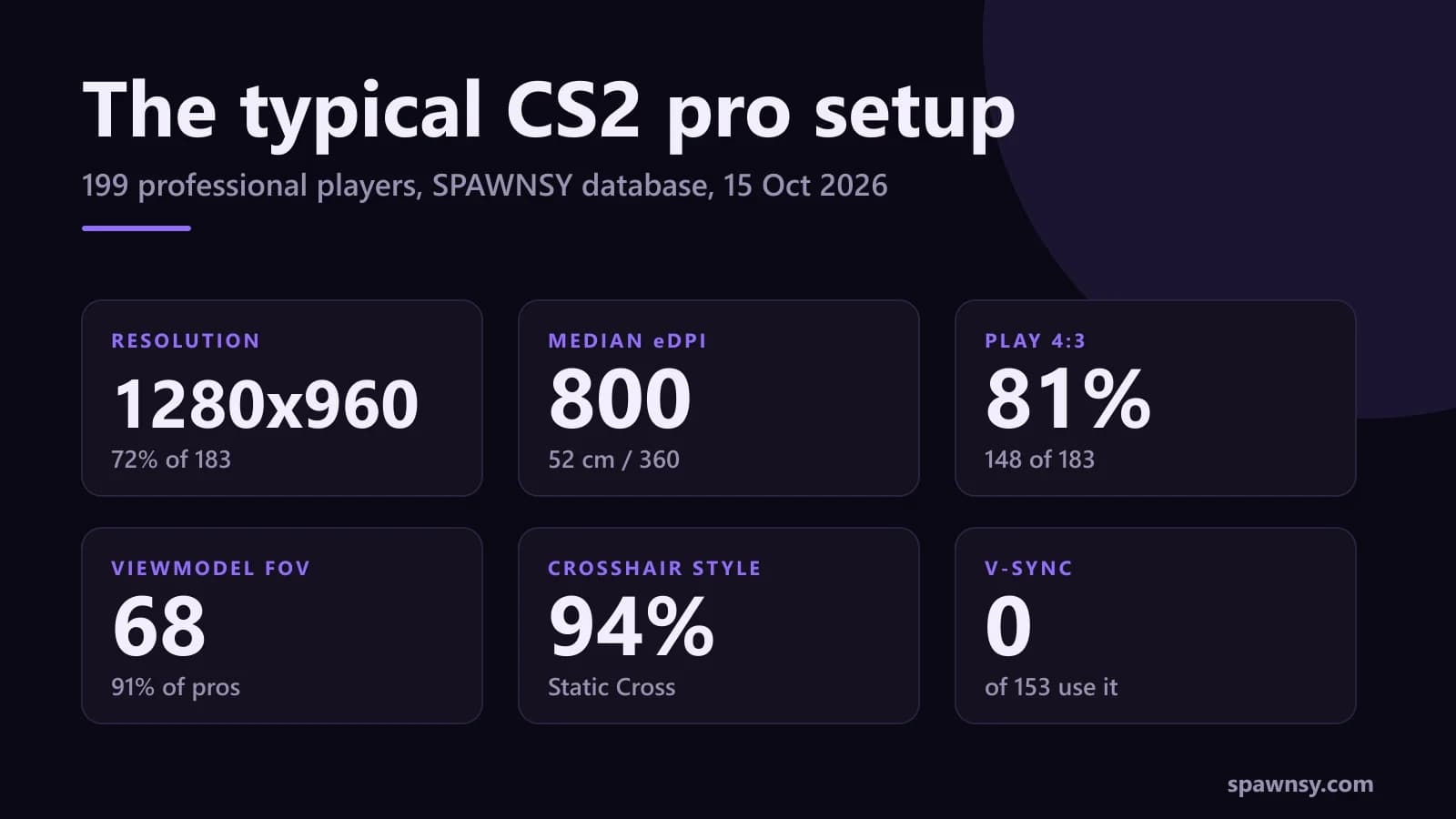
Of the 185 CS2 pros in our database with a sensitivity on record, none plays below 400 eDPI, and 131 of the 183 with a saved resolution sit on exactly the same one: 1280x960. We counted the settings of 199 professionals, from sensitivity to crosshair colour, and the result is something you cannot see by reading one profile at a time. The CS2 elite is far more alike than the videos about "perfect settings" suggest. Almost everything except sensitivity and crosshair shade is shared.
Where the numbers come from
We count players in the "pro" category of the database behind our crosshair and pro settings pages: 199 people, with creators and legends left out. Settings come from publicly available sources, crosshair codes are refreshed every 12 hours, and where we have match demos we read the code from the last round of the match. Every statistic has its own sample size because not everyone has every value on record: we know sensitivity for 185 players, screen settings for 183 and video settings for 154. Each figure below comes with the number of players behind it, so it does not look more certain than it is.
There are no mice, keyboards or monitors here. We deliberately do not collect them: pros swap gear every few months and a demo cannot show it, so any such column would quickly turn into an outdated answer nobody checks. Everything in this report can be rebuilt from game data and public sources, and refreshes with the database. This article is a snapshot from 15 October 2026.
Sensitivity: a median of 800 eDPI, about 52 cm per 360
The median eDPI (mouse DPI times in-game sensitivity) is 800 among pros, the mean 847. The middle half of the field sits between 720 and 960 eDPI, which at the default yaw of 0.022 means 43 to 58 cm of mouse travel for a full 360-degree turn. The median is 52 cm. If someone tells you CS2 demands extremely low sensitivity, the data does not back it up: the lowest value in the whole database is 400 eDPI (three players), nobody goes below it, and the typical pro plays at twice that.
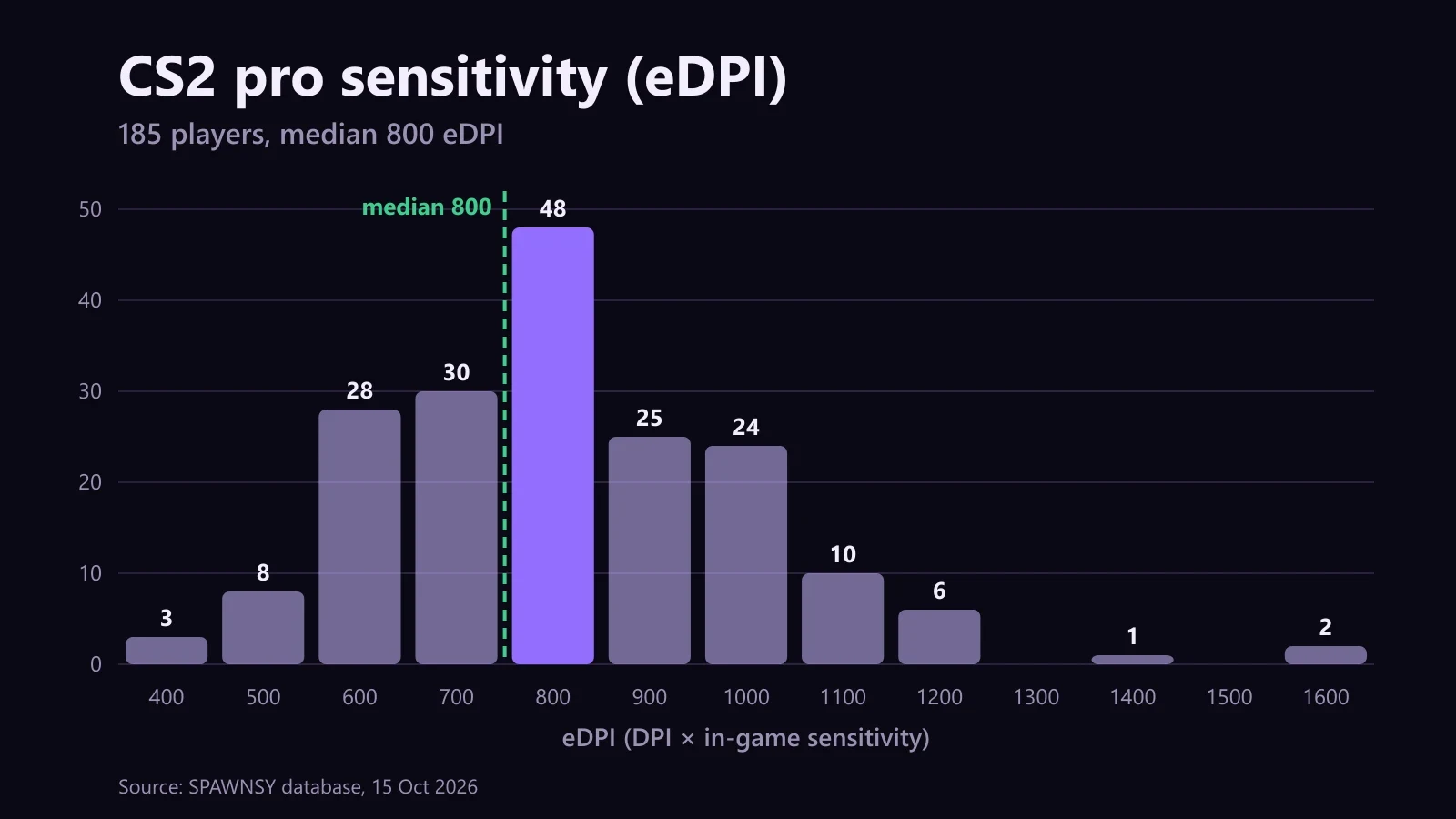
Half the players fall between 400 and 800 eDPI (95 people, 51%), and nearly all the rest, 84 players (45%), between 801 and 1200. Only six are above 1200, and the extremes are two players at 1600. The spread is wide but the shape is clear: everyone plays low, just each at a slightly different low. If someone on your team plays at 1200 and wins, they have broken no rule.
On the DPI side the choice is almost binary: 96 players (52%) use 800 DPI, 81 (44%) use 400 DPI, and the remaining eight split across 900, 1000, 1600 and 3200. 400 DPI with a sensitivity of 2.0 and 800 DPI with 1.0 give the same eDPI, so the same movement on screen. Which one to pick depends on how comfortably you scale sensitivity in the settings.
The conversion to centimetres is simple: 360 divided by (DPI times in-game sensitivity times 0.022), all times 2.54. At 800 eDPI that gives 52 cm. Your own sensitivity is much easier to grasp in centimetres than in eDPI, and centimetres are what you should compare against the elite, because raw in-game values depend on DPI.
Screen: 4:3 is the norm and 1280x960 close to a monopoly
Resolution is the most uniform part of the setup. If you had to memorise one number, it would be 1280x960: 131 of 183 players use it, 72%. The next resolutions are far behind.
Native 16:9 is played by 20 of 183 players (11%), and 5:4 and 16:10 have a handful of followers each. "Stretched" scaling, which stretches the 4:3 image across the whole panel, is chosen by 150 players (82%), black bars by 13 (7%). Fullscreen mode covers 181 of 183 cases. If you are setting CS2 up from scratch and do not know where to start, 1280x960 in fullscreen with Stretched is the choice most of the professional world shares, and switching to it costs ten minutes. Only 52 players have a refresh rate on record: 27 play at 240 Hz, 23 at 360 Hz and 2 at 280 Hz.
The data does not show that 4:3 gives an advantage: it only shows that pros choose it. Larger character models on screen are the usual reason given, but it is a matter of taste, and 20 players in our database play native 16:9.
Graphics and viewmodel: hardly any differences
All 153 pros with this value on record have V-Sync off. It is the most uniform parameter in the whole database: not a single exception. Viewmodel FOV is nearly as settled: 169 of 185 players (91%) use 68, ten use 60, and the other six are spread over 63, 64 and 65. Weapon position preset 2 is chosen by 112 players (61%), preset 1 by 37 (20%) and preset 0 by 22 (12%).
The rest of the graphics are less unanimous but still have a clear favourite. Anti-aliasing is 4x MSAA for 78 players (51%), 8x MSAA for 47 (31%) and off for 12 (8%). Shadow quality set to High is used by 102 of 154 players (66%), Low by 29 (19%). NVIDIA Reflex is on for 90 of the 136 players who have it on record (66%), 23 of them with Boost.
The frame cap is surprising: of the 119 players with one on record, 74 (62%) play uncapped, meaning a value of 0. Among those who do set a ceiling the median is 500 FPS, and the most common values are 400, 999 and 500. Setting a cap is the minority choice.
Crosshair: static cross, green or cyan
Crosshair style is almost as uniform as V-Sync: 188 of 199 pros (94%) use Static Cross. Only 16 players (8%) turn on the centre dot. The remaining eleven spread over five other styles, the most popular of which, Static Circle, has six users.
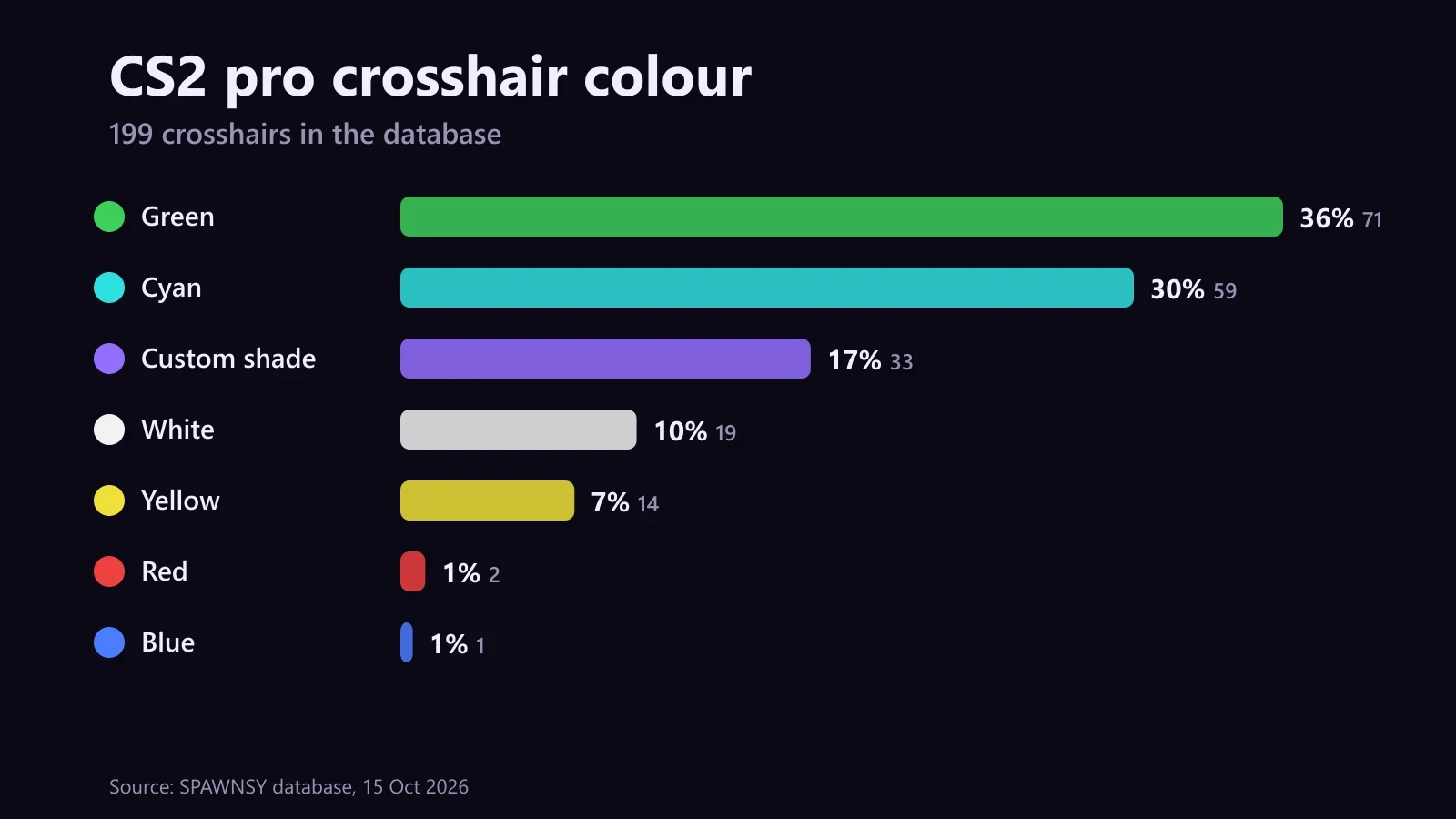
Green has 71 players (36%), cyan 59 (30%), white 19 (10%), yellow 14 (7%), and red and blue three between them. Another 33 players (17%) use a custom shade, an RGB value that matches none of the names. Green and cyan together are two thirds of the field, so if you are starting from scratch, start there.
You can copy any of these codes straight from a player's profile. If you hold a code in an older format, the crosshair code converter turns it into the current one, and on the player pages in the database you see how the crosshair looks against a map. For a comparison, open the ZywOo settings page or donk's: next to every value you see how many pros share it.
Launch options: knowledge gets copied, not checked
84 pros have launch options on record. The most common is -novid (64 players, 76%), followed by -tickrate (62 players), -console (44), -freq (43) and -allow_third_party_software (29). We checked a few entries from these lists against the game files: +cl_forcepreload (8 players), +mat_queue_mode (6), +cl_updaterate (6) and +cl_cmdrate (6) appear in pros' launch options, yet they do not exist at all in the current CS2 files (the 1 October 2026 build). They are CS:GO leftovers carried over from earlier configs.
We checked only the commands starting with a plus. Dash flags such as -novid we did not verify, so we make no call on them. A command on a pro's list does not prove it does anything, though, so before you copy someone else's line, type each command into the game console and see whether the game knows it.
How to use this
First, set the constants of the elite and do not agonise over them. Fullscreen, V-Sync off, viewmodel FOV 68, Static Cross, a centred radar and Boost Player Contrast are the settings discussed least, because almost nobody leaves them. If you are on 16:9 and have never tried 4:3, give 1280x960 a week and judge it yourself rather than from a forum opinion.
Second, choose sensitivity for yourself, but in centimetres. Work out your cm per 360 and compare it with the 43 to 58 cm range. If you play above 800 eDPI you are in good company, since 90 pros have more. Above 1200 eDPI it gets lonely: that is six people out of 185. Change sensitivity gradually, by a few percent, and give each change several days.
Third, pick the crosshair colour for yourself and for the maps you play most. Green and cyan are a safe start, but 17% of pros use a custom shade, so a quarter of an hour spent finding one you can see on every map is well spent. Once your gear is set, you can track how your matches go on FACEIT: the Spawnsy Faceit extension shows levels 11-20, the average ELO of both teams and win chances right in the matchroom.
What is not here
Similar settings will not make anyone a pro. What sets these players apart is hours of practice and team play, which you cannot copy from a menu. The data also has gaps: not every player has every field filled in, some entries from public sources are older, and we match colour names with some approximation. When a pro changes something in game, the database corrects itself at the next refresh.
Comments
Discussion
Join the conversation around this story.
Join the discussion
Sign in to comment and reply to other readers.
Sign inNo comments yet
Start the discussion first.