%22%20fill%3D%22rgb(0%2C0%2C0)%22%20d%3D%22M%201708.71%2032.0719%20L%201711.17%2032.1726%20L%201711.48%2033.8726%20C%201698.63%2068.7557%201678.15%20111.062%201663.25%20146.038%20L%201610.27%20270.222%20C%201600.68%20293.044%201548.56%20422.248%201540.04%20431.57%20C%201533.67%20438.547%201128.18%20599.98%201082.51%20618.503%20L%20896.13%20695.087%20C%20861.529%20708.971%20827.042%20723.139%20792.674%20737.591%20C%20773.372%20745.745%20749.086%20754.449%20732.134%20766.537%20C%20692.666%20794.684%20697.752%20841.911%20698.601%20884.356%20C%20699.702%20939.367%20740.841%20953.958%20782.454%20976.677%20L%20861.67%201020.18%20L%201099.89%201152.37%20C%201107.22%201156.5%201119.88%201164.35%201127.14%201167.58%20C%201169.86%201186.61%201146.74%201195.41%201117.9%201208.29%20C%201100.37%201216.11%201079.03%201225.42%201060.64%201233.58%20C%201010.18%201256.26%20959.538%201278.54%20908.726%201300.43%20C%20894.529%201306.71%20881.754%201312.22%20867.258%201317.69%20C%20862.804%201316.04%20858.4%201314.27%20854.051%201312.36%20C%20836.181%201304.32%20811.094%201289.47%20793.048%201279.86%20L%20667.457%201213.33%20L%20559.157%201156.4%20C%20524.558%201137.94%20487.124%201123.47%20472.687%201083.79%20C%20469.558%201074.97%20467.621%201065.77%20466.927%201056.43%20C%20465.765%201038.59%20466.66%201011.98%20466.668%20993.332%20L%20466.359%20873.615%20C%20465.984%20815.652%20463.947%20757.728%20465.485%20699.747%20C%20465.795%20688.052%20466.054%20675.662%20467.175%20664.054%20C%20469.31%20640.858%20475.406%20618.2%20485.2%20597.064%20C%20517.254%20527.676%20568.707%20508.151%20633.929%20480.324%20L%20726.507%20441.167%20L%201040.13%20310.018%20L%201452.31%20137.782%20L%201616.93%2069.4204%20C%201646.93%2057.0612%201678.5%2043.152%201708.71%2032.0719%20z%22%2F%3E%0D%0A%3Cpath%20transform%3D%22translate(0%2C0)%22%20fill%3D%22rgb(0%2C0%2C0)%22%20d%3D%22M%201180.36%20731.182%20C%201195.24%20733.945%201233.7%20756.876%201248.98%20765.026%20L%201364.16%20826.126%20L%201484.37%20889.381%20C%201498.57%20896.955%201532.42%20914.303%201544.52%20923.261%20C%201557.39%20932.823%201567.44%20945.681%201573.6%20960.477%20C%201577.74%20970.613%201580.28%20981.333%201581.12%20992.25%20C%201582.2%201006.88%201581.3%201032.21%201581.31%201047.95%20L%201581.63%201160.97%20C%201582.26%201211.62%201582.57%201262.29%201582.57%201312.95%20C%201582.44%201333.48%201582.84%201362.18%201581%201382.38%20C%201579.14%201403.66%201573.97%201424.53%201565.69%201444.23%20C%201551.08%201479.78%201525.53%201509.75%201492.74%201529.79%20C%201460.17%201549.9%201412.55%201568.06%201376.2%201583.68%20C%201297.89%201617.01%201219.4%201649.9%201140.72%201682.34%20L%20334.313%202018.15%20C%20339.936%202006.05%20344.516%201995.06%20349.5%201982.67%20C%20380.898%201908.42%20413.985%201834.57%20445.11%201760.02%20C%20459.052%201725.94%20473.375%201692.02%20488.076%201658.26%20C%20492.996%201647.05%20502.305%201624.37%20508.527%201614.93%20C%20525.371%201606.59%20557.563%201594.41%20575.732%201586.98%20L%20705.864%201534%20C%20845.58%201478.27%20984.961%201421.71%201124%201364.32%20L%201246.78%201313.94%20C%201290.4%201295.55%201343.27%201280.12%201348.5%201224.17%20C%201350.49%201202.85%201351.54%201164.6%201346.69%201143.96%20C%201344.6%201134.87%201340.77%201126.27%201335.41%201118.63%20C%201321.45%201099.1%201289.07%201084.29%201267.79%201072.67%20L%201188.51%201029.14%20L%20997.495%20923.267%20L%20933.233%20887.54%20C%20924.86%20882.894%20890.238%20867.795%20898.045%20858.391%20C%20907.874%20846.549%20953.243%20829.416%20967.235%20823.263%20L%201064.01%20780.291%20C%201087.5%20769.837%201111.05%20759.524%201134.65%20749.351%20C%201147.99%20743.555%201166.91%20734.741%201180.36%20731.182%20z%22%2F%3E%0D%0A%3C%2Fsvg%3E)
%22%20fill%3D%22rgb(255%2C255%2C255)%22%20d%3D%22M%201708.71%2032.0719%20L%201711.17%2032.1726%20L%201711.48%2033.8726%20C%201698.63%2068.7557%201678.15%20111.062%201663.25%20146.038%20L%201610.27%20270.222%20C%201600.68%20293.044%201548.56%20422.248%201540.04%20431.57%20C%201533.67%20438.547%201128.18%20599.98%201082.51%20618.503%20L%20896.13%20695.087%20C%20861.529%20708.971%20827.042%20723.139%20792.674%20737.591%20C%20773.372%20745.745%20749.086%20754.449%20732.134%20766.537%20C%20692.666%20794.684%20697.752%20841.911%20698.601%20884.356%20C%20699.702%20939.367%20740.841%20953.958%20782.454%20976.677%20L%20861.67%201020.18%20L%201099.89%201152.37%20C%201107.22%201156.5%201119.88%201164.35%201127.14%201167.58%20C%201169.86%201186.61%201146.74%201195.41%201117.9%201208.29%20C%201100.37%201216.11%201079.03%201225.42%201060.64%201233.58%20C%201010.18%201256.26%20959.538%201278.54%20908.726%201300.43%20C%20894.529%201306.71%20881.754%201312.22%20867.258%201317.69%20C%20862.804%201316.04%20858.4%201314.27%20854.051%201312.36%20C%20836.181%201304.32%20811.094%201289.47%20793.048%201279.86%20L%20667.457%201213.33%20L%20559.157%201156.4%20C%20524.558%201137.94%20487.124%201123.47%20472.687%201083.79%20C%20469.558%201074.97%20467.621%201065.77%20466.927%201056.43%20C%20465.765%201038.59%20466.66%201011.98%20466.668%20993.332%20L%20466.359%20873.615%20C%20465.984%20815.652%20463.947%20757.728%20465.485%20699.747%20C%20465.795%20688.052%20466.054%20675.662%20467.175%20664.054%20C%20469.31%20640.858%20475.406%20618.2%20485.2%20597.064%20C%20517.254%20527.676%20568.707%20508.151%20633.929%20480.324%20L%20726.507%20441.167%20L%201040.13%20310.018%20L%201452.31%20137.782%20L%201616.93%2069.4204%20C%201646.93%2057.0612%201678.5%2043.152%201708.71%2032.0719%20z%22%2F%3E%0D%0A%3Cpath%20transform%3D%22translate(0%2C0)%22%20fill%3D%22rgb(255%2C255%2C255)%22%20d%3D%22M%201180.36%20731.182%20C%201195.24%20733.945%201233.7%20756.876%201248.98%20765.026%20L%201364.16%20826.126%20L%201484.37%20889.381%20C%201498.57%20896.955%201532.42%20914.303%201544.52%20923.261%20C%201557.39%20932.823%201567.44%20945.681%201573.6%20960.477%20C%201577.74%20970.613%201580.28%20981.333%201581.12%20992.25%20C%201582.2%201006.88%201581.3%201032.21%201581.31%201047.95%20L%201581.63%201160.97%20C%201582.26%201211.62%201582.57%201262.29%201582.57%201312.95%20C%201582.44%201333.48%201582.84%201362.18%201581%201382.38%20C%201579.14%201403.66%201573.97%201424.53%201565.69%201444.23%20C%201551.08%201479.78%201525.53%201509.75%201492.74%201529.79%20C%201460.17%201549.9%201412.55%201568.06%201376.2%201583.68%20C%201297.89%201617.01%201219.4%201649.9%201140.72%201682.34%20L%20334.313%202018.15%20C%20339.936%202006.05%20344.516%201995.06%20349.5%201982.67%20C%20380.898%201908.42%20413.985%201834.57%20445.11%201760.02%20C%20459.052%201725.94%20473.375%201692.02%20488.076%201658.26%20C%20492.996%201647.05%20502.305%201624.37%20508.527%201614.93%20C%20525.371%201606.59%20557.563%201594.41%20575.732%201586.98%20L%20705.864%201534%20C%20845.58%201478.27%20984.961%201421.71%201124%201364.32%20L%201246.78%201313.94%20C%201290.4%201295.55%201343.27%201280.12%201348.5%201224.17%20C%201350.49%201202.85%201351.54%201164.6%201346.69%201143.96%20C%201344.6%201134.87%201340.77%201126.27%201335.41%201118.63%20C%201321.45%201099.1%201289.07%201084.29%201267.79%201072.67%20L%201188.51%201029.14%20L%20997.495%20923.267%20L%20933.233%20887.54%20C%20924.86%20882.894%20890.238%20867.795%20898.045%20858.391%20C%20907.874%20846.549%20953.243%20829.416%20967.235%20823.263%20L%201064.01%20780.291%20C%201087.5%20769.837%201111.05%20759.524%201134.65%20749.351%20C%201147.99%20743.555%201166.91%20734.741%201180.36%20731.182%20z%22%2F%3E%0D%0A%3C%2Fsvg%3E)

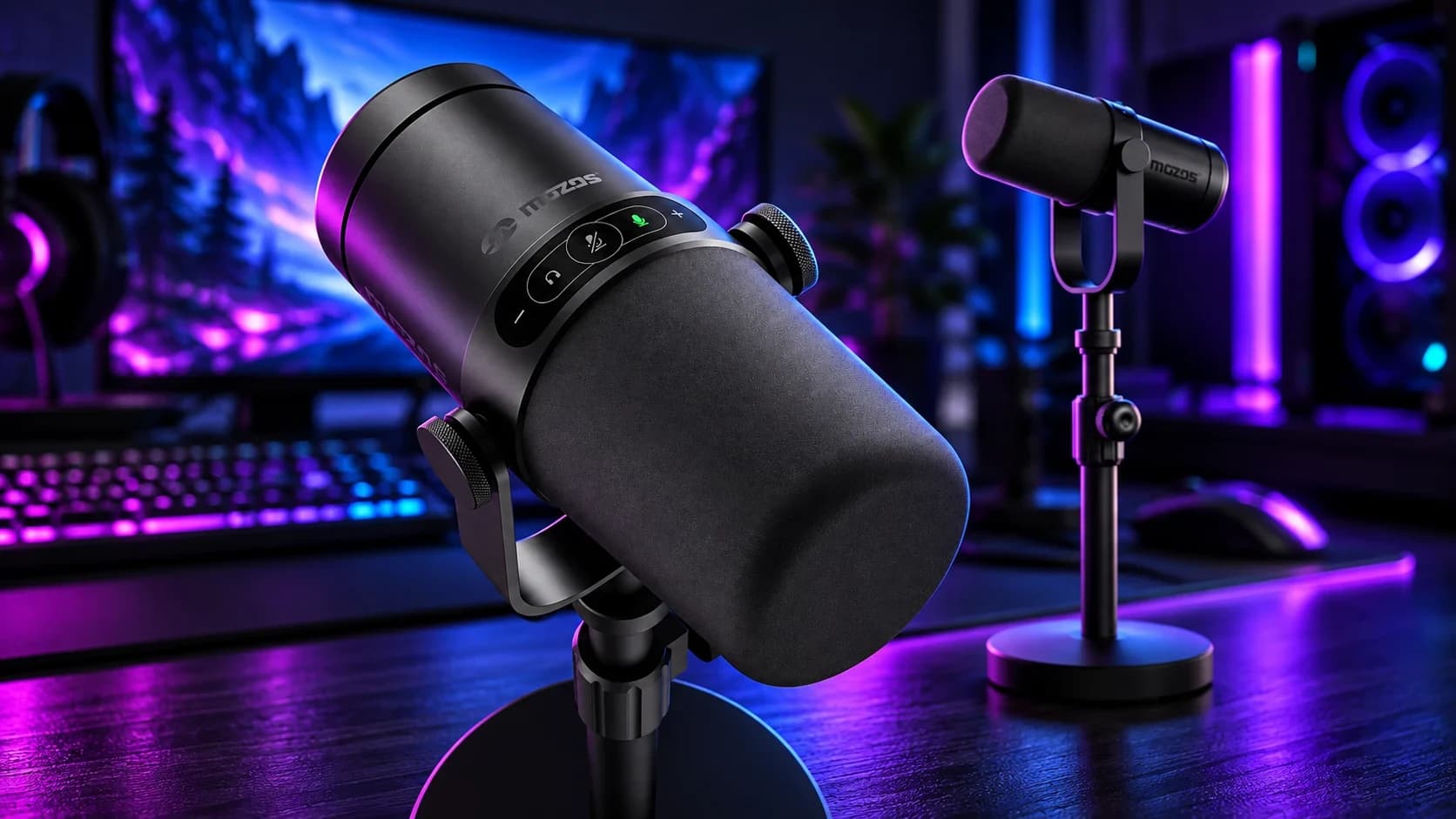
On Discord the Mozos MKIT-STUDIO-PRO sounds like the competition that starts at about $180, and it costs about $70. One caveat straight away: Discord has advanced filters that even out differences between microphones, so we also checked it in audio programs. The warm, clean sound held up there on its own.
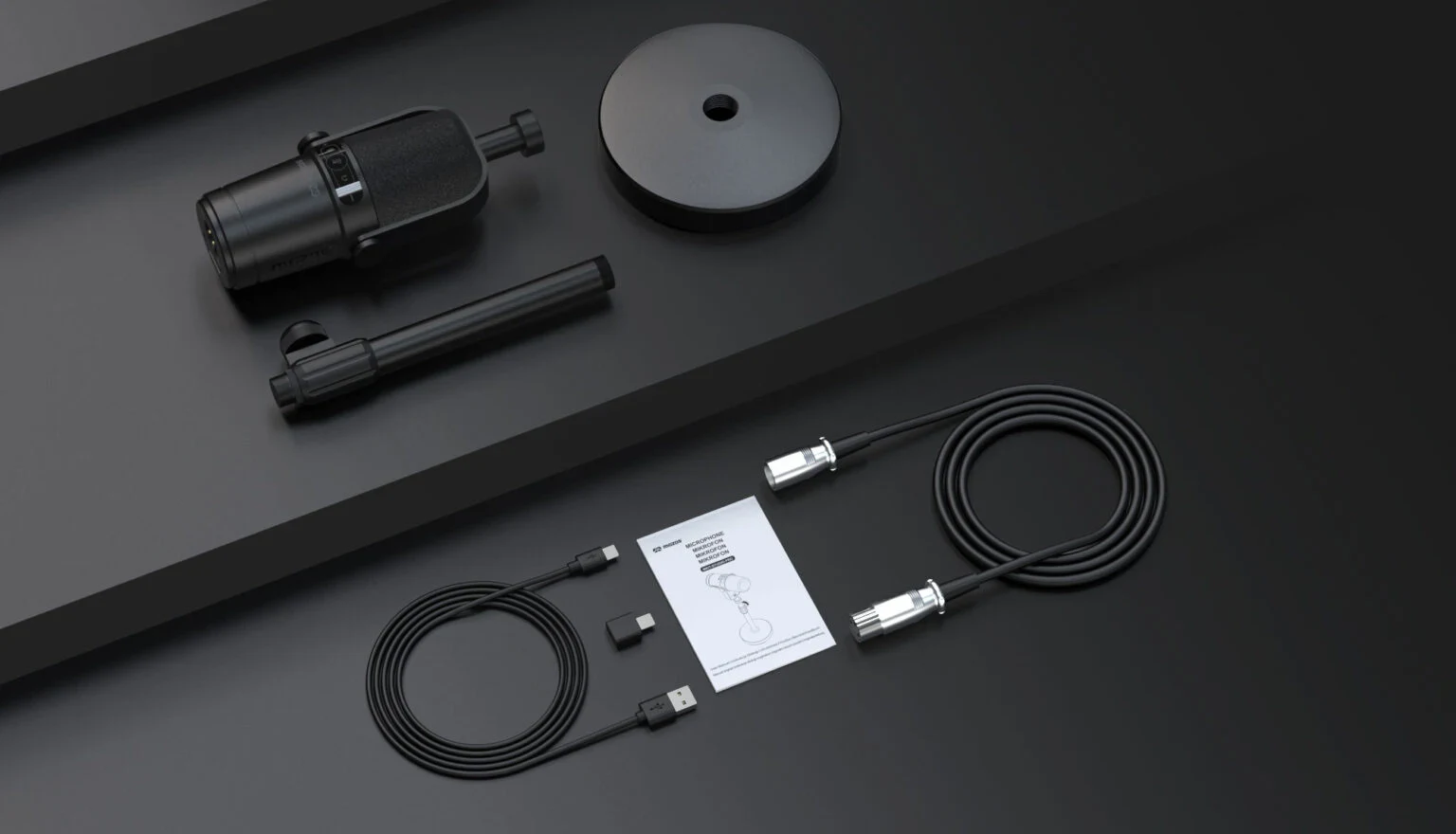
Its looks are meant to recall the pricier Shure MV7 family: a cylinder hung in a yoke with two knurled knobs, and a strip of touch buttons on top. It is a dynamic microphone with a cardioid pattern. It connects over USB-C or XLR, and has a 3.5 mm jack for headphone monitoring. Over USB it works without drivers, you just plug it in. The manufacturer quotes a 50 Hz to 20 kHz response, and the box includes an iron stand adjustable from 230 to 325 mm.
Metal you can feel
The body is metal, heavy and well fitted. Going by looks alone you would never guess it costs under $70; you would put it a good deal higher. That is the first thing that sets it apart in this price bracket.
We did not use the stand from the box. The microphone hung on a Mozos SB37 arm that we have owned for years, and 581 g gave it no trouble. The stand in the set is iron, weighs 1.14 kg and adjusts from 230 to 325 mm. If you plan to use it, check on your own desk whether the lowest setting leaves the microphone blocking your monitor. In our opinion a microphone arm should be an essential part of the setup, and for people who use it strictly at a computer we recommend getting one: it adds comfort, and Mozos offers relatively cheap arms.
How it sounds
Warm and clean is the shortest way to put it. We spoke from 25 to 30 cm and set the gain so we were heard well without the microphone picking up room noise. A dynamic with a cardioid pattern likes to be close to your mouth and rejects what happens at the sides and behind it, so at that distance background noise is not a problem.
We did not use a separate pop filter and did not miss one. The microphone handles plosives, the "p" and "b" sounds, well; with too strong a burst of air they can hit the capsule like a dull thump. At our 25 to 30 cm we heard nothing of the sort.
We talk on messengers every day, and that is where it impresses most. On Discord the Mozos sounds like competition from about $180, but keep in mind that Discord helps: it has advanced filters that clean the signal and blur some of the differences between microphones. That is why we ran a second test in audio programs, with no middleman, and there the microphone keeps its warm, clean character.
If you record your voice through a headset mic today, like the one in our JLab Daybreak Wireless review, this is the natural next step.
Why a dynamic and not a condenser
Many cheap USB streaming microphones are condensers. They pick up more detail, but also everything around you: the keyboard, the fan in your PC, the echo off a bare wall. In a room you have not treated, that is a short road to recordings where you hear the room more than the voice.
A dynamic microphone works the other way round. It is less sensitive, so it does not gather distant sounds, and the cardioid pattern rejects what happens at the sides and behind. The price is having to speak close, but 25 to 30 cm is the distance you sit at a computer anyway. That is why a dynamic suits an ordinary room with a desk and a keyboard.
Distance and the proximity effect
Every cardioid microphone has a proximity effect: the closer to your mouth, the more bass. From a few centimeters the voice turns thick and radio-like, from a dozen or so it is more neutral. We speak from 25 to 30 cm, and at that distance we describe the sound as warm and clean.
Want to check it on your own voice? Record the same sentence from three distances and compare. A few centimeters changes the character of the sound more than any slider in a program. The most common beginner mistake is speaking too far away: you then have to turn the gain up and the noise rises together with your voice.
USB or XLR: what the interface does
We tried both connections: USB straight into Windows, and XLR into a Focusrite Scarlett Solo 4th generation interface. Over XLR the microphone sounds clearly better, but that is true of every microphone that has both USB and XLR. On USB the electronics in the microphone process the sound: a converter and a simple preamp. Over XLR the microphone hands over an analog signal, and the interface's preamp and converter do the work.
The difference is easiest to hear on a recording. Below are two clips from Grzegorz Rycko's YouTube channel, recorded with the same microphone: USB first, then XLR. The channel is not affiliated with SPAWNSY in any way.
Dynamic microphones have a low output level and like strong preamps. According to Focusrite's specifications the Scarlett Solo 4th generation has a microphone gain range of 57 dB, and a dynamic does not need 48 V phantom power.
If you have an interface, plug in XLR and that is it. If you do not, USB is a fine way to start, and you will not need to change microphones when you finally buy one. That is the biggest practical advantage of a microphone with both USB and XLR: you buy once.
Positioning
The capsule is at the front, under the foam, so you speak into the end of the microphone, not the side. The yoke knobs set the angle. Route the cable so it does not pull on the microphone or lie across the keyboard, because a tug on the cable moves the arm.
The touch panel
On top of the body is a strip with five backlit touch buttons: headphone volume, mute and gain. It works well and looks good, a nice touch for the design. We reach for it rarely, because we set the levels once at the start and barely use mute, but it lacks nothing.
It is not something amazing, and it is not why you buy this microphone. It is a pleasant extra that fits the rest of the build.
The Fifine AM8 next to it
We own the Fifine AM8 privately; the black one cost us about $78. It is a rival from the same shelf: a dynamic microphone with USB-C, XLR and a headphone output. The difference is the material. The AM8 is plastic and the Mozos is metal, and you see it from the first touch.
We go back to the Fifine only for its gain and headphone knobs, which we like more than the Mozos touch panel. We set gain on the interface anyway, so it makes no difference to us. Everything else goes to the Mozos: the metal, a stand that can be fitted to your desk, and a price about $8 lower than what we paid for the AM8.
For about $70 you get a microphone that looks and weighs like higher-class gear, connects two ways (USB to start, XLR for later) and sounds warm and clean. On Discord it can sound like a microphone that costs about $180, and in audio programs, where nothing smooths it out, it still holds up. It handles plosives well even without a pop filter. We have not had anything better at this price on our desk.
Score: 8.5 out of 10. For the money it is a very good microphone, and the one clear difference we hear in our use is between USB and XLR: over XLR it plays better.
Buy it if you want a good microphone for calls, streams and recording at around $70. Skip it if you would rather have physical knobs than a touch panel.
Comments
Discussion
Join the conversation around this story.
Join the discussion
Sign in to comment and reply to other readers.
Sign inNo comments yet
Start the discussion first.