%22%20fill%3D%22rgb(0%2C0%2C0)%22%20d%3D%22M%201708.71%2032.0719%20L%201711.17%2032.1726%20L%201711.48%2033.8726%20C%201698.63%2068.7557%201678.15%20111.062%201663.25%20146.038%20L%201610.27%20270.222%20C%201600.68%20293.044%201548.56%20422.248%201540.04%20431.57%20C%201533.67%20438.547%201128.18%20599.98%201082.51%20618.503%20L%20896.13%20695.087%20C%20861.529%20708.971%20827.042%20723.139%20792.674%20737.591%20C%20773.372%20745.745%20749.086%20754.449%20732.134%20766.537%20C%20692.666%20794.684%20697.752%20841.911%20698.601%20884.356%20C%20699.702%20939.367%20740.841%20953.958%20782.454%20976.677%20L%20861.67%201020.18%20L%201099.89%201152.37%20C%201107.22%201156.5%201119.88%201164.35%201127.14%201167.58%20C%201169.86%201186.61%201146.74%201195.41%201117.9%201208.29%20C%201100.37%201216.11%201079.03%201225.42%201060.64%201233.58%20C%201010.18%201256.26%20959.538%201278.54%20908.726%201300.43%20C%20894.529%201306.71%20881.754%201312.22%20867.258%201317.69%20C%20862.804%201316.04%20858.4%201314.27%20854.051%201312.36%20C%20836.181%201304.32%20811.094%201289.47%20793.048%201279.86%20L%20667.457%201213.33%20L%20559.157%201156.4%20C%20524.558%201137.94%20487.124%201123.47%20472.687%201083.79%20C%20469.558%201074.97%20467.621%201065.77%20466.927%201056.43%20C%20465.765%201038.59%20466.66%201011.98%20466.668%20993.332%20L%20466.359%20873.615%20C%20465.984%20815.652%20463.947%20757.728%20465.485%20699.747%20C%20465.795%20688.052%20466.054%20675.662%20467.175%20664.054%20C%20469.31%20640.858%20475.406%20618.2%20485.2%20597.064%20C%20517.254%20527.676%20568.707%20508.151%20633.929%20480.324%20L%20726.507%20441.167%20L%201040.13%20310.018%20L%201452.31%20137.782%20L%201616.93%2069.4204%20C%201646.93%2057.0612%201678.5%2043.152%201708.71%2032.0719%20z%22%2F%3E%0D%0A%3Cpath%20transform%3D%22translate(0%2C0)%22%20fill%3D%22rgb(0%2C0%2C0)%22%20d%3D%22M%201180.36%20731.182%20C%201195.24%20733.945%201233.7%20756.876%201248.98%20765.026%20L%201364.16%20826.126%20L%201484.37%20889.381%20C%201498.57%20896.955%201532.42%20914.303%201544.52%20923.261%20C%201557.39%20932.823%201567.44%20945.681%201573.6%20960.477%20C%201577.74%20970.613%201580.28%20981.333%201581.12%20992.25%20C%201582.2%201006.88%201581.3%201032.21%201581.31%201047.95%20L%201581.63%201160.97%20C%201582.26%201211.62%201582.57%201262.29%201582.57%201312.95%20C%201582.44%201333.48%201582.84%201362.18%201581%201382.38%20C%201579.14%201403.66%201573.97%201424.53%201565.69%201444.23%20C%201551.08%201479.78%201525.53%201509.75%201492.74%201529.79%20C%201460.17%201549.9%201412.55%201568.06%201376.2%201583.68%20C%201297.89%201617.01%201219.4%201649.9%201140.72%201682.34%20L%20334.313%202018.15%20C%20339.936%202006.05%20344.516%201995.06%20349.5%201982.67%20C%20380.898%201908.42%20413.985%201834.57%20445.11%201760.02%20C%20459.052%201725.94%20473.375%201692.02%20488.076%201658.26%20C%20492.996%201647.05%20502.305%201624.37%20508.527%201614.93%20C%20525.371%201606.59%20557.563%201594.41%20575.732%201586.98%20L%20705.864%201534%20C%20845.58%201478.27%20984.961%201421.71%201124%201364.32%20L%201246.78%201313.94%20C%201290.4%201295.55%201343.27%201280.12%201348.5%201224.17%20C%201350.49%201202.85%201351.54%201164.6%201346.69%201143.96%20C%201344.6%201134.87%201340.77%201126.27%201335.41%201118.63%20C%201321.45%201099.1%201289.07%201084.29%201267.79%201072.67%20L%201188.51%201029.14%20L%20997.495%20923.267%20L%20933.233%20887.54%20C%20924.86%20882.894%20890.238%20867.795%20898.045%20858.391%20C%20907.874%20846.549%20953.243%20829.416%20967.235%20823.263%20L%201064.01%20780.291%20C%201087.5%20769.837%201111.05%20759.524%201134.65%20749.351%20C%201147.99%20743.555%201166.91%20734.741%201180.36%20731.182%20z%22%2F%3E%0D%0A%3C%2Fsvg%3E)
%22%20fill%3D%22rgb(255%2C255%2C255)%22%20d%3D%22M%201708.71%2032.0719%20L%201711.17%2032.1726%20L%201711.48%2033.8726%20C%201698.63%2068.7557%201678.15%20111.062%201663.25%20146.038%20L%201610.27%20270.222%20C%201600.68%20293.044%201548.56%20422.248%201540.04%20431.57%20C%201533.67%20438.547%201128.18%20599.98%201082.51%20618.503%20L%20896.13%20695.087%20C%20861.529%20708.971%20827.042%20723.139%20792.674%20737.591%20C%20773.372%20745.745%20749.086%20754.449%20732.134%20766.537%20C%20692.666%20794.684%20697.752%20841.911%20698.601%20884.356%20C%20699.702%20939.367%20740.841%20953.958%20782.454%20976.677%20L%20861.67%201020.18%20L%201099.89%201152.37%20C%201107.22%201156.5%201119.88%201164.35%201127.14%201167.58%20C%201169.86%201186.61%201146.74%201195.41%201117.9%201208.29%20C%201100.37%201216.11%201079.03%201225.42%201060.64%201233.58%20C%201010.18%201256.26%20959.538%201278.54%20908.726%201300.43%20C%20894.529%201306.71%20881.754%201312.22%20867.258%201317.69%20C%20862.804%201316.04%20858.4%201314.27%20854.051%201312.36%20C%20836.181%201304.32%20811.094%201289.47%20793.048%201279.86%20L%20667.457%201213.33%20L%20559.157%201156.4%20C%20524.558%201137.94%20487.124%201123.47%20472.687%201083.79%20C%20469.558%201074.97%20467.621%201065.77%20466.927%201056.43%20C%20465.765%201038.59%20466.66%201011.98%20466.668%20993.332%20L%20466.359%20873.615%20C%20465.984%20815.652%20463.947%20757.728%20465.485%20699.747%20C%20465.795%20688.052%20466.054%20675.662%20467.175%20664.054%20C%20469.31%20640.858%20475.406%20618.2%20485.2%20597.064%20C%20517.254%20527.676%20568.707%20508.151%20633.929%20480.324%20L%20726.507%20441.167%20L%201040.13%20310.018%20L%201452.31%20137.782%20L%201616.93%2069.4204%20C%201646.93%2057.0612%201678.5%2043.152%201708.71%2032.0719%20z%22%2F%3E%0D%0A%3Cpath%20transform%3D%22translate(0%2C0)%22%20fill%3D%22rgb(255%2C255%2C255)%22%20d%3D%22M%201180.36%20731.182%20C%201195.24%20733.945%201233.7%20756.876%201248.98%20765.026%20L%201364.16%20826.126%20L%201484.37%20889.381%20C%201498.57%20896.955%201532.42%20914.303%201544.52%20923.261%20C%201557.39%20932.823%201567.44%20945.681%201573.6%20960.477%20C%201577.74%20970.613%201580.28%20981.333%201581.12%20992.25%20C%201582.2%201006.88%201581.3%201032.21%201581.31%201047.95%20L%201581.63%201160.97%20C%201582.26%201211.62%201582.57%201262.29%201582.57%201312.95%20C%201582.44%201333.48%201582.84%201362.18%201581%201382.38%20C%201579.14%201403.66%201573.97%201424.53%201565.69%201444.23%20C%201551.08%201479.78%201525.53%201509.75%201492.74%201529.79%20C%201460.17%201549.9%201412.55%201568.06%201376.2%201583.68%20C%201297.89%201617.01%201219.4%201649.9%201140.72%201682.34%20L%20334.313%202018.15%20C%20339.936%202006.05%20344.516%201995.06%20349.5%201982.67%20C%20380.898%201908.42%20413.985%201834.57%20445.11%201760.02%20C%20459.052%201725.94%20473.375%201692.02%20488.076%201658.26%20C%20492.996%201647.05%20502.305%201624.37%20508.527%201614.93%20C%20525.371%201606.59%20557.563%201594.41%20575.732%201586.98%20L%20705.864%201534%20C%20845.58%201478.27%20984.961%201421.71%201124%201364.32%20L%201246.78%201313.94%20C%201290.4%201295.55%201343.27%201280.12%201348.5%201224.17%20C%201350.49%201202.85%201351.54%201164.6%201346.69%201143.96%20C%201344.6%201134.87%201340.77%201126.27%201335.41%201118.63%20C%201321.45%201099.1%201289.07%201084.29%201267.79%201072.67%20L%201188.51%201029.14%20L%20997.495%20923.267%20L%20933.233%20887.54%20C%20924.86%20882.894%20890.238%20867.795%20898.045%20858.391%20C%20907.874%20846.549%20953.243%20829.416%20967.235%20823.263%20L%201064.01%20780.291%20C%201087.5%20769.837%201111.05%20759.524%201134.65%20749.351%20C%201147.99%20743.555%201166.91%20734.741%201180.36%20731.182%20z%22%2F%3E%0D%0A%3C%2Fsvg%3E)
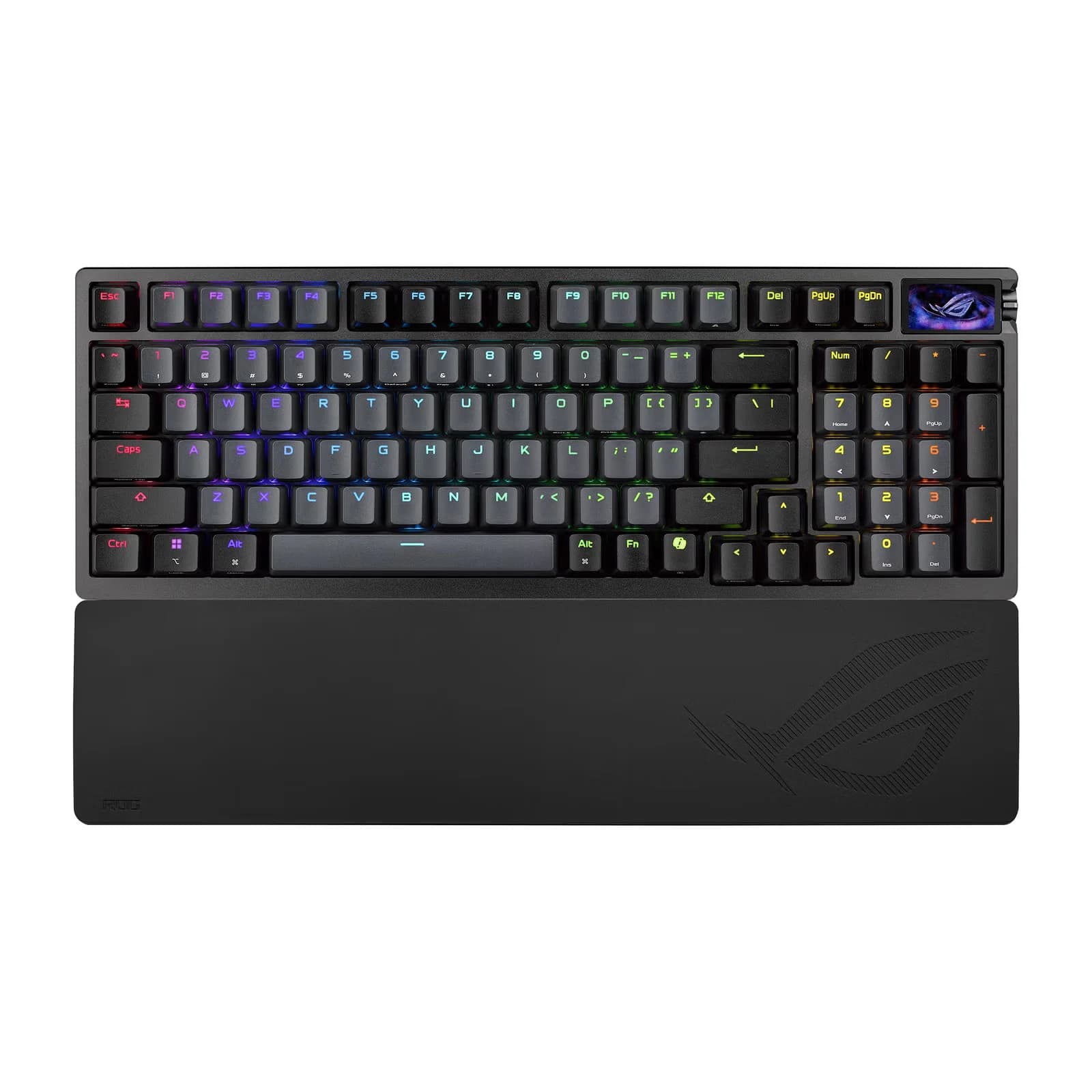
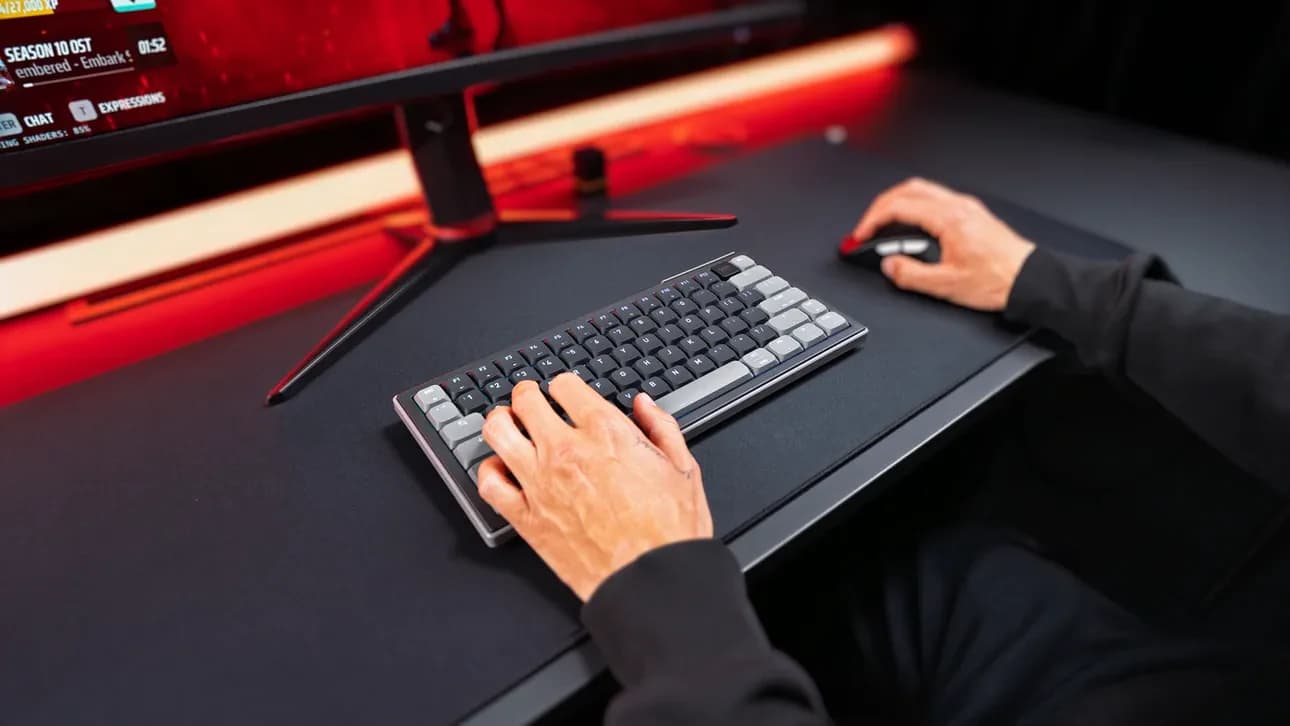
The Asus ROG Azoth 96 HE spent several weeks on our desk in its full configuration: 96% layout, ROG HFX V2 magnetic switches, a touchscreen, a control knob, the entire €399 package. After that stretch of daily use, the picture is clear: this keyboard genuinely does a lot of things well, and there's one problem no spec sheet can hide, its price.
Specs
Build quality
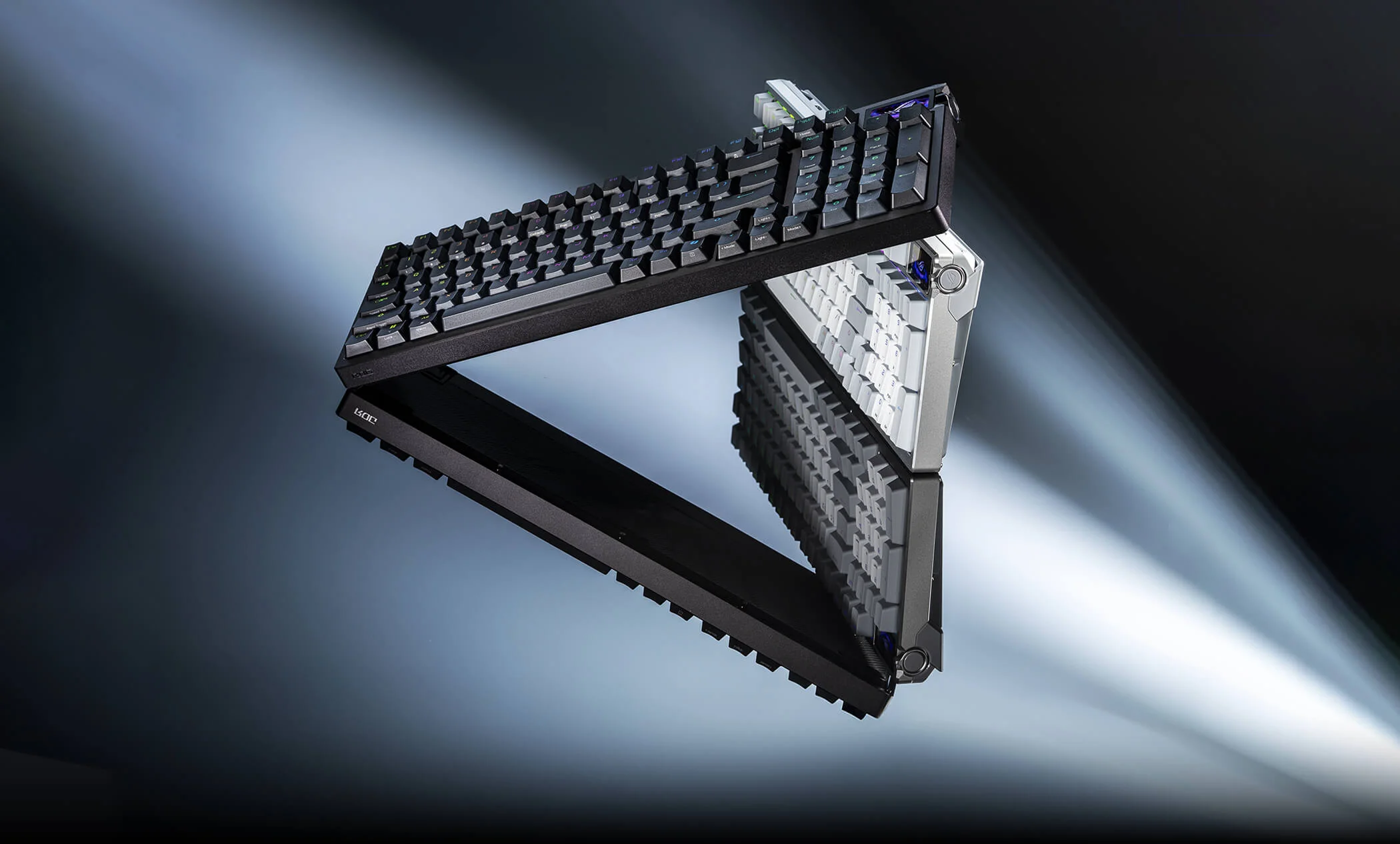
Under the case sits a six-layer dampening stack: four layers of PORON, IXPE, and silicone, all mounted on a gasket setup. That's exactly the kind of construction you'd expect to produce a deep, muted sound instead of hollow plastic clatter, and it delivers, consistently confirmed across independent reviews: a deep, "thocky" strike instead of a high-pitched click. The keycaps are doubleshot PBT, pleasant to the touch, neither too smooth nor overly textured. The stabilizers under the longer keys (spacebar, enter, shift) worked correctly right out of the box, no rattle, no need for any modding before first use, which at this price tier ought to be standard but often isn't in practice.
The case itself is heavy and rigid, with no detectable flex during normal typing, and the tilt feet hold their angle even after weeks of moving the keyboard between a desk and a backpack. The 96% layout with a numpad is a decision that pleases some people and bothers others, but for anyone who also works in spreadsheets or a video editor outside of CS2, it's a genuine argument for this variant over a narrower 75% board like the Wooting 60HE v2 or the original mechanical Azoth.
Typing on it is simply enjoyable. The HFX V2 switches have a lighter actuation force than standard mechanical switches (32 grams) and a shorter travel, which together produce a fast, responsive feel that makes you want to keep typing, whether that's a work document or a callout in chat mid-round. The day-to-day experience is unambiguously positive, and this is the part of the review where Asus has nothing to answer for.
Playing CS2: actuation and Rapid Trigger
The 0.1-3.5mm actuation range with 0.01mm steps gives real control over how quickly the keyboard reacts to a press, and Rapid Trigger lets you set a separate release threshold independent of the press threshold, which in theory translates into faster counter-strafes and cleaner peeks. You adjust it either in Armoury Crate or directly from the knob, which for actuation specifically is genuinely convenient, no need to open the software every time you want to drop from 1.5mm to 0.8mm before a ranked session.
In an actual match, the difference against standard mechanical switches is noticeable, but it isn't a unique advantage of the Azoth: you get the exact same thing from Wooting boards, from the Keychron Q1 HE 8K, or from cheaper Chinese magnetic keyboards we've tested before. Rapid Trigger on the Asus works correctly and consistently, no false double inputs or chattering during testing, but that's the baseline for the Hall Effect segment in 2026, not something that sets this specific model apart from the competition. If anyone was hoping HFX V2 would add something new to the actual feel of a counter-strafe, they'll likely be disappointed, because the gap between a well-tuned Rapid Trigger on the Asus and the same mechanism on a competitor is practically imperceptible during normal play.
Wireless and battery life
The Azoth 96 HE switches between 2.4GHz, Bluetooth, and wired mode via a switch on the back of the case, and the 2.4GHz mode holds the full 8000Hz polling rate, the same as a wired connection, so going wireless costs nothing in responsiveness. We didn't personally log a large number of hours off battery, so this section leans on consistent reports from other reviewers rather than guessing: the keyboard lasts a week or more of full daily use with moderate RGB and the screen on, considerably longer with both dimmed or turned off. That's worse than the original mechanical Azoth managed years ago, but still above average for Hall Effect keyboards, which by nature draw more power from continuously sampling switch position rather than just registering a circuit closing like standard mechanical switches.
Armoury Crate, the screen, and the knob
This is where the technology is good and the packaging around it undercuts the experience. The OLED screen and three-way knob for on-the-fly actuation adjustment sound great on a spec sheet, but in daily use they're an unnecessary gimmick: once the keyboard is configured, it just works, and the screen and knob quickly become something you stop touching after the first week of playing with new gear. If they disappeared from the next revision in exchange for a lower price, the actual experience of typing or gaming wouldn't meaningfully change, and your wallet would notice the difference.
Armoury Crate is the bigger issue, the software you have to go through just to configure the screen and part of the settings. Reviewers consistently ding it for a bloated installer, ads, a game store pushed at every opportunity, and system-wide performance profiles that have nothing to do with the keyboard itself. On top of that, complaints about Armoury Crate being genuinely hard to fully uninstall come up often enough to treat it as a real, recurring problem rather than an isolated complaint. Asus offers a lighter, web-based alternative called Gear Link, accessible from inside Armoury Crate itself, but that's a workaround, not a fix for the underlying issue, since reaching Gear Link in the first place still means sitting through the same heavy, ad-laden startup window.
Price: the real problem with this keyboard
€399 for a keyboard puts you in a tier where expectations are correspondingly high, and the Azoth 96 HE largely meets them on the technical side: good switches, solid construction, thoughtful connectivity. The problem is that the magnetic keyboard market in 2026 is mature enough that essentially the same technology is available for noticeably less money. The Keychron Q1 HE 8K, which we reviewed earlier, runs around $200-220, roughly half the Azoth's price, and offers the same core: magnetic switches, adjustable actuation, high polling, solid construction. Further down the price ladder, the examples get even more pointed: the DrunkDeer A75 Ultra and the Endgame Gear KB65HE reportedly deliver 85-90% of the flagship experience for a fraction of the cost according to independent testing, and the Royal Kludge C98 HE offers adjustable Hall Effect actuation for under $80. Even the Wooting 60HE v2, which isn't cheap by any measure, comes out looking like the more reasonable buy in this comparison at the same class of Rapid Trigger experience.
This isn't an argument that the Azoth 96 HE is a bad keyboard. It's technically very good. It's an argument that at this specific price, you're largely paying for the brand, a screen you won't touch after the first week, and software you have to put up with, not a real advantage over cheaper competitors in the things that actually matter while gaming: actuation, Rapid Trigger, and switch quality itself. The gap in feel between the Azoth and the Keychron Q1 HE 8K during an actual CS2 session is small enough that it's hard to justify a $180-200 premium for a screen and a ROG logo on the case.
Who this keyboard is for
The Azoth 96 HE makes sense in one specific situation: you buy hardware once every few years, want peace of mind from a big brand with full service support, and a numpad is a genuine daily need for you, not an afterthought. In that scenario, €399 is the price of zero compromises, not just a ROG logo tax. It looks worse if the keyboard's only job is CS2 and FACEIT grinding, because there what matters is mainly the actuation mechanism and Rapid Trigger itself, and those are, as established, practically identical in models that cost half as much.
Then there's the look of it. The RGB lighting under the translucent keycap legends looks good in both light and dark case colors, and the matte finish resists fingerprints far better than the glossy plastic on cheaper builds. It's a small thing, but in a segment where a keyboard sits on your desk for years, that kind of detail matters more than it might seem at first glance.
Comments
Discussion
Join the conversation around this story.
Join the discussion
Sign in to comment and reply to other readers.
Sign inNo comments yet
Start the discussion first.