%22%20fill%3D%22rgb(0%2C0%2C0)%22%20d%3D%22M%201708.71%2032.0719%20L%201711.17%2032.1726%20L%201711.48%2033.8726%20C%201698.63%2068.7557%201678.15%20111.062%201663.25%20146.038%20L%201610.27%20270.222%20C%201600.68%20293.044%201548.56%20422.248%201540.04%20431.57%20C%201533.67%20438.547%201128.18%20599.98%201082.51%20618.503%20L%20896.13%20695.087%20C%20861.529%20708.971%20827.042%20723.139%20792.674%20737.591%20C%20773.372%20745.745%20749.086%20754.449%20732.134%20766.537%20C%20692.666%20794.684%20697.752%20841.911%20698.601%20884.356%20C%20699.702%20939.367%20740.841%20953.958%20782.454%20976.677%20L%20861.67%201020.18%20L%201099.89%201152.37%20C%201107.22%201156.5%201119.88%201164.35%201127.14%201167.58%20C%201169.86%201186.61%201146.74%201195.41%201117.9%201208.29%20C%201100.37%201216.11%201079.03%201225.42%201060.64%201233.58%20C%201010.18%201256.26%20959.538%201278.54%20908.726%201300.43%20C%20894.529%201306.71%20881.754%201312.22%20867.258%201317.69%20C%20862.804%201316.04%20858.4%201314.27%20854.051%201312.36%20C%20836.181%201304.32%20811.094%201289.47%20793.048%201279.86%20L%20667.457%201213.33%20L%20559.157%201156.4%20C%20524.558%201137.94%20487.124%201123.47%20472.687%201083.79%20C%20469.558%201074.97%20467.621%201065.77%20466.927%201056.43%20C%20465.765%201038.59%20466.66%201011.98%20466.668%20993.332%20L%20466.359%20873.615%20C%20465.984%20815.652%20463.947%20757.728%20465.485%20699.747%20C%20465.795%20688.052%20466.054%20675.662%20467.175%20664.054%20C%20469.31%20640.858%20475.406%20618.2%20485.2%20597.064%20C%20517.254%20527.676%20568.707%20508.151%20633.929%20480.324%20L%20726.507%20441.167%20L%201040.13%20310.018%20L%201452.31%20137.782%20L%201616.93%2069.4204%20C%201646.93%2057.0612%201678.5%2043.152%201708.71%2032.0719%20z%22%2F%3E%0D%0A%3Cpath%20transform%3D%22translate(0%2C0)%22%20fill%3D%22rgb(0%2C0%2C0)%22%20d%3D%22M%201180.36%20731.182%20C%201195.24%20733.945%201233.7%20756.876%201248.98%20765.026%20L%201364.16%20826.126%20L%201484.37%20889.381%20C%201498.57%20896.955%201532.42%20914.303%201544.52%20923.261%20C%201557.39%20932.823%201567.44%20945.681%201573.6%20960.477%20C%201577.74%20970.613%201580.28%20981.333%201581.12%20992.25%20C%201582.2%201006.88%201581.3%201032.21%201581.31%201047.95%20L%201581.63%201160.97%20C%201582.26%201211.62%201582.57%201262.29%201582.57%201312.95%20C%201582.44%201333.48%201582.84%201362.18%201581%201382.38%20C%201579.14%201403.66%201573.97%201424.53%201565.69%201444.23%20C%201551.08%201479.78%201525.53%201509.75%201492.74%201529.79%20C%201460.17%201549.9%201412.55%201568.06%201376.2%201583.68%20C%201297.89%201617.01%201219.4%201649.9%201140.72%201682.34%20L%20334.313%202018.15%20C%20339.936%202006.05%20344.516%201995.06%20349.5%201982.67%20C%20380.898%201908.42%20413.985%201834.57%20445.11%201760.02%20C%20459.052%201725.94%20473.375%201692.02%20488.076%201658.26%20C%20492.996%201647.05%20502.305%201624.37%20508.527%201614.93%20C%20525.371%201606.59%20557.563%201594.41%20575.732%201586.98%20L%20705.864%201534%20C%20845.58%201478.27%20984.961%201421.71%201124%201364.32%20L%201246.78%201313.94%20C%201290.4%201295.55%201343.27%201280.12%201348.5%201224.17%20C%201350.49%201202.85%201351.54%201164.6%201346.69%201143.96%20C%201344.6%201134.87%201340.77%201126.27%201335.41%201118.63%20C%201321.45%201099.1%201289.07%201084.29%201267.79%201072.67%20L%201188.51%201029.14%20L%20997.495%20923.267%20L%20933.233%20887.54%20C%20924.86%20882.894%20890.238%20867.795%20898.045%20858.391%20C%20907.874%20846.549%20953.243%20829.416%20967.235%20823.263%20L%201064.01%20780.291%20C%201087.5%20769.837%201111.05%20759.524%201134.65%20749.351%20C%201147.99%20743.555%201166.91%20734.741%201180.36%20731.182%20z%22%2F%3E%0D%0A%3C%2Fsvg%3E)
%22%20fill%3D%22rgb(255%2C255%2C255)%22%20d%3D%22M%201708.71%2032.0719%20L%201711.17%2032.1726%20L%201711.48%2033.8726%20C%201698.63%2068.7557%201678.15%20111.062%201663.25%20146.038%20L%201610.27%20270.222%20C%201600.68%20293.044%201548.56%20422.248%201540.04%20431.57%20C%201533.67%20438.547%201128.18%20599.98%201082.51%20618.503%20L%20896.13%20695.087%20C%20861.529%20708.971%20827.042%20723.139%20792.674%20737.591%20C%20773.372%20745.745%20749.086%20754.449%20732.134%20766.537%20C%20692.666%20794.684%20697.752%20841.911%20698.601%20884.356%20C%20699.702%20939.367%20740.841%20953.958%20782.454%20976.677%20L%20861.67%201020.18%20L%201099.89%201152.37%20C%201107.22%201156.5%201119.88%201164.35%201127.14%201167.58%20C%201169.86%201186.61%201146.74%201195.41%201117.9%201208.29%20C%201100.37%201216.11%201079.03%201225.42%201060.64%201233.58%20C%201010.18%201256.26%20959.538%201278.54%20908.726%201300.43%20C%20894.529%201306.71%20881.754%201312.22%20867.258%201317.69%20C%20862.804%201316.04%20858.4%201314.27%20854.051%201312.36%20C%20836.181%201304.32%20811.094%201289.47%20793.048%201279.86%20L%20667.457%201213.33%20L%20559.157%201156.4%20C%20524.558%201137.94%20487.124%201123.47%20472.687%201083.79%20C%20469.558%201074.97%20467.621%201065.77%20466.927%201056.43%20C%20465.765%201038.59%20466.66%201011.98%20466.668%20993.332%20L%20466.359%20873.615%20C%20465.984%20815.652%20463.947%20757.728%20465.485%20699.747%20C%20465.795%20688.052%20466.054%20675.662%20467.175%20664.054%20C%20469.31%20640.858%20475.406%20618.2%20485.2%20597.064%20C%20517.254%20527.676%20568.707%20508.151%20633.929%20480.324%20L%20726.507%20441.167%20L%201040.13%20310.018%20L%201452.31%20137.782%20L%201616.93%2069.4204%20C%201646.93%2057.0612%201678.5%2043.152%201708.71%2032.0719%20z%22%2F%3E%0D%0A%3Cpath%20transform%3D%22translate(0%2C0)%22%20fill%3D%22rgb(255%2C255%2C255)%22%20d%3D%22M%201180.36%20731.182%20C%201195.24%20733.945%201233.7%20756.876%201248.98%20765.026%20L%201364.16%20826.126%20L%201484.37%20889.381%20C%201498.57%20896.955%201532.42%20914.303%201544.52%20923.261%20C%201557.39%20932.823%201567.44%20945.681%201573.6%20960.477%20C%201577.74%20970.613%201580.28%20981.333%201581.12%20992.25%20C%201582.2%201006.88%201581.3%201032.21%201581.31%201047.95%20L%201581.63%201160.97%20C%201582.26%201211.62%201582.57%201262.29%201582.57%201312.95%20C%201582.44%201333.48%201582.84%201362.18%201581%201382.38%20C%201579.14%201403.66%201573.97%201424.53%201565.69%201444.23%20C%201551.08%201479.78%201525.53%201509.75%201492.74%201529.79%20C%201460.17%201549.9%201412.55%201568.06%201376.2%201583.68%20C%201297.89%201617.01%201219.4%201649.9%201140.72%201682.34%20L%20334.313%202018.15%20C%20339.936%202006.05%20344.516%201995.06%20349.5%201982.67%20C%20380.898%201908.42%20413.985%201834.57%20445.11%201760.02%20C%20459.052%201725.94%20473.375%201692.02%20488.076%201658.26%20C%20492.996%201647.05%20502.305%201624.37%20508.527%201614.93%20C%20525.371%201606.59%20557.563%201594.41%20575.732%201586.98%20L%20705.864%201534%20C%20845.58%201478.27%20984.961%201421.71%201124%201364.32%20L%201246.78%201313.94%20C%201290.4%201295.55%201343.27%201280.12%201348.5%201224.17%20C%201350.49%201202.85%201351.54%201164.6%201346.69%201143.96%20C%201344.6%201134.87%201340.77%201126.27%201335.41%201118.63%20C%201321.45%201099.1%201289.07%201084.29%201267.79%201072.67%20L%201188.51%201029.14%20L%20997.495%20923.267%20L%20933.233%20887.54%20C%20924.86%20882.894%20890.238%20867.795%20898.045%20858.391%20C%20907.874%20846.549%20953.243%20829.416%20967.235%20823.263%20L%201064.01%20780.291%20C%201087.5%20769.837%201111.05%20759.524%201134.65%20749.351%20C%201147.99%20743.555%201166.91%20734.741%201180.36%20731.182%20z%22%2F%3E%0D%0A%3C%2Fsvg%3E)

Windows 11 version 24H2 in the Home and Pro editions gets its last updates today, 13 October. If you game on it, the end of support will not break a single title overnight. The bigger problem for players is a bug Microsoft confirmed on 2 October: apps that rely on Windows' built-in AC-3 (Dolby Digital) audio decoder can close without warning, and games are on the list. It affects 24H2, 25H2 and 26H2 alike, so moving to a newer version does not avoid it, and there is no fix yet.
What exactly ends with 24H2
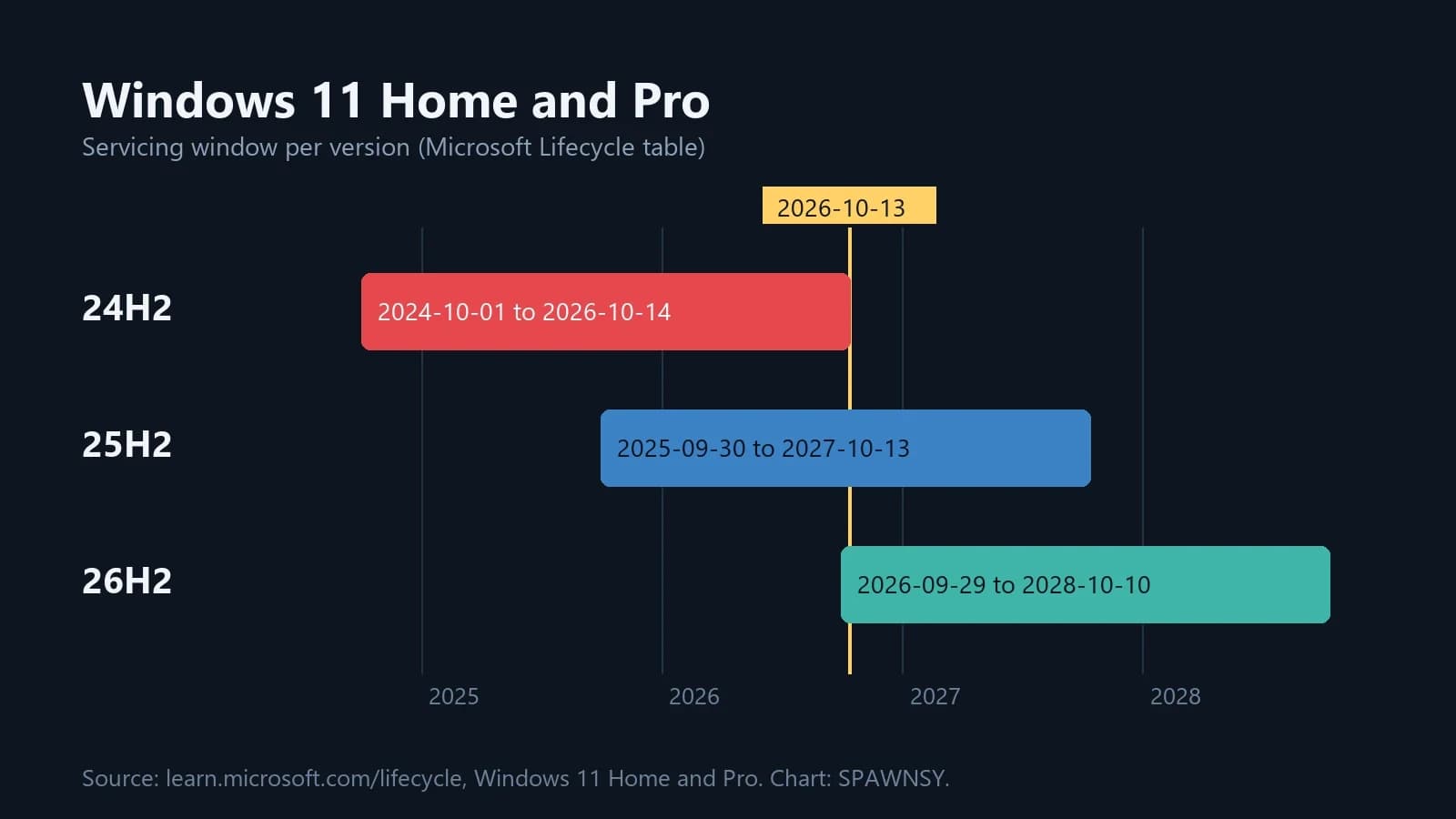
Microsoft's lifecycle table shows 24H2 for Windows 11 Home and Pro starting on 1 October 2024, with an end date of 14 October 2026 (06:59:59). Today's Patch Tuesday is the last patch for it. After that, 24H2 machines stop receiving security fixes and bug fixes. Windows 11 25H2 is supported until 13 October 2027, and 26H2, which Microsoft released on 29 September 2026, until 10 October 2028.
Games do not depend on whether the system gets updates. The catch is that every new bug found in 24H2 from now on stays there for good. So check your version (press Win + R and run winver) and install 25H2 or 26H2 through Windows Update if it is offered to your PC.
The AC-3 bug: what Microsoft has confirmed
In the release-health notes for 24H2, Microsoft describes a problem it opened on 2 October at 15:06 Pacific time. After the update of 22 September (KB5124010, build 26100.9550) and later ones, some apps that need AC-3 audio decoding can close unexpectedly. Sometimes an app fails to launch at all, and in other cases it runs until a particular feature is used, such as playing music. Microsoft names games, media players and some productivity programs as affected.
Microsoft stresses that many modern apps do not use the built-in decoder and will never see the problem. The component is mostly used by older programs, and some titles ship their own audio libraries. The company has not published a list of games, a cause or a date for the fix. Windows Latest says 26H2 is hit because it shares code with 25H2, so someone who installed KB5124010 on 25H2 and later upgraded lands on the same bug.
Other gaming problems after recent patches
That is not the only trouble of recent weeks. The 11 August update KB5121003 caused crashes and freezes in some games on 24H2 and 25H2. Microsoft named ARC Raiders, MARVEL Tōkon: Fighting Souls and The Finals among them and shared a temporary workaround. PCWorld tied the crashes to a driver file called inpoutx64.sys. After the September patches, Windows Latest and Tom's Hardware also reported AMD graphics driver timeouts, black screens and freezes, and according to Windows Latest KB5129195 does not list a fix for them. Microsoft has not confirmed those reports in the 24H2 release-health page.
Each of these gets fixed with another patch, and from today 24H2 Home and Pro users will not receive any more. We have covered the topic before in our guide to safe Windows 11 gaming optimisation and in the story about the bug that ate 500 GB of disk space.
A timeline of patches, from August to today
The timeline shows problems with games returning after one update after another, and the AC-3 bug is still open just as the lifecycle of 24H2 ends.
FACEIT and Windows 10
FACEIT's requirements for 14 October concern Windows 10, not 11. We set out the rules that take effect tomorrow in a separate piece on how FACEIT will not throw Windows 10 out on 14 October.
In our view the end of 24H2 today is an administrative matter, and the real risk for gamers is the AC-3 bug. It exists in three versions at once, so you cannot avoid it by changing the system. There is no official workaround, and Microsoft has given no date for a fix. If a game closes when you change the volume or the audio settings, this bug is the first suspect.
If the AC-3 fix did not make it into today's Patch Tuesday (we could not find a description of that update at the time of writing, so check release health), 24H2 Home and Pro users will get it only after moving to a newer version. That is the strongest argument for updating, because the rest looks calm: games will not stop working just because support has lapsed.
Which version should you pick? In our view 25H2 is the more sensible choice over the freshly released 26H2: it has been out for a year and is supported until October 2027. We would treat uninstalling KB5124010 as a last resort, since it is a cumulative update that carries security fixes.

Comments
Discussion
Join the conversation around this story.
Join the discussion
Sign in to comment and reply to other readers.
Sign inNo comments yet
Start the discussion first.