%22%20fill%3D%22rgb(0%2C0%2C0)%22%20d%3D%22M%201708.71%2032.0719%20L%201711.17%2032.1726%20L%201711.48%2033.8726%20C%201698.63%2068.7557%201678.15%20111.062%201663.25%20146.038%20L%201610.27%20270.222%20C%201600.68%20293.044%201548.56%20422.248%201540.04%20431.57%20C%201533.67%20438.547%201128.18%20599.98%201082.51%20618.503%20L%20896.13%20695.087%20C%20861.529%20708.971%20827.042%20723.139%20792.674%20737.591%20C%20773.372%20745.745%20749.086%20754.449%20732.134%20766.537%20C%20692.666%20794.684%20697.752%20841.911%20698.601%20884.356%20C%20699.702%20939.367%20740.841%20953.958%20782.454%20976.677%20L%20861.67%201020.18%20L%201099.89%201152.37%20C%201107.22%201156.5%201119.88%201164.35%201127.14%201167.58%20C%201169.86%201186.61%201146.74%201195.41%201117.9%201208.29%20C%201100.37%201216.11%201079.03%201225.42%201060.64%201233.58%20C%201010.18%201256.26%20959.538%201278.54%20908.726%201300.43%20C%20894.529%201306.71%20881.754%201312.22%20867.258%201317.69%20C%20862.804%201316.04%20858.4%201314.27%20854.051%201312.36%20C%20836.181%201304.32%20811.094%201289.47%20793.048%201279.86%20L%20667.457%201213.33%20L%20559.157%201156.4%20C%20524.558%201137.94%20487.124%201123.47%20472.687%201083.79%20C%20469.558%201074.97%20467.621%201065.77%20466.927%201056.43%20C%20465.765%201038.59%20466.66%201011.98%20466.668%20993.332%20L%20466.359%20873.615%20C%20465.984%20815.652%20463.947%20757.728%20465.485%20699.747%20C%20465.795%20688.052%20466.054%20675.662%20467.175%20664.054%20C%20469.31%20640.858%20475.406%20618.2%20485.2%20597.064%20C%20517.254%20527.676%20568.707%20508.151%20633.929%20480.324%20L%20726.507%20441.167%20L%201040.13%20310.018%20L%201452.31%20137.782%20L%201616.93%2069.4204%20C%201646.93%2057.0612%201678.5%2043.152%201708.71%2032.0719%20z%22%2F%3E%0D%0A%3Cpath%20transform%3D%22translate(0%2C0)%22%20fill%3D%22rgb(0%2C0%2C0)%22%20d%3D%22M%201180.36%20731.182%20C%201195.24%20733.945%201233.7%20756.876%201248.98%20765.026%20L%201364.16%20826.126%20L%201484.37%20889.381%20C%201498.57%20896.955%201532.42%20914.303%201544.52%20923.261%20C%201557.39%20932.823%201567.44%20945.681%201573.6%20960.477%20C%201577.74%20970.613%201580.28%20981.333%201581.12%20992.25%20C%201582.2%201006.88%201581.3%201032.21%201581.31%201047.95%20L%201581.63%201160.97%20C%201582.26%201211.62%201582.57%201262.29%201582.57%201312.95%20C%201582.44%201333.48%201582.84%201362.18%201581%201382.38%20C%201579.14%201403.66%201573.97%201424.53%201565.69%201444.23%20C%201551.08%201479.78%201525.53%201509.75%201492.74%201529.79%20C%201460.17%201549.9%201412.55%201568.06%201376.2%201583.68%20C%201297.89%201617.01%201219.4%201649.9%201140.72%201682.34%20L%20334.313%202018.15%20C%20339.936%202006.05%20344.516%201995.06%20349.5%201982.67%20C%20380.898%201908.42%20413.985%201834.57%20445.11%201760.02%20C%20459.052%201725.94%20473.375%201692.02%20488.076%201658.26%20C%20492.996%201647.05%20502.305%201624.37%20508.527%201614.93%20C%20525.371%201606.59%20557.563%201594.41%20575.732%201586.98%20L%20705.864%201534%20C%20845.58%201478.27%20984.961%201421.71%201124%201364.32%20L%201246.78%201313.94%20C%201290.4%201295.55%201343.27%201280.12%201348.5%201224.17%20C%201350.49%201202.85%201351.54%201164.6%201346.69%201143.96%20C%201344.6%201134.87%201340.77%201126.27%201335.41%201118.63%20C%201321.45%201099.1%201289.07%201084.29%201267.79%201072.67%20L%201188.51%201029.14%20L%20997.495%20923.267%20L%20933.233%20887.54%20C%20924.86%20882.894%20890.238%20867.795%20898.045%20858.391%20C%20907.874%20846.549%20953.243%20829.416%20967.235%20823.263%20L%201064.01%20780.291%20C%201087.5%20769.837%201111.05%20759.524%201134.65%20749.351%20C%201147.99%20743.555%201166.91%20734.741%201180.36%20731.182%20z%22%2F%3E%0D%0A%3C%2Fsvg%3E)
%22%20fill%3D%22rgb(255%2C255%2C255)%22%20d%3D%22M%201708.71%2032.0719%20L%201711.17%2032.1726%20L%201711.48%2033.8726%20C%201698.63%2068.7557%201678.15%20111.062%201663.25%20146.038%20L%201610.27%20270.222%20C%201600.68%20293.044%201548.56%20422.248%201540.04%20431.57%20C%201533.67%20438.547%201128.18%20599.98%201082.51%20618.503%20L%20896.13%20695.087%20C%20861.529%20708.971%20827.042%20723.139%20792.674%20737.591%20C%20773.372%20745.745%20749.086%20754.449%20732.134%20766.537%20C%20692.666%20794.684%20697.752%20841.911%20698.601%20884.356%20C%20699.702%20939.367%20740.841%20953.958%20782.454%20976.677%20L%20861.67%201020.18%20L%201099.89%201152.37%20C%201107.22%201156.5%201119.88%201164.35%201127.14%201167.58%20C%201169.86%201186.61%201146.74%201195.41%201117.9%201208.29%20C%201100.37%201216.11%201079.03%201225.42%201060.64%201233.58%20C%201010.18%201256.26%20959.538%201278.54%20908.726%201300.43%20C%20894.529%201306.71%20881.754%201312.22%20867.258%201317.69%20C%20862.804%201316.04%20858.4%201314.27%20854.051%201312.36%20C%20836.181%201304.32%20811.094%201289.47%20793.048%201279.86%20L%20667.457%201213.33%20L%20559.157%201156.4%20C%20524.558%201137.94%20487.124%201123.47%20472.687%201083.79%20C%20469.558%201074.97%20467.621%201065.77%20466.927%201056.43%20C%20465.765%201038.59%20466.66%201011.98%20466.668%20993.332%20L%20466.359%20873.615%20C%20465.984%20815.652%20463.947%20757.728%20465.485%20699.747%20C%20465.795%20688.052%20466.054%20675.662%20467.175%20664.054%20C%20469.31%20640.858%20475.406%20618.2%20485.2%20597.064%20C%20517.254%20527.676%20568.707%20508.151%20633.929%20480.324%20L%20726.507%20441.167%20L%201040.13%20310.018%20L%201452.31%20137.782%20L%201616.93%2069.4204%20C%201646.93%2057.0612%201678.5%2043.152%201708.71%2032.0719%20z%22%2F%3E%0D%0A%3Cpath%20transform%3D%22translate(0%2C0)%22%20fill%3D%22rgb(255%2C255%2C255)%22%20d%3D%22M%201180.36%20731.182%20C%201195.24%20733.945%201233.7%20756.876%201248.98%20765.026%20L%201364.16%20826.126%20L%201484.37%20889.381%20C%201498.57%20896.955%201532.42%20914.303%201544.52%20923.261%20C%201557.39%20932.823%201567.44%20945.681%201573.6%20960.477%20C%201577.74%20970.613%201580.28%20981.333%201581.12%20992.25%20C%201582.2%201006.88%201581.3%201032.21%201581.31%201047.95%20L%201581.63%201160.97%20C%201582.26%201211.62%201582.57%201262.29%201582.57%201312.95%20C%201582.44%201333.48%201582.84%201362.18%201581%201382.38%20C%201579.14%201403.66%201573.97%201424.53%201565.69%201444.23%20C%201551.08%201479.78%201525.53%201509.75%201492.74%201529.79%20C%201460.17%201549.9%201412.55%201568.06%201376.2%201583.68%20C%201297.89%201617.01%201219.4%201649.9%201140.72%201682.34%20L%20334.313%202018.15%20C%20339.936%202006.05%20344.516%201995.06%20349.5%201982.67%20C%20380.898%201908.42%20413.985%201834.57%20445.11%201760.02%20C%20459.052%201725.94%20473.375%201692.02%20488.076%201658.26%20C%20492.996%201647.05%20502.305%201624.37%20508.527%201614.93%20C%20525.371%201606.59%20557.563%201594.41%20575.732%201586.98%20L%20705.864%201534%20C%20845.58%201478.27%20984.961%201421.71%201124%201364.32%20L%201246.78%201313.94%20C%201290.4%201295.55%201343.27%201280.12%201348.5%201224.17%20C%201350.49%201202.85%201351.54%201164.6%201346.69%201143.96%20C%201344.6%201134.87%201340.77%201126.27%201335.41%201118.63%20C%201321.45%201099.1%201289.07%201084.29%201267.79%201072.67%20L%201188.51%201029.14%20L%20997.495%20923.267%20L%20933.233%20887.54%20C%20924.86%20882.894%20890.238%20867.795%20898.045%20858.391%20C%20907.874%20846.549%20953.243%20829.416%20967.235%20823.263%20L%201064.01%20780.291%20C%201087.5%20769.837%201111.05%20759.524%201134.65%20749.351%20C%201147.99%20743.555%201166.91%20734.741%201180.36%20731.182%20z%22%2F%3E%0D%0A%3C%2Fsvg%3E)
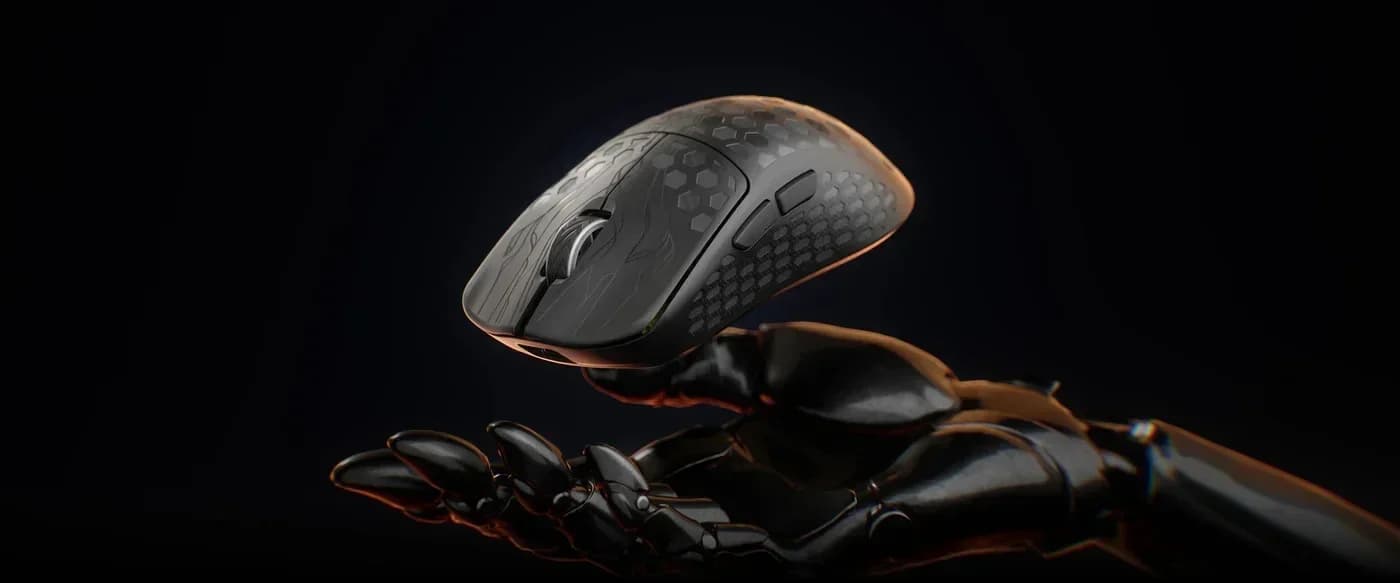
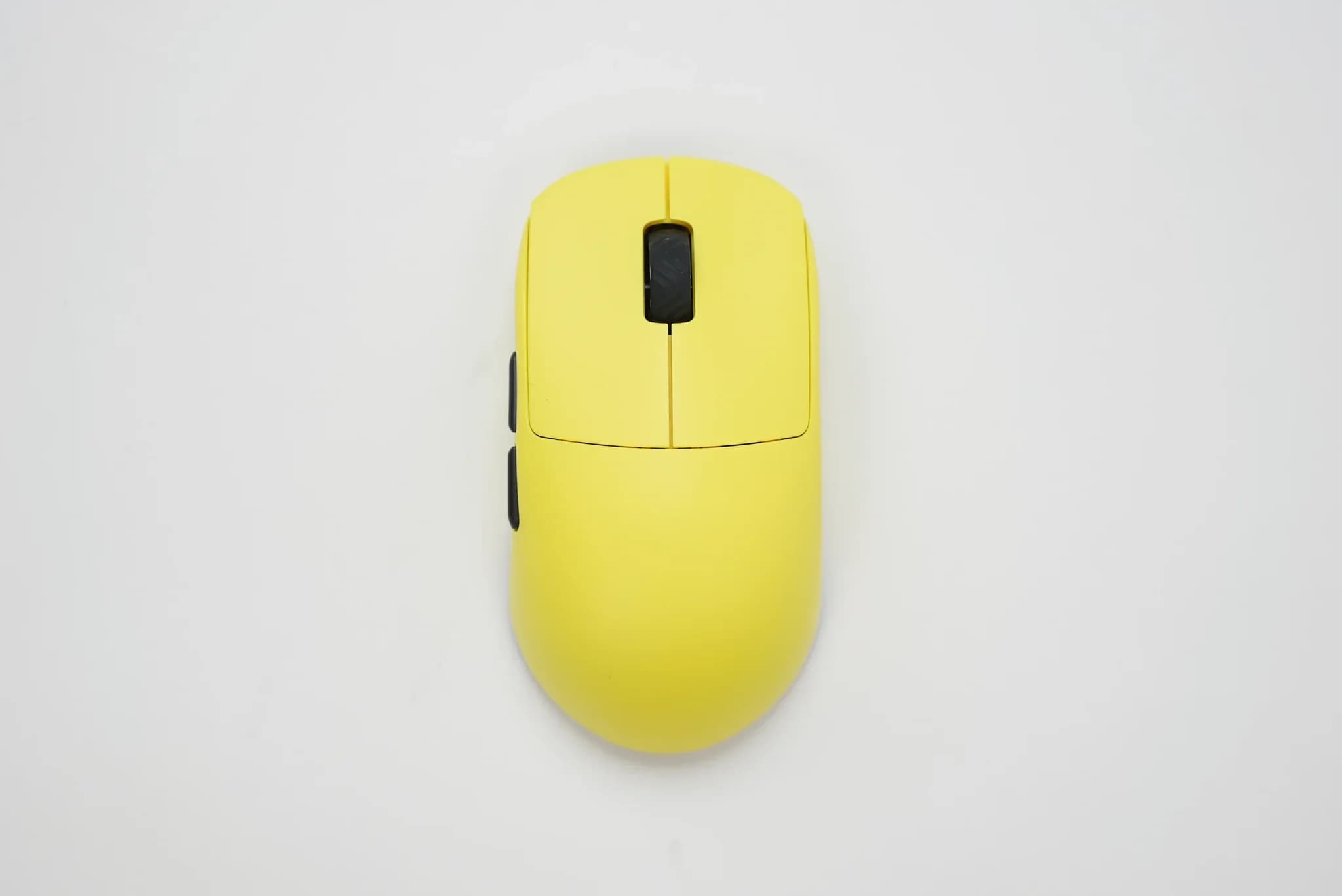
43 grams on the spec sheet, 44 on our own scale, a difference well within measurement error. The Keychron G5 Ultra Light keeps its word on whatever's easiest to check with a ruler and a kitchen scale. What's harder to check is what actually decides whether a lightweight mouse belongs in competitive play: does the sensor ever misbehave, does the battery claim hold up, does 8000Hz polling mean anything beyond a spec table. We spent enough time with the G5 to answer all three, and only one of them comes with a real caveat.
First impression: spare parts included in the box
Before the mouse even reaches your hand, Keychron includes spare feet and so-called dots in the box, small replaceable glide elements. We don't test hardware with swapped-in parts, since that reviews someone's tuning job instead of the actual product, but the fact that the manufacturer assumes the stock feet will wear out and prepares the buyer for that is a concrete, practical gesture. The stock feet glide well from day one, no break-in period.
Shape: a compact build, with a caveat for large hands
The G5 is a compact, symmetrical, low-profile design built with palm and claw grips in mind, not necessarily large hands. We tested it in palm grip, and the first two days required genuine adjustment, mostly from switching off a noticeably larger previous mouse (which weighed 55 grams). A size change of that magnitude changes how the hand controls movement, so an initial "too small, too twitchy" impression is a normal adjustment phase, not a flaw in the mouse itself.
The real test turned out to be a hand with relatively long fingers and a wider grip. At those proportions, the mouse occasionally lifted slightly off the pad during faster movements, an effect of a lift-off distance set too low by default combined with a finger placement that isn't optimal for such a compact shell. The fix turned out to be simple: switching LOD to 2mm in Keychron Launcher, combined with a deliberate correction to finger placement, eliminated the issue entirely. That's not a construction flaw, just a natural consequence of the G5 targeting smaller and medium hands, meaning large, wide hands need to adjust settings instead of expecting the default configuration to be perfect out of the box.
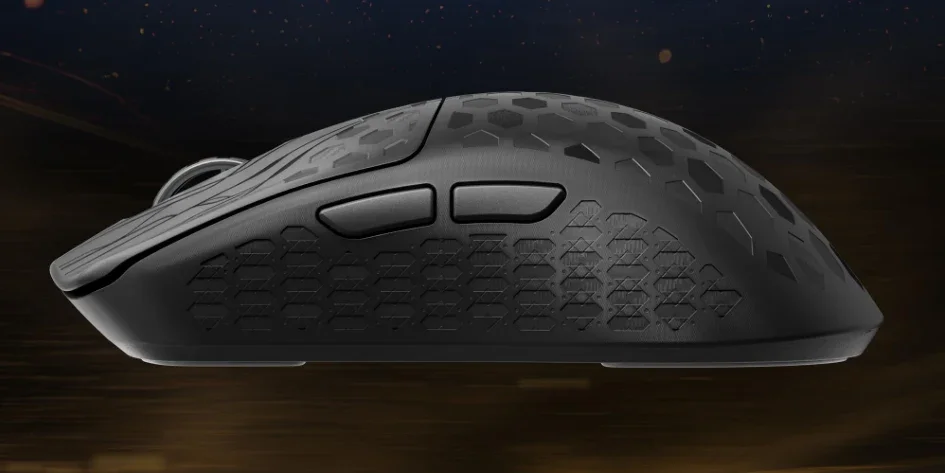
The shell's surface helps where the shape gets demanding. The G5 has a textured, honeycomb-like structure across the sides and top, cut directly into the carbon fiber cover on top of the ABS body, that genuinely improves grip, even once the hand starts sweating during a longer session, without leaving the greasy residue that can ruin a matte shell after weeks of use.
Sensor and tracking: zero issues through the whole test
The PixArt PAW3950 inside the G5 gave us zero problems through the entire test period, in-game and in everyday use alike: zero tracking issues, zero skips, zero situations where you'd have to blame the mousepad instead. Keychron claims a sensitivity range of 100-30,000 DPI, tracking speed up to 750 IPS, acceleration up to 50G, and correct tracking even on glass. Whether you're running low or high DPI in CS2, the sensor simply doesn't let you down.
8000Hz: over cable-free connections too, not just on a spec sheet
One of the more common doubts around mice claiming 8000Hz polling is whether that number only holds over a cable, with wireless quietly delivering less. With the G5, the answer is unambiguous: full 8000Hz is available over both the 2.4GHz wireless connection and wired USB-C, with no hidden ceiling on either. The Polling Rate panel in Keychron Launcher labels the option "Wired/2.4GHz" outright, one shared range for both modes, running from 125Hz all the way to 8000Hz.
What's more interesting than the raw ceiling is how Keychron Launcher lets you consciously manage the power cost of running that high. The "Sensor Sampling Mode" section offers two options: "Standard Mode," described as smooth operation with stable scanning, and "Competitive Mode," with a claimed sensor scan rate of at least 20,000 times per second, lower latency, and higher precision, at the cost of higher power draw. The 2.4GHz connection itself claims 0.41ms of latency. That split is genuinely useful: not every session needs the maximum setting, and the ability to consciously toggle between them instead of being locked into one rigid setting is real control over battery drain.
Battery: a week of gaming on one charge, on Competitive Mode settings
Manufacturer claims (up to 37 hours at 8000Hz, up to 162 hours over Bluetooth) each describe a single, specific mode, so they don't translate directly into mixed real-world use. After charging to 100% once, the mouse lasted roughly a week of regular, multi-hour gaming sessions, running at 2000Hz polling with the sensor's Competitive Mode switched on, a noticeably more power-hungry setup than a default office profile. In our conditions that's a very good result, especially with Competitive Mode and a higher polling rate switched on.
Software: Keychron Launcher
Keychron Launcher runs in the browser, with nothing to install on disk, and despite that apparent simplicity it covers the full set: DPI, polling rate split by sensor mode, macros, lift-off distance, profiles. The interface is clean, responsive, and doesn't bury settings in nested menus. It's one of the best pieces of software we've dealt with for a gaming mouse.
Switches: a light, pleasant click, a scroll wheel that takes getting used to
The main buttons, left and right, have a light, pleasant click, with none of the hollow or plasticky feel that sometimes comes with very light mice. The scroll wheel is a different story: it's stiff and needs noticeably more force than the buttons, as if a rubberized coating is gently braking it, so the first sessions require real adjustment before you stop thinking about it mid-game. It's one of the few parts of the G5 that doesn't click immediately, unlike the rest of the build.
How the G5 plays in CS2
The difference shows up on flicks: the lighter the mouse, the easier it was to land a fast flick onto a target, and the 44 grams are most noticeable in exactly those moments. Precision when stopping the cursor exactly where it needs to be didn't change noticeably compared to the previous mouse, that's more about muscle memory than weight itself.
The side buttons are placed well enough that even gripping harder during tense round moments never triggered an accidental press. Once you've adjusted, the mouse stops being something you have to think about mid-game, including in 1v1 or 1v2 situations under pressure. Even after multi-hour ranked sessions, there was no noticeable hand or wrist fatigue.
DPI, without a dedicated button
The G5 ships with five programmable buttons and a sensitivity range of 100-30,000 DPI, but none of those buttons is a dedicated switch for changing sensitivity on the fly. You can work around it by remapping the function onto one of the other buttons in Keychron Launcher, but then that button is gone for anything else, so it's a workaround, not a real fix. For a player who rarely changes sensitivity mid-session, it's a detail that won't matter. For someone switching between multiple sensitivity profiles within a single game, it's a genuine downside.
Price
$109.99 is the one point in this review where we're confident some readers will hesitate. For that money you get the carbon fiber cover on an ABS body, a sensor that doesn't miss a beat, genuine 8000Hz over both connection modes, and software that rarely disappoints. The justification for that number sits in the sum of those details, not any single argument.
Verdict
The G5 has no weak links in the places where lightweight mice usually cut corners: the sensor, polling, and software all hold up without reservation. The only two real questions left are whether the shape fits your hand and whether $109.99 fits your budget.
Buy it if:
- you have a small or medium hand using palm or claw grip,
- you play mostly CS2 or other FPS titles and want the lowest weight you can get,
- you want genuine 8000Hz both wirelessly and over cable,
- you want software that works right away, with nothing to install on disk.
Think twice if:
- you have a large, wide hand with long fingers, since without LOD tuning and finger-placement adjustment the mouse can lift slightly,
- you change sensitivity mid-game often and want a dedicated DPI button,
- a stiff scroll wheel that needs more force than the buttons would be a real problem for you, not a minor annoyance,
- $109.99 is above what you'd budget for a mouse.
With a realistic read on your own hand size and a willingness to pay top-of-segment pricing, the G5 delivers exactly what it promises.
Comments
Discussion
Join the conversation around this story.
Join the discussion
Sign in to comment and reply to other readers.
Sign inNo comments yet
Start the discussion first.