%22%20fill%3D%22rgb(0%2C0%2C0)%22%20d%3D%22M%201708.71%2032.0719%20L%201711.17%2032.1726%20L%201711.48%2033.8726%20C%201698.63%2068.7557%201678.15%20111.062%201663.25%20146.038%20L%201610.27%20270.222%20C%201600.68%20293.044%201548.56%20422.248%201540.04%20431.57%20C%201533.67%20438.547%201128.18%20599.98%201082.51%20618.503%20L%20896.13%20695.087%20C%20861.529%20708.971%20827.042%20723.139%20792.674%20737.591%20C%20773.372%20745.745%20749.086%20754.449%20732.134%20766.537%20C%20692.666%20794.684%20697.752%20841.911%20698.601%20884.356%20C%20699.702%20939.367%20740.841%20953.958%20782.454%20976.677%20L%20861.67%201020.18%20L%201099.89%201152.37%20C%201107.22%201156.5%201119.88%201164.35%201127.14%201167.58%20C%201169.86%201186.61%201146.74%201195.41%201117.9%201208.29%20C%201100.37%201216.11%201079.03%201225.42%201060.64%201233.58%20C%201010.18%201256.26%20959.538%201278.54%20908.726%201300.43%20C%20894.529%201306.71%20881.754%201312.22%20867.258%201317.69%20C%20862.804%201316.04%20858.4%201314.27%20854.051%201312.36%20C%20836.181%201304.32%20811.094%201289.47%20793.048%201279.86%20L%20667.457%201213.33%20L%20559.157%201156.4%20C%20524.558%201137.94%20487.124%201123.47%20472.687%201083.79%20C%20469.558%201074.97%20467.621%201065.77%20466.927%201056.43%20C%20465.765%201038.59%20466.66%201011.98%20466.668%20993.332%20L%20466.359%20873.615%20C%20465.984%20815.652%20463.947%20757.728%20465.485%20699.747%20C%20465.795%20688.052%20466.054%20675.662%20467.175%20664.054%20C%20469.31%20640.858%20475.406%20618.2%20485.2%20597.064%20C%20517.254%20527.676%20568.707%20508.151%20633.929%20480.324%20L%20726.507%20441.167%20L%201040.13%20310.018%20L%201452.31%20137.782%20L%201616.93%2069.4204%20C%201646.93%2057.0612%201678.5%2043.152%201708.71%2032.0719%20z%22%2F%3E%0D%0A%3Cpath%20transform%3D%22translate(0%2C0)%22%20fill%3D%22rgb(0%2C0%2C0)%22%20d%3D%22M%201180.36%20731.182%20C%201195.24%20733.945%201233.7%20756.876%201248.98%20765.026%20L%201364.16%20826.126%20L%201484.37%20889.381%20C%201498.57%20896.955%201532.42%20914.303%201544.52%20923.261%20C%201557.39%20932.823%201567.44%20945.681%201573.6%20960.477%20C%201577.74%20970.613%201580.28%20981.333%201581.12%20992.25%20C%201582.2%201006.88%201581.3%201032.21%201581.31%201047.95%20L%201581.63%201160.97%20C%201582.26%201211.62%201582.57%201262.29%201582.57%201312.95%20C%201582.44%201333.48%201582.84%201362.18%201581%201382.38%20C%201579.14%201403.66%201573.97%201424.53%201565.69%201444.23%20C%201551.08%201479.78%201525.53%201509.75%201492.74%201529.79%20C%201460.17%201549.9%201412.55%201568.06%201376.2%201583.68%20C%201297.89%201617.01%201219.4%201649.9%201140.72%201682.34%20L%20334.313%202018.15%20C%20339.936%202006.05%20344.516%201995.06%20349.5%201982.67%20C%20380.898%201908.42%20413.985%201834.57%20445.11%201760.02%20C%20459.052%201725.94%20473.375%201692.02%20488.076%201658.26%20C%20492.996%201647.05%20502.305%201624.37%20508.527%201614.93%20C%20525.371%201606.59%20557.563%201594.41%20575.732%201586.98%20L%20705.864%201534%20C%20845.58%201478.27%20984.961%201421.71%201124%201364.32%20L%201246.78%201313.94%20C%201290.4%201295.55%201343.27%201280.12%201348.5%201224.17%20C%201350.49%201202.85%201351.54%201164.6%201346.69%201143.96%20C%201344.6%201134.87%201340.77%201126.27%201335.41%201118.63%20C%201321.45%201099.1%201289.07%201084.29%201267.79%201072.67%20L%201188.51%201029.14%20L%20997.495%20923.267%20L%20933.233%20887.54%20C%20924.86%20882.894%20890.238%20867.795%20898.045%20858.391%20C%20907.874%20846.549%20953.243%20829.416%20967.235%20823.263%20L%201064.01%20780.291%20C%201087.5%20769.837%201111.05%20759.524%201134.65%20749.351%20C%201147.99%20743.555%201166.91%20734.741%201180.36%20731.182%20z%22%2F%3E%0D%0A%3C%2Fsvg%3E)
%22%20fill%3D%22rgb(255%2C255%2C255)%22%20d%3D%22M%201708.71%2032.0719%20L%201711.17%2032.1726%20L%201711.48%2033.8726%20C%201698.63%2068.7557%201678.15%20111.062%201663.25%20146.038%20L%201610.27%20270.222%20C%201600.68%20293.044%201548.56%20422.248%201540.04%20431.57%20C%201533.67%20438.547%201128.18%20599.98%201082.51%20618.503%20L%20896.13%20695.087%20C%20861.529%20708.971%20827.042%20723.139%20792.674%20737.591%20C%20773.372%20745.745%20749.086%20754.449%20732.134%20766.537%20C%20692.666%20794.684%20697.752%20841.911%20698.601%20884.356%20C%20699.702%20939.367%20740.841%20953.958%20782.454%20976.677%20L%20861.67%201020.18%20L%201099.89%201152.37%20C%201107.22%201156.5%201119.88%201164.35%201127.14%201167.58%20C%201169.86%201186.61%201146.74%201195.41%201117.9%201208.29%20C%201100.37%201216.11%201079.03%201225.42%201060.64%201233.58%20C%201010.18%201256.26%20959.538%201278.54%20908.726%201300.43%20C%20894.529%201306.71%20881.754%201312.22%20867.258%201317.69%20C%20862.804%201316.04%20858.4%201314.27%20854.051%201312.36%20C%20836.181%201304.32%20811.094%201289.47%20793.048%201279.86%20L%20667.457%201213.33%20L%20559.157%201156.4%20C%20524.558%201137.94%20487.124%201123.47%20472.687%201083.79%20C%20469.558%201074.97%20467.621%201065.77%20466.927%201056.43%20C%20465.765%201038.59%20466.66%201011.98%20466.668%20993.332%20L%20466.359%20873.615%20C%20465.984%20815.652%20463.947%20757.728%20465.485%20699.747%20C%20465.795%20688.052%20466.054%20675.662%20467.175%20664.054%20C%20469.31%20640.858%20475.406%20618.2%20485.2%20597.064%20C%20517.254%20527.676%20568.707%20508.151%20633.929%20480.324%20L%20726.507%20441.167%20L%201040.13%20310.018%20L%201452.31%20137.782%20L%201616.93%2069.4204%20C%201646.93%2057.0612%201678.5%2043.152%201708.71%2032.0719%20z%22%2F%3E%0D%0A%3Cpath%20transform%3D%22translate(0%2C0)%22%20fill%3D%22rgb(255%2C255%2C255)%22%20d%3D%22M%201180.36%20731.182%20C%201195.24%20733.945%201233.7%20756.876%201248.98%20765.026%20L%201364.16%20826.126%20L%201484.37%20889.381%20C%201498.57%20896.955%201532.42%20914.303%201544.52%20923.261%20C%201557.39%20932.823%201567.44%20945.681%201573.6%20960.477%20C%201577.74%20970.613%201580.28%20981.333%201581.12%20992.25%20C%201582.2%201006.88%201581.3%201032.21%201581.31%201047.95%20L%201581.63%201160.97%20C%201582.26%201211.62%201582.57%201262.29%201582.57%201312.95%20C%201582.44%201333.48%201582.84%201362.18%201581%201382.38%20C%201579.14%201403.66%201573.97%201424.53%201565.69%201444.23%20C%201551.08%201479.78%201525.53%201509.75%201492.74%201529.79%20C%201460.17%201549.9%201412.55%201568.06%201376.2%201583.68%20C%201297.89%201617.01%201219.4%201649.9%201140.72%201682.34%20L%20334.313%202018.15%20C%20339.936%202006.05%20344.516%201995.06%20349.5%201982.67%20C%20380.898%201908.42%20413.985%201834.57%20445.11%201760.02%20C%20459.052%201725.94%20473.375%201692.02%20488.076%201658.26%20C%20492.996%201647.05%20502.305%201624.37%20508.527%201614.93%20C%20525.371%201606.59%20557.563%201594.41%20575.732%201586.98%20L%20705.864%201534%20C%20845.58%201478.27%20984.961%201421.71%201124%201364.32%20L%201246.78%201313.94%20C%201290.4%201295.55%201343.27%201280.12%201348.5%201224.17%20C%201350.49%201202.85%201351.54%201164.6%201346.69%201143.96%20C%201344.6%201134.87%201340.77%201126.27%201335.41%201118.63%20C%201321.45%201099.1%201289.07%201084.29%201267.79%201072.67%20L%201188.51%201029.14%20L%20997.495%20923.267%20L%20933.233%20887.54%20C%20924.86%20882.894%20890.238%20867.795%20898.045%20858.391%20C%20907.874%20846.549%20953.243%20829.416%20967.235%20823.263%20L%201064.01%20780.291%20C%201087.5%20769.837%201111.05%20759.524%201134.65%20749.351%20C%201147.99%20743.555%201166.91%20734.741%201180.36%20731.182%20z%22%2F%3E%0D%0A%3C%2Fsvg%3E)
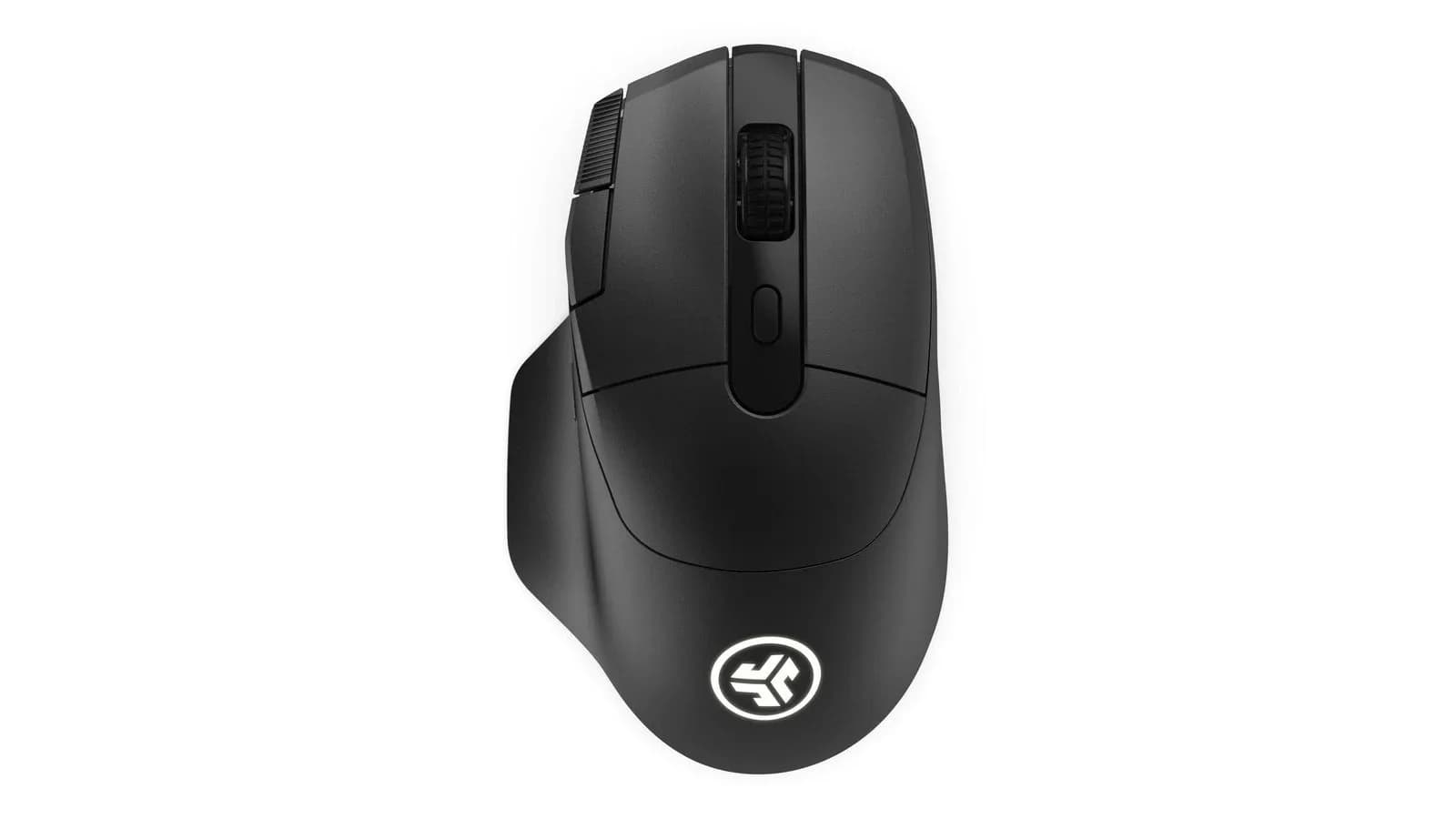
JLab's own software thinks our mouse is a different mouse. Lab detected the Daybreak Wireless Gaming Mouse as another device model, and as a result not a single setting could be changed, be it DPI, buttons or macros. The mouse works straight out of the box, is comfortable and has good specs, so as an everyday work mouse it does the job. Everything else the "gaming" label promises depends on software that can't read it, and on a $100 launch price (the manufacturer's store shows $122.99 today) that is hard to defend against the competition.
Shape and comfort: an everyday mouse for work and casual play
The body is large, ergonomic and made for right-handed users. The shape is comfortable and it is the strongest point of this mouse: it sits well in the hand by itself and holds up as an everyday mouse. The manufacturer claims a weight of 53 grams, which is low for a body this big.
We have to be clear about what this design is not for, though. A large, ergonomic shape with nine buttons and a four-way D-pad under the thumb is a build for work and casual play, and in no way for FPS games. In CS2 or Valorant you want a small, light, symmetrical body, and the Daybreak is its opposite. We say it for the buyer who reads the "gaming" label and expects an all-purpose shooting mouse.
Buttons and the D-pad
The mouse has nine programmable buttons and a four-way D-pad under the thumb, which leaves plenty of room for shortcuts in RPGs, MMOs and office work. Reviewers abroad write that this unusual layout takes a few days to get used to, and that the back and forward buttons on the top edge can be awkward to reach. They also point at the weak tactile feedback of the DPI button. For someone who plays simple shooters, the extra buttons will be redundant.
Work first: two devices and a long battery
Where the Daybreak makes the most sense is the desk at work. Bluetooth 5.4 holds two devices at once, so one mouse can serve a laptop and a desktop, and the dongle takes over when you want the lowest latency. More than 80 hours of battery, according to the manufacturer, means charging over USB-C once in a long while. Those are features a large ergonomic mouse should have, and here they work in the buyer's favor.
Sensor and connectivity: decent specs
Inside sits a PixArt PAW3395, a sensor known from many pricier mice, with a range of 650 to 26,000 DPI, a maximum speed of 650 IPS and 50 g acceleration, plus Motion Sync. The specs are good. The mouse connects through the LabSpeed 2.4 GHz dongle (USB-A) or over Bluetooth 5.4 to two devices at once, charges over USB-C, and the manufacturer says the battery should last more than 80 hours.
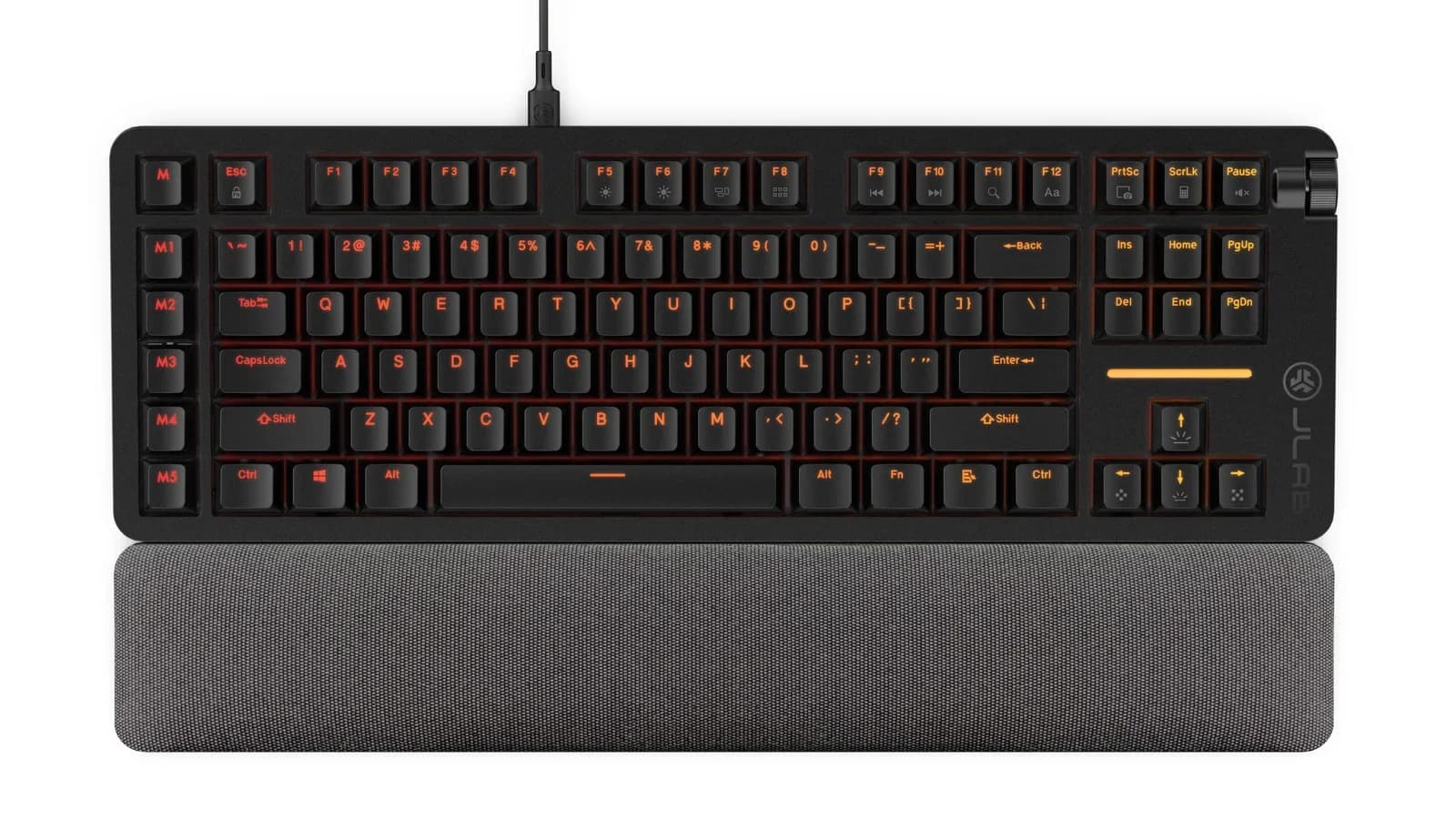
The weaker point is the polling rate. The mouse runs at 1000 Hz and drops to 125 Hz over Bluetooth, a limit of the protocol itself. Those are ordinary numbers and plenty for work. The problem shows up next to the keyboard from the same series, which runs at 8000 Hz: the manufacturer plays up that figure on one device and skips it on the other. If you wonder whether higher polling matters for you at all, we wrote it up in our 8000 Hz guide.
Software: the mouse the app can't see
This is the main problem with the device. JLab Lab detected the mouse as another model and wouldn't let us change any setting. We were left with what the mouse does at the factory, with no way to assign macros, remap buttons or change the polling rate. For a mouse with nine programmable buttons that is a serious limitation, because its entire value lies in being able to assign those buttons.
The app carries a beta label anyway, and its lack of polish shows on the keyboard too, as we describe in its review. With the mouse it stands out more than with the other devices: hardware that works for a moment loses its point when you can't configure it your way.
Build
The shell is plastic and feels utilitarian, without traits of a top-shelf product. There is an illuminated JLab logo at the back, and otherwise the mouse is all black and understated. At $100 there is no reason to expect exotic materials, but you don't get a single element of build that sets it apart from the competition either.
Price against the competition
The launch price of the Daybreak Wireless is $99.99, but the manufacturer's store shows $122.99 today. At that level the market is unusually crowded. The Scyrox V8 we reviewed costs around 75 euros and has an 8K dongle, and in our roundup of Chinese FPS mice we cover models that cost $30 to $40. On the shelf of light shooter mice, like the 49-gram Razer Viper V4 Pro, the Daybreak has no business, because it plays in a different category.
JLab's lower Midnight series has a $70 mouse, also at 1000 Hz polling. The $30 gap therefore has to be justified by the sensor, the button count and the D-pad alone, and with the software problem that is hard to call obvious.
Who it makes sense for
For someone looking for a comfortable everyday mouse for work and casual gaming, with many buttons for shortcuts and a battery that lasts. That person doesn't need configuration or low weight, and the shape is comfortable. We don't recommend it to FPS players or to anyone who wants to program buttons, because on our unit JLab's software allowed no changes at all.
The JLab Daybreak Wireless Gaming Mouse is a comfortable everyday mouse with good specs and weak software. The shape is comfortable, and the PAW3395 sensor gives more than the average user will ever use. As a device for "the office with the occasional game" it works fine.
JLab's software detected the mouse as another model and blocked every settings change. In our view that is a fundamental fault: nine programmable buttons that we couldn't program is an empty promise from the label. Add a shape unsuited to FPS games and 1000 Hz polling next to a keyboard from the same series at 8000 Hz.
For $100, let alone $123, the market offers more: lighter mice with higher polling, and on a budget scale simply cheaper ones. The Daybreak is fine as a mid-range product, but in the segment where JLab wants to compete it falls behind.
Recommendation: if you want a comfortable mouse for everyday use, wait for a discount or pick another model. For online shooters get a lighter mouse, and if you want certainty that the software will handle your settings, wait for a more mature version of Lab.
Comments
Discussion
Join the conversation around this story.
Join the discussion
Sign in to comment and reply to other readers.
Sign inNo comments yet
Start the discussion first.