%22%20fill%3D%22rgb(0%2C0%2C0)%22%20d%3D%22M%201708.71%2032.0719%20L%201711.17%2032.1726%20L%201711.48%2033.8726%20C%201698.63%2068.7557%201678.15%20111.062%201663.25%20146.038%20L%201610.27%20270.222%20C%201600.68%20293.044%201548.56%20422.248%201540.04%20431.57%20C%201533.67%20438.547%201128.18%20599.98%201082.51%20618.503%20L%20896.13%20695.087%20C%20861.529%20708.971%20827.042%20723.139%20792.674%20737.591%20C%20773.372%20745.745%20749.086%20754.449%20732.134%20766.537%20C%20692.666%20794.684%20697.752%20841.911%20698.601%20884.356%20C%20699.702%20939.367%20740.841%20953.958%20782.454%20976.677%20L%20861.67%201020.18%20L%201099.89%201152.37%20C%201107.22%201156.5%201119.88%201164.35%201127.14%201167.58%20C%201169.86%201186.61%201146.74%201195.41%201117.9%201208.29%20C%201100.37%201216.11%201079.03%201225.42%201060.64%201233.58%20C%201010.18%201256.26%20959.538%201278.54%20908.726%201300.43%20C%20894.529%201306.71%20881.754%201312.22%20867.258%201317.69%20C%20862.804%201316.04%20858.4%201314.27%20854.051%201312.36%20C%20836.181%201304.32%20811.094%201289.47%20793.048%201279.86%20L%20667.457%201213.33%20L%20559.157%201156.4%20C%20524.558%201137.94%20487.124%201123.47%20472.687%201083.79%20C%20469.558%201074.97%20467.621%201065.77%20466.927%201056.43%20C%20465.765%201038.59%20466.66%201011.98%20466.668%20993.332%20L%20466.359%20873.615%20C%20465.984%20815.652%20463.947%20757.728%20465.485%20699.747%20C%20465.795%20688.052%20466.054%20675.662%20467.175%20664.054%20C%20469.31%20640.858%20475.406%20618.2%20485.2%20597.064%20C%20517.254%20527.676%20568.707%20508.151%20633.929%20480.324%20L%20726.507%20441.167%20L%201040.13%20310.018%20L%201452.31%20137.782%20L%201616.93%2069.4204%20C%201646.93%2057.0612%201678.5%2043.152%201708.71%2032.0719%20z%22%2F%3E%0D%0A%3Cpath%20transform%3D%22translate(0%2C0)%22%20fill%3D%22rgb(0%2C0%2C0)%22%20d%3D%22M%201180.36%20731.182%20C%201195.24%20733.945%201233.7%20756.876%201248.98%20765.026%20L%201364.16%20826.126%20L%201484.37%20889.381%20C%201498.57%20896.955%201532.42%20914.303%201544.52%20923.261%20C%201557.39%20932.823%201567.44%20945.681%201573.6%20960.477%20C%201577.74%20970.613%201580.28%20981.333%201581.12%20992.25%20C%201582.2%201006.88%201581.3%201032.21%201581.31%201047.95%20L%201581.63%201160.97%20C%201582.26%201211.62%201582.57%201262.29%201582.57%201312.95%20C%201582.44%201333.48%201582.84%201362.18%201581%201382.38%20C%201579.14%201403.66%201573.97%201424.53%201565.69%201444.23%20C%201551.08%201479.78%201525.53%201509.75%201492.74%201529.79%20C%201460.17%201549.9%201412.55%201568.06%201376.2%201583.68%20C%201297.89%201617.01%201219.4%201649.9%201140.72%201682.34%20L%20334.313%202018.15%20C%20339.936%202006.05%20344.516%201995.06%20349.5%201982.67%20C%20380.898%201908.42%20413.985%201834.57%20445.11%201760.02%20C%20459.052%201725.94%20473.375%201692.02%20488.076%201658.26%20C%20492.996%201647.05%20502.305%201624.37%20508.527%201614.93%20C%20525.371%201606.59%20557.563%201594.41%20575.732%201586.98%20L%20705.864%201534%20C%20845.58%201478.27%20984.961%201421.71%201124%201364.32%20L%201246.78%201313.94%20C%201290.4%201295.55%201343.27%201280.12%201348.5%201224.17%20C%201350.49%201202.85%201351.54%201164.6%201346.69%201143.96%20C%201344.6%201134.87%201340.77%201126.27%201335.41%201118.63%20C%201321.45%201099.1%201289.07%201084.29%201267.79%201072.67%20L%201188.51%201029.14%20L%20997.495%20923.267%20L%20933.233%20887.54%20C%20924.86%20882.894%20890.238%20867.795%20898.045%20858.391%20C%20907.874%20846.549%20953.243%20829.416%20967.235%20823.263%20L%201064.01%20780.291%20C%201087.5%20769.837%201111.05%20759.524%201134.65%20749.351%20C%201147.99%20743.555%201166.91%20734.741%201180.36%20731.182%20z%22%2F%3E%0D%0A%3C%2Fsvg%3E)
%22%20fill%3D%22rgb(255%2C255%2C255)%22%20d%3D%22M%201708.71%2032.0719%20L%201711.17%2032.1726%20L%201711.48%2033.8726%20C%201698.63%2068.7557%201678.15%20111.062%201663.25%20146.038%20L%201610.27%20270.222%20C%201600.68%20293.044%201548.56%20422.248%201540.04%20431.57%20C%201533.67%20438.547%201128.18%20599.98%201082.51%20618.503%20L%20896.13%20695.087%20C%20861.529%20708.971%20827.042%20723.139%20792.674%20737.591%20C%20773.372%20745.745%20749.086%20754.449%20732.134%20766.537%20C%20692.666%20794.684%20697.752%20841.911%20698.601%20884.356%20C%20699.702%20939.367%20740.841%20953.958%20782.454%20976.677%20L%20861.67%201020.18%20L%201099.89%201152.37%20C%201107.22%201156.5%201119.88%201164.35%201127.14%201167.58%20C%201169.86%201186.61%201146.74%201195.41%201117.9%201208.29%20C%201100.37%201216.11%201079.03%201225.42%201060.64%201233.58%20C%201010.18%201256.26%20959.538%201278.54%20908.726%201300.43%20C%20894.529%201306.71%20881.754%201312.22%20867.258%201317.69%20C%20862.804%201316.04%20858.4%201314.27%20854.051%201312.36%20C%20836.181%201304.32%20811.094%201289.47%20793.048%201279.86%20L%20667.457%201213.33%20L%20559.157%201156.4%20C%20524.558%201137.94%20487.124%201123.47%20472.687%201083.79%20C%20469.558%201074.97%20467.621%201065.77%20466.927%201056.43%20C%20465.765%201038.59%20466.66%201011.98%20466.668%20993.332%20L%20466.359%20873.615%20C%20465.984%20815.652%20463.947%20757.728%20465.485%20699.747%20C%20465.795%20688.052%20466.054%20675.662%20467.175%20664.054%20C%20469.31%20640.858%20475.406%20618.2%20485.2%20597.064%20C%20517.254%20527.676%20568.707%20508.151%20633.929%20480.324%20L%20726.507%20441.167%20L%201040.13%20310.018%20L%201452.31%20137.782%20L%201616.93%2069.4204%20C%201646.93%2057.0612%201678.5%2043.152%201708.71%2032.0719%20z%22%2F%3E%0D%0A%3Cpath%20transform%3D%22translate(0%2C0)%22%20fill%3D%22rgb(255%2C255%2C255)%22%20d%3D%22M%201180.36%20731.182%20C%201195.24%20733.945%201233.7%20756.876%201248.98%20765.026%20L%201364.16%20826.126%20L%201484.37%20889.381%20C%201498.57%20896.955%201532.42%20914.303%201544.52%20923.261%20C%201557.39%20932.823%201567.44%20945.681%201573.6%20960.477%20C%201577.74%20970.613%201580.28%20981.333%201581.12%20992.25%20C%201582.2%201006.88%201581.3%201032.21%201581.31%201047.95%20L%201581.63%201160.97%20C%201582.26%201211.62%201582.57%201262.29%201582.57%201312.95%20C%201582.44%201333.48%201582.84%201362.18%201581%201382.38%20C%201579.14%201403.66%201573.97%201424.53%201565.69%201444.23%20C%201551.08%201479.78%201525.53%201509.75%201492.74%201529.79%20C%201460.17%201549.9%201412.55%201568.06%201376.2%201583.68%20C%201297.89%201617.01%201219.4%201649.9%201140.72%201682.34%20L%20334.313%202018.15%20C%20339.936%202006.05%20344.516%201995.06%20349.5%201982.67%20C%20380.898%201908.42%20413.985%201834.57%20445.11%201760.02%20C%20459.052%201725.94%20473.375%201692.02%20488.076%201658.26%20C%20492.996%201647.05%20502.305%201624.37%20508.527%201614.93%20C%20525.371%201606.59%20557.563%201594.41%20575.732%201586.98%20L%20705.864%201534%20C%20845.58%201478.27%20984.961%201421.71%201124%201364.32%20L%201246.78%201313.94%20C%201290.4%201295.55%201343.27%201280.12%201348.5%201224.17%20C%201350.49%201202.85%201351.54%201164.6%201346.69%201143.96%20C%201344.6%201134.87%201340.77%201126.27%201335.41%201118.63%20C%201321.45%201099.1%201289.07%201084.29%201267.79%201072.67%20L%201188.51%201029.14%20L%20997.495%20923.267%20L%20933.233%20887.54%20C%20924.86%20882.894%20890.238%20867.795%20898.045%20858.391%20C%20907.874%20846.549%20953.243%20829.416%20967.235%20823.263%20L%201064.01%20780.291%20C%201087.5%20769.837%201111.05%20759.524%201134.65%20749.351%20C%201147.99%20743.555%201166.91%20734.741%201180.36%20731.182%20z%22%2F%3E%0D%0A%3C%2Fsvg%3E)

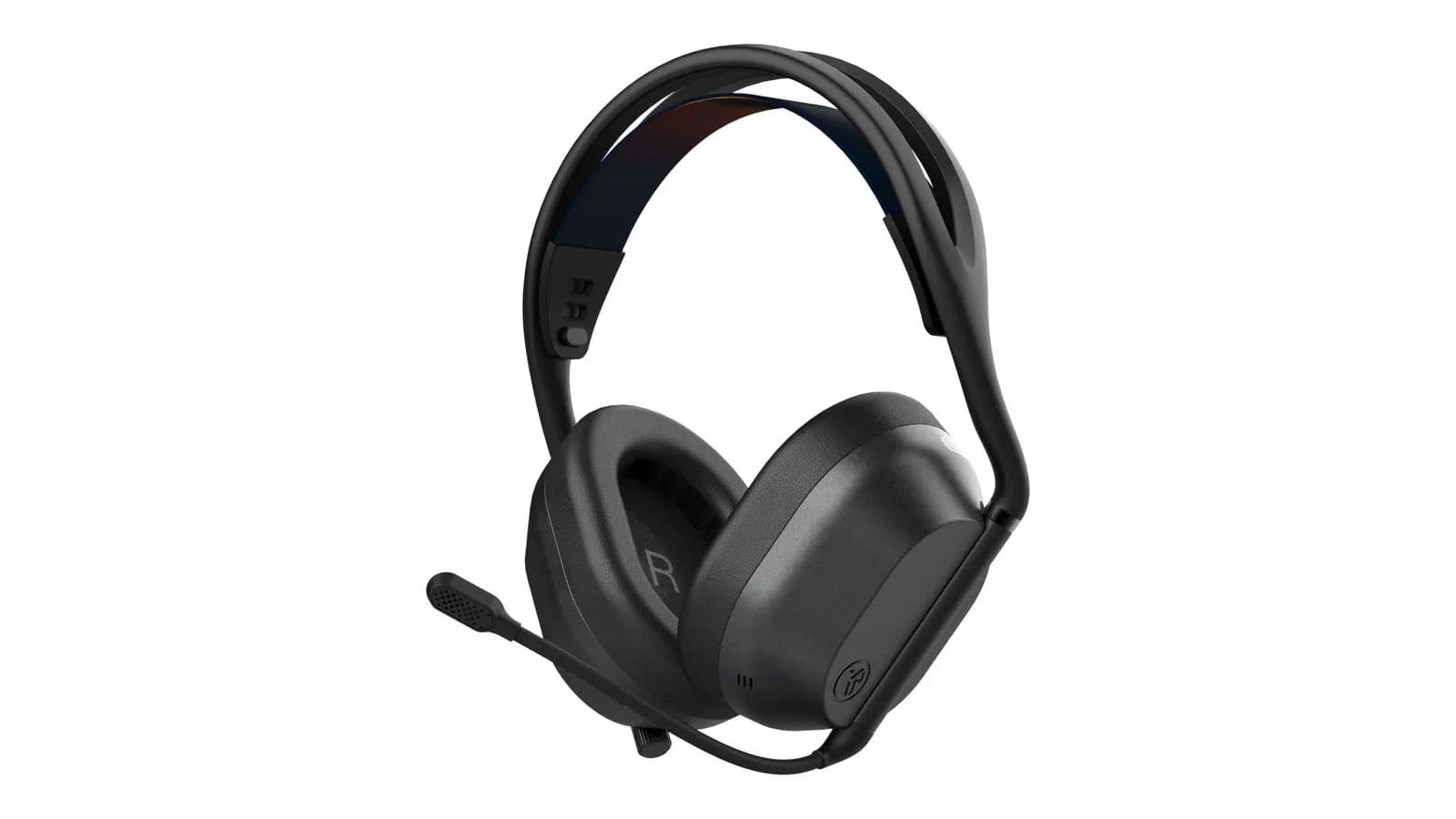
A headset that switches itself off after five seconds of silence, with audio that stutters until it notices the PC is playing sound again. That is how we met the JLab Daybreak Wireless Gaming Headset, and it was easy to blame a single faulty unit. It turned out the problem went away after changing the port: the dongle plugged in through a USB-A adapter caused it, and the same dongle plugged straight into USB-C worked without a fault. The story sums up the whole headset. It works well in many areas, and the details that spoil the first hours only show up the first time you plug it in.
What you get and how it connects
The Daybreak Wireless is an over-ear headset with two dynamic drivers (50 mm and 20 mm) and DTS Headphone:X support. It connects three ways: through the LabSpeed 2.4 GHz dongle with a USB-C plug and a claimed latency of about 25 ms (meant for PC and PlayStation), over Bluetooth 5.3, or with a 3.5 mm cable. It can hold two sources at once, and a switch on the earcup changes between dongle and Bluetooth. JLab rates battery life at more than 70 hours on the dongle and more than 100 hours over Bluetooth, and a 10-minute quick charge should give roughly 10 hours of play.
That is the connectivity you expect from a $130 gaming headset, and the spec sheet has no holes. The trouble starts on first use.
The shutoff problem: a different port fixed it
The headset switched off after about five seconds without sound. On its own that could be ordinary battery saving, if not for the side effect: when the PC started playing again the headset had to detect it anew, and during that time the audio stuttered. Every return to sound after a longer silence started with a ragged first moment.
We found the fix by trial. The dongle has a USB-C plug, and we were connecting it to the PC through a USB-A adapter. After removing the adapter and plugging the dongle straight into a USB-C port, the problem disappeared. If your computer only has USB-A, which is the norm on many desktops, it is hard to say whether you will hit the same issue, but it is worth weighing before you buy. Check it in the first week and keep the option to return it.
Sound: versatile, but without an FPS character
Overall the headset sounds fine and is pleasant to listen to. The two drivers give a clear top end and a sensible bass, and the sound stays consistent across films, music and story-driven games. In productions like The Witcher or Red Dead Redemption 2, where atmosphere, music and space matter, the Daybreak works very well and we can recommend it there.
The tuning suits films, music and story games. In online shooters, where you need to pick up footsteps and direction quickly, the headset lacks the character you expect from an FPS-oriented model. We wouldn't recommend it to CS2, Valorant or Call of Duty players, because in those games every positioning detail counts, and the Daybreak plays for a different listener than its "gaming" label suggests.
The microphone: average
The microphone is average, and that is all you can honestly say about it. The detachable boom with noise reduction (ENC) offers quick mute when you flip it up and a "hear yourself" mode, and those are good extras, but the voice quality doesn't rise above average. It is enough for talking in games. For recording, streaming and professional work, where tone and clarity matter, you need a separate microphone.
At $130, and even more at $172, we expect more, because the mic is half of any gaming headset. An average mic suits gear in the $60 to $70 range. A model that puts itself on the top shelf should have a better one.
One headset for PC, console and phone
The Daybreak's biggest asset is flexibility. The 2.4 GHz dongle serves a PC and a PlayStation, Bluetooth connects the headset to a phone or tablet, and the 3.5 mm cable helps anywhere a wireless option is missing. Holding two connections at once means you can play on the PC and take calls on the phone without re-pairing anything. For someone who doesn't want three headsets at home, that is a sensible argument.
The battery rounds it out: more than 100 hours over Bluetooth turns the headset into something you forget about for months, and quick charging saves the day after the cell runs flat. Those are parameters that impress in daily use more than any figure about the drivers.
Comfort and build
The box includes two sets of swappable earcups: faux leather and sport fabric, in Cloud Foam housings. The wide suspension headband spreads pressure over the head. Synthetic leather gets warm during long sessions, so the fabric set is the more sensible option for marathon play. The whole construction is plastic, with none of the metal reinforcement you find in pricier headsets.
Software: the same beta as the keyboard and mouse
The headset uses JLab's Lab app, the same one used for the keyboard and mouse, and it carries the same beta label. It lets you build an equalizer, assign buttons and adjust volume. We cover the app's maturity in more detail in the keyboard and mouse reviews, where Lab detected the device as a different model and blocked every setting change.
Price against the competition
The launch price of the Daybreak Wireless is $129.99, but the manufacturer's store shows $172.19 today. At either price you can pick gear that does its job better, and at the second the gap grows to $40 to $70. The SteelSeries Arctis Nova 5 costs around $130 and delivers over 60 hours of battery, 2.4 GHz plus Bluetooth and an extensive set of sound presets. The Razer BlackShark V3 X HyperSpeed at around $100 has 50 mm drivers, a cardioid microphone and 70 hours of battery, and aims straight at online shooter players. The Daybreak plays on versatility, but versatility stops being an argument when the competition does the same thing cheaper or better.
It is worth looking at JLab's own lineup too. In the lower Midnight series a headset with a 50 mm driver and an estimated battery of over 70 hours costs $100. The Daybreak adds a second, smaller driver and DTS for $30. That is a small gap for a jump from one series to the next, and it makes the Daybreak's price harder to defend.
Who it makes sense for
For someone who mostly plays story-driven and single-player games, listens to plenty of music and films, and wants one headset for PC, console and phone with long battery life and source switching. For that person the compromises in positioning and the microphone won't matter. We wouldn't recommend it to FPS players, to anyone who needs a good mic for calls and recording, or to people whose computer has only USB-A ports and who don't want to test whether the dongle behaves.
The JLab Daybreak Wireless is a pleasant, versatile headset without an FPS character, and at $130, let alone $172, it is hard to call a deal. Battery, connectivity and build give it a decent base, and in story games the sound does its job.
The biggest letdown is how the dongle behaves. A headset that switches off after five seconds of silence and chops the audio when it restarts has a flaw you spot in the first hour, and it shouldn't reach a product sold as top shelf. That only a change of port fixed it gives, in our view, the impression of missing tests on typical computers.
The microphone is average, and a beta app completes the picture of a device that fits the mid-range better than the segment JLab wants to compete in. For this money the Razer BlackShark V3 X HyperSpeed gives online players more, and the Arctis Nova 5 gives more versatility.
Recommendation: if you play story-driven games and want a universal headset, buy it only at a price close to the $130 launch level or lower, and plug the dongle straight into USB-C. For shooters pick something else. JLab would do better in the budget segment, where these traits wouldn't clash with the price.
Comments
Discussion
Join the conversation around this story.
Join the discussion
Sign in to comment and reply to other readers.
Sign inNo comments yet
Start the discussion first.