%22%20fill%3D%22rgb(0%2C0%2C0)%22%20d%3D%22M%201708.71%2032.0719%20L%201711.17%2032.1726%20L%201711.48%2033.8726%20C%201698.63%2068.7557%201678.15%20111.062%201663.25%20146.038%20L%201610.27%20270.222%20C%201600.68%20293.044%201548.56%20422.248%201540.04%20431.57%20C%201533.67%20438.547%201128.18%20599.98%201082.51%20618.503%20L%20896.13%20695.087%20C%20861.529%20708.971%20827.042%20723.139%20792.674%20737.591%20C%20773.372%20745.745%20749.086%20754.449%20732.134%20766.537%20C%20692.666%20794.684%20697.752%20841.911%20698.601%20884.356%20C%20699.702%20939.367%20740.841%20953.958%20782.454%20976.677%20L%20861.67%201020.18%20L%201099.89%201152.37%20C%201107.22%201156.5%201119.88%201164.35%201127.14%201167.58%20C%201169.86%201186.61%201146.74%201195.41%201117.9%201208.29%20C%201100.37%201216.11%201079.03%201225.42%201060.64%201233.58%20C%201010.18%201256.26%20959.538%201278.54%20908.726%201300.43%20C%20894.529%201306.71%20881.754%201312.22%20867.258%201317.69%20C%20862.804%201316.04%20858.4%201314.27%20854.051%201312.36%20C%20836.181%201304.32%20811.094%201289.47%20793.048%201279.86%20L%20667.457%201213.33%20L%20559.157%201156.4%20C%20524.558%201137.94%20487.124%201123.47%20472.687%201083.79%20C%20469.558%201074.97%20467.621%201065.77%20466.927%201056.43%20C%20465.765%201038.59%20466.66%201011.98%20466.668%20993.332%20L%20466.359%20873.615%20C%20465.984%20815.652%20463.947%20757.728%20465.485%20699.747%20C%20465.795%20688.052%20466.054%20675.662%20467.175%20664.054%20C%20469.31%20640.858%20475.406%20618.2%20485.2%20597.064%20C%20517.254%20527.676%20568.707%20508.151%20633.929%20480.324%20L%20726.507%20441.167%20L%201040.13%20310.018%20L%201452.31%20137.782%20L%201616.93%2069.4204%20C%201646.93%2057.0612%201678.5%2043.152%201708.71%2032.0719%20z%22%2F%3E%0D%0A%3Cpath%20transform%3D%22translate(0%2C0)%22%20fill%3D%22rgb(0%2C0%2C0)%22%20d%3D%22M%201180.36%20731.182%20C%201195.24%20733.945%201233.7%20756.876%201248.98%20765.026%20L%201364.16%20826.126%20L%201484.37%20889.381%20C%201498.57%20896.955%201532.42%20914.303%201544.52%20923.261%20C%201557.39%20932.823%201567.44%20945.681%201573.6%20960.477%20C%201577.74%20970.613%201580.28%20981.333%201581.12%20992.25%20C%201582.2%201006.88%201581.3%201032.21%201581.31%201047.95%20L%201581.63%201160.97%20C%201582.26%201211.62%201582.57%201262.29%201582.57%201312.95%20C%201582.44%201333.48%201582.84%201362.18%201581%201382.38%20C%201579.14%201403.66%201573.97%201424.53%201565.69%201444.23%20C%201551.08%201479.78%201525.53%201509.75%201492.74%201529.79%20C%201460.17%201549.9%201412.55%201568.06%201376.2%201583.68%20C%201297.89%201617.01%201219.4%201649.9%201140.72%201682.34%20L%20334.313%202018.15%20C%20339.936%202006.05%20344.516%201995.06%20349.5%201982.67%20C%20380.898%201908.42%20413.985%201834.57%20445.11%201760.02%20C%20459.052%201725.94%20473.375%201692.02%20488.076%201658.26%20C%20492.996%201647.05%20502.305%201624.37%20508.527%201614.93%20C%20525.371%201606.59%20557.563%201594.41%20575.732%201586.98%20L%20705.864%201534%20C%20845.58%201478.27%20984.961%201421.71%201124%201364.32%20L%201246.78%201313.94%20C%201290.4%201295.55%201343.27%201280.12%201348.5%201224.17%20C%201350.49%201202.85%201351.54%201164.6%201346.69%201143.96%20C%201344.6%201134.87%201340.77%201126.27%201335.41%201118.63%20C%201321.45%201099.1%201289.07%201084.29%201267.79%201072.67%20L%201188.51%201029.14%20L%20997.495%20923.267%20L%20933.233%20887.54%20C%20924.86%20882.894%20890.238%20867.795%20898.045%20858.391%20C%20907.874%20846.549%20953.243%20829.416%20967.235%20823.263%20L%201064.01%20780.291%20C%201087.5%20769.837%201111.05%20759.524%201134.65%20749.351%20C%201147.99%20743.555%201166.91%20734.741%201180.36%20731.182%20z%22%2F%3E%0D%0A%3C%2Fsvg%3E)
%22%20fill%3D%22rgb(255%2C255%2C255)%22%20d%3D%22M%201708.71%2032.0719%20L%201711.17%2032.1726%20L%201711.48%2033.8726%20C%201698.63%2068.7557%201678.15%20111.062%201663.25%20146.038%20L%201610.27%20270.222%20C%201600.68%20293.044%201548.56%20422.248%201540.04%20431.57%20C%201533.67%20438.547%201128.18%20599.98%201082.51%20618.503%20L%20896.13%20695.087%20C%20861.529%20708.971%20827.042%20723.139%20792.674%20737.591%20C%20773.372%20745.745%20749.086%20754.449%20732.134%20766.537%20C%20692.666%20794.684%20697.752%20841.911%20698.601%20884.356%20C%20699.702%20939.367%20740.841%20953.958%20782.454%20976.677%20L%20861.67%201020.18%20L%201099.89%201152.37%20C%201107.22%201156.5%201119.88%201164.35%201127.14%201167.58%20C%201169.86%201186.61%201146.74%201195.41%201117.9%201208.29%20C%201100.37%201216.11%201079.03%201225.42%201060.64%201233.58%20C%201010.18%201256.26%20959.538%201278.54%20908.726%201300.43%20C%20894.529%201306.71%20881.754%201312.22%20867.258%201317.69%20C%20862.804%201316.04%20858.4%201314.27%20854.051%201312.36%20C%20836.181%201304.32%20811.094%201289.47%20793.048%201279.86%20L%20667.457%201213.33%20L%20559.157%201156.4%20C%20524.558%201137.94%20487.124%201123.47%20472.687%201083.79%20C%20469.558%201074.97%20467.621%201065.77%20466.927%201056.43%20C%20465.765%201038.59%20466.66%201011.98%20466.668%20993.332%20L%20466.359%20873.615%20C%20465.984%20815.652%20463.947%20757.728%20465.485%20699.747%20C%20465.795%20688.052%20466.054%20675.662%20467.175%20664.054%20C%20469.31%20640.858%20475.406%20618.2%20485.2%20597.064%20C%20517.254%20527.676%20568.707%20508.151%20633.929%20480.324%20L%20726.507%20441.167%20L%201040.13%20310.018%20L%201452.31%20137.782%20L%201616.93%2069.4204%20C%201646.93%2057.0612%201678.5%2043.152%201708.71%2032.0719%20z%22%2F%3E%0D%0A%3Cpath%20transform%3D%22translate(0%2C0)%22%20fill%3D%22rgb(255%2C255%2C255)%22%20d%3D%22M%201180.36%20731.182%20C%201195.24%20733.945%201233.7%20756.876%201248.98%20765.026%20L%201364.16%20826.126%20L%201484.37%20889.381%20C%201498.57%20896.955%201532.42%20914.303%201544.52%20923.261%20C%201557.39%20932.823%201567.44%20945.681%201573.6%20960.477%20C%201577.74%20970.613%201580.28%20981.333%201581.12%20992.25%20C%201582.2%201006.88%201581.3%201032.21%201581.31%201047.95%20L%201581.63%201160.97%20C%201582.26%201211.62%201582.57%201262.29%201582.57%201312.95%20C%201582.44%201333.48%201582.84%201362.18%201581%201382.38%20C%201579.14%201403.66%201573.97%201424.53%201565.69%201444.23%20C%201551.08%201479.78%201525.53%201509.75%201492.74%201529.79%20C%201460.17%201549.9%201412.55%201568.06%201376.2%201583.68%20C%201297.89%201617.01%201219.4%201649.9%201140.72%201682.34%20L%20334.313%202018.15%20C%20339.936%202006.05%20344.516%201995.06%20349.5%201982.67%20C%20380.898%201908.42%20413.985%201834.57%20445.11%201760.02%20C%20459.052%201725.94%20473.375%201692.02%20488.076%201658.26%20C%20492.996%201647.05%20502.305%201624.37%20508.527%201614.93%20C%20525.371%201606.59%20557.563%201594.41%20575.732%201586.98%20L%20705.864%201534%20C%20845.58%201478.27%20984.961%201421.71%201124%201364.32%20L%201246.78%201313.94%20C%201290.4%201295.55%201343.27%201280.12%201348.5%201224.17%20C%201350.49%201202.85%201351.54%201164.6%201346.69%201143.96%20C%201344.6%201134.87%201340.77%201126.27%201335.41%201118.63%20C%201321.45%201099.1%201289.07%201084.29%201267.79%201072.67%20L%201188.51%201029.14%20L%20997.495%20923.267%20L%20933.233%20887.54%20C%20924.86%20882.894%20890.238%20867.795%20898.045%20858.391%20C%20907.874%20846.549%20953.243%20829.416%20967.235%20823.263%20L%201064.01%20780.291%20C%201087.5%20769.837%201111.05%20759.524%201134.65%20749.351%20C%201147.99%20743.555%201166.91%20734.741%201180.36%20731.182%20z%22%2F%3E%0D%0A%3C%2Fsvg%3E)

Since the Rush Hour update some players have been asking whether CS2 runs better, because Valve's notes carried a line saying the engine code was updated to the latest version of Source 2. The only measurement we found by 2 October shows something other than what you might expect: the frame rate barely moved, but the game takes noticeably less graphics memory. This piece gathers what we know about CS2 FPS after that change, which settings have real justification and which tips from the internet fall away because they refer to commands and switches the game no longer has.
What changed in FPS after Rush Hour
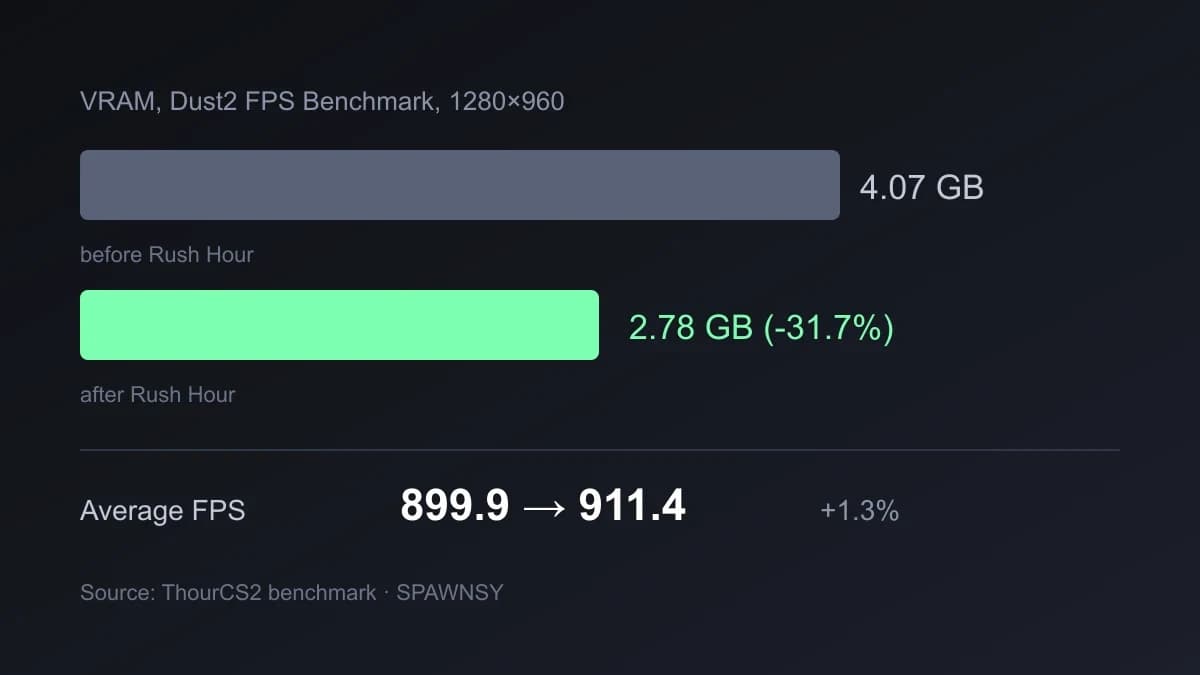
The measurement was made by the creator ThourCS2 and reported by TalkEsport and FPSHUB, among others. The test ran on the FPS Benchmark Dust2 workshop map, on a PC with a Ryzen 7 9800X3D, a GeForce RTX 5070 and 32 GB of DDR5, at 1280×960 with NVIDIA Reflex on, 2x MSAA and everything else on low. The same hardware and the same options before and after the update produced the results in the table.
Two conclusions follow. On very powerful hardware the FPS difference is within measurement error, so there is no reason to expect miracles. The big change is in memory: it looks as if some of the data now goes to system memory instead of the card, which may matter to owners of cards with 4 to 6 GB of VRAM, and on a PC with 8 GB of RAM it is worth checking that the headroom is enough. Keep in mind this is one test on one configuration. We do not know how older cards and processors behave, and so far nobody has measured it in a way that could be repeated.
How to measure your own FPS before you change anything
Without a measurement every settings change is a guess. For comparisons use the map mentioned above from the Steam Workshop, FPS Benchmark Dust2, because it runs the same route each time. The result only means something relative to your own previous result on the same map with the same settings, so do not compare it with other people's numbers from different hardware.
During normal play you can switch on a counter with cl_showfps 1, and in the game's description mode 2 is smoothed FPS, 3 is server latency and 4 logs FPS to a file. The 1% low frame value matters more than the average, because it is what causes the feeling of stutter. The HUD telemetry also reports frame time: cl_hud_telemetry_frametime_show 1 shows the indicator only when frames are bad. The full list of commands that really exist in this version is in a separate roundup.
Graphics settings: what pros choose
We did not measure the cost of each option separately on a single computer, so we will not give a percentage ranking. Instead we show the settings recommended by ProSettings.net based on 941 professional players counted in October 2026. It is a good starting point, because pros optimise for clarity and latency, not for pretty pictures.
- V-Sync off. It adds input lag.
- CMAA2 anti-aliasing. In the game's settings file this is the
r_csgo_cmaa_enableoption, separate from MSAA multisampling, which is heavier for the card. - Shadows on low, dynamic shadows on all. That way a moving player's shadow stays visible even though shadow quality is low.
- Texture detail on medium. Higher levels load VRAM with no benefit for the game.
- NVIDIA Reflex on. Described below.
- FSR off. Upscaling blurs the image, which is why the site recommends turning it off.
The sources do not agree on one point: ProSettings recommends low shadow quality with dynamic shadows on all, while a February 2026 Hotspawn guide sets shadow quality to high because it helps spot opponents. For shadows it is therefore best to measure both options on your own hardware and pick the one that does not cost frames you need.
The cs2_video.txt file in the Steam settings folder shows that the game keeps these options under names such as videocfg_shadow_quality, videocfg_dynamic_shadows, videocfg_texture_detail, videocfg_particle_detail, videocfg_ao_detail, videocfg_hdr_detail, videocfg_fsr_detail, shaderquality and msaa_samples. Among them are shadow quality, dynamic shadows, textures, particles, ambient occlusion, HDR, FSR, shader quality and MSAA. If you are after FPS, these are the entries worth lowering one at a time, measuring the result on the same map.
NVIDIA Reflex and low-latency modes
The low-latency option has three positions in the game. According to the description of the r_low_latency command, 0 is off, 1 is on (NVIDIA Low Latency or AMD Anti-Lag 2) and 2 is on with a boost, available for NVIDIA cards only. In the settings it appears as Reflex, and ProSettings recommends turning it on. Reflex shortens the render queue, so it lowers latency and does not raise the frame count, which is why you will not see its effect in an FPS counter.
Resolution and aspect ratio
Resolution is the strongest lever on FPS and also a matter of taste. According to ProSettings the most common pro resolutions are 1280×960 (53%), 1024×768 (15%), 1920×1080 (13%), 1280×1024 (6%) and 1152×864 (5%). Stretched formats therefore dominate. Lowering the resolution gives more frames and characters fill more pixels, but the image loses sharpness, so the site's advice is cautious: keep your monitor's native aspect ratio unless you have a reason to change it.
Since the 22 September update changing resolution no longer breaks the crosshair. Valve made it resolution independent, so the game converts thickness and length itself: going from 1280×720 to 2560×1440, two pixels of thickness become four. You can test different resolutions without redoing the crosshair, and how to convert an old code is covered in the crosshair guide.
fps_max
The frame cap is set with fps_max, and fps_max 0 removes it. Without a cap the frame count jumps with the load of the scene. In our judgement it is better to choose a value your computer holds in difficult moments, for example in smoke on a full server, than to chase the highest possible number, because stable frames matter more than a record on an empty map. That is practical advice, not a measurement result.
Launch options and commands that drop out
FPS guides repeat a set of switches inherited from CS:GO. In the game files of 1 October 2026 there is no text -novid, -threads or -nojoy, so they have nothing to do, which agrees with the intro having been removed along with the move to Source 2. Nor are there the commands cl_forcepreload, mat_queue_mode, r_dynamic or net_graph. A guide that tells you to type them is out of date, and the game usually does not report an error, it just skips them.
The popular -high, which ProSettings still recommends as a way to get a higher process priority, is an unclear matter: we did not find such text in the game files, so we cannot confirm that it does anything. What does exist is -vulkan and -dx11, which choose the graphics interface and mostly make sense when you have trouble with the default one, and +fps_max, an ordinary command executed at startup. The -allow_third_party_software switch, according to guides, comes with the game's untrusted mode, so add it only when you really need to record or run an overlay.
After Rush Hour we did not get a jump in FPS but a change in memory use: that is what the only available measurement shows, and it comes from a powerful computer. If you have an older card with little VRAM you may feel an improvement, and if your limit is the processor, expect a small difference. Before you change anything, measure the starting point on the same map.
The most will come from going through your video settings with pro-based recommendations in mind: V-Sync off, low shadows with dynamic shadows on all, medium textures, Reflex, FSR off. Treat resolution as a trade-off between frames and sharpness, not as an obligation. Everything else from FPS guides, meaning the switches and commands from CS:GO, you can safely drop from your config.
We will return to this when measurements on several hardware generations appear and results can be compared on the same map, because one test on a top processor is too little to judge how the update affected the average player.

Comments
Discussion
Join the conversation around this story.
Join the discussion
Sign in to comment and reply to other readers.
Sign inNo comments yet
Start the discussion first.