%22%20fill%3D%22rgb(0%2C0%2C0)%22%20d%3D%22M%201708.71%2032.0719%20L%201711.17%2032.1726%20L%201711.48%2033.8726%20C%201698.63%2068.7557%201678.15%20111.062%201663.25%20146.038%20L%201610.27%20270.222%20C%201600.68%20293.044%201548.56%20422.248%201540.04%20431.57%20C%201533.67%20438.547%201128.18%20599.98%201082.51%20618.503%20L%20896.13%20695.087%20C%20861.529%20708.971%20827.042%20723.139%20792.674%20737.591%20C%20773.372%20745.745%20749.086%20754.449%20732.134%20766.537%20C%20692.666%20794.684%20697.752%20841.911%20698.601%20884.356%20C%20699.702%20939.367%20740.841%20953.958%20782.454%20976.677%20L%20861.67%201020.18%20L%201099.89%201152.37%20C%201107.22%201156.5%201119.88%201164.35%201127.14%201167.58%20C%201169.86%201186.61%201146.74%201195.41%201117.9%201208.29%20C%201100.37%201216.11%201079.03%201225.42%201060.64%201233.58%20C%201010.18%201256.26%20959.538%201278.54%20908.726%201300.43%20C%20894.529%201306.71%20881.754%201312.22%20867.258%201317.69%20C%20862.804%201316.04%20858.4%201314.27%20854.051%201312.36%20C%20836.181%201304.32%20811.094%201289.47%20793.048%201279.86%20L%20667.457%201213.33%20L%20559.157%201156.4%20C%20524.558%201137.94%20487.124%201123.47%20472.687%201083.79%20C%20469.558%201074.97%20467.621%201065.77%20466.927%201056.43%20C%20465.765%201038.59%20466.66%201011.98%20466.668%20993.332%20L%20466.359%20873.615%20C%20465.984%20815.652%20463.947%20757.728%20465.485%20699.747%20C%20465.795%20688.052%20466.054%20675.662%20467.175%20664.054%20C%20469.31%20640.858%20475.406%20618.2%20485.2%20597.064%20C%20517.254%20527.676%20568.707%20508.151%20633.929%20480.324%20L%20726.507%20441.167%20L%201040.13%20310.018%20L%201452.31%20137.782%20L%201616.93%2069.4204%20C%201646.93%2057.0612%201678.5%2043.152%201708.71%2032.0719%20z%22%2F%3E%0D%0A%3Cpath%20transform%3D%22translate(0%2C0)%22%20fill%3D%22rgb(0%2C0%2C0)%22%20d%3D%22M%201180.36%20731.182%20C%201195.24%20733.945%201233.7%20756.876%201248.98%20765.026%20L%201364.16%20826.126%20L%201484.37%20889.381%20C%201498.57%20896.955%201532.42%20914.303%201544.52%20923.261%20C%201557.39%20932.823%201567.44%20945.681%201573.6%20960.477%20C%201577.74%20970.613%201580.28%20981.333%201581.12%20992.25%20C%201582.2%201006.88%201581.3%201032.21%201581.31%201047.95%20L%201581.63%201160.97%20C%201582.26%201211.62%201582.57%201262.29%201582.57%201312.95%20C%201582.44%201333.48%201582.84%201362.18%201581%201382.38%20C%201579.14%201403.66%201573.97%201424.53%201565.69%201444.23%20C%201551.08%201479.78%201525.53%201509.75%201492.74%201529.79%20C%201460.17%201549.9%201412.55%201568.06%201376.2%201583.68%20C%201297.89%201617.01%201219.4%201649.9%201140.72%201682.34%20L%20334.313%202018.15%20C%20339.936%202006.05%20344.516%201995.06%20349.5%201982.67%20C%20380.898%201908.42%20413.985%201834.57%20445.11%201760.02%20C%20459.052%201725.94%20473.375%201692.02%20488.076%201658.26%20C%20492.996%201647.05%20502.305%201624.37%20508.527%201614.93%20C%20525.371%201606.59%20557.563%201594.41%20575.732%201586.98%20L%20705.864%201534%20C%20845.58%201478.27%20984.961%201421.71%201124%201364.32%20L%201246.78%201313.94%20C%201290.4%201295.55%201343.27%201280.12%201348.5%201224.17%20C%201350.49%201202.85%201351.54%201164.6%201346.69%201143.96%20C%201344.6%201134.87%201340.77%201126.27%201335.41%201118.63%20C%201321.45%201099.1%201289.07%201084.29%201267.79%201072.67%20L%201188.51%201029.14%20L%20997.495%20923.267%20L%20933.233%20887.54%20C%20924.86%20882.894%20890.238%20867.795%20898.045%20858.391%20C%20907.874%20846.549%20953.243%20829.416%20967.235%20823.263%20L%201064.01%20780.291%20C%201087.5%20769.837%201111.05%20759.524%201134.65%20749.351%20C%201147.99%20743.555%201166.91%20734.741%201180.36%20731.182%20z%22%2F%3E%0D%0A%3C%2Fsvg%3E)
%22%20fill%3D%22rgb(255%2C255%2C255)%22%20d%3D%22M%201708.71%2032.0719%20L%201711.17%2032.1726%20L%201711.48%2033.8726%20C%201698.63%2068.7557%201678.15%20111.062%201663.25%20146.038%20L%201610.27%20270.222%20C%201600.68%20293.044%201548.56%20422.248%201540.04%20431.57%20C%201533.67%20438.547%201128.18%20599.98%201082.51%20618.503%20L%20896.13%20695.087%20C%20861.529%20708.971%20827.042%20723.139%20792.674%20737.591%20C%20773.372%20745.745%20749.086%20754.449%20732.134%20766.537%20C%20692.666%20794.684%20697.752%20841.911%20698.601%20884.356%20C%20699.702%20939.367%20740.841%20953.958%20782.454%20976.677%20L%20861.67%201020.18%20L%201099.89%201152.37%20C%201107.22%201156.5%201119.88%201164.35%201127.14%201167.58%20C%201169.86%201186.61%201146.74%201195.41%201117.9%201208.29%20C%201100.37%201216.11%201079.03%201225.42%201060.64%201233.58%20C%201010.18%201256.26%20959.538%201278.54%20908.726%201300.43%20C%20894.529%201306.71%20881.754%201312.22%20867.258%201317.69%20C%20862.804%201316.04%20858.4%201314.27%20854.051%201312.36%20C%20836.181%201304.32%20811.094%201289.47%20793.048%201279.86%20L%20667.457%201213.33%20L%20559.157%201156.4%20C%20524.558%201137.94%20487.124%201123.47%20472.687%201083.79%20C%20469.558%201074.97%20467.621%201065.77%20466.927%201056.43%20C%20465.765%201038.59%20466.66%201011.98%20466.668%20993.332%20L%20466.359%20873.615%20C%20465.984%20815.652%20463.947%20757.728%20465.485%20699.747%20C%20465.795%20688.052%20466.054%20675.662%20467.175%20664.054%20C%20469.31%20640.858%20475.406%20618.2%20485.2%20597.064%20C%20517.254%20527.676%20568.707%20508.151%20633.929%20480.324%20L%20726.507%20441.167%20L%201040.13%20310.018%20L%201452.31%20137.782%20L%201616.93%2069.4204%20C%201646.93%2057.0612%201678.5%2043.152%201708.71%2032.0719%20z%22%2F%3E%0D%0A%3Cpath%20transform%3D%22translate(0%2C0)%22%20fill%3D%22rgb(255%2C255%2C255)%22%20d%3D%22M%201180.36%20731.182%20C%201195.24%20733.945%201233.7%20756.876%201248.98%20765.026%20L%201364.16%20826.126%20L%201484.37%20889.381%20C%201498.57%20896.955%201532.42%20914.303%201544.52%20923.261%20C%201557.39%20932.823%201567.44%20945.681%201573.6%20960.477%20C%201577.74%20970.613%201580.28%20981.333%201581.12%20992.25%20C%201582.2%201006.88%201581.3%201032.21%201581.31%201047.95%20L%201581.63%201160.97%20C%201582.26%201211.62%201582.57%201262.29%201582.57%201312.95%20C%201582.44%201333.48%201582.84%201362.18%201581%201382.38%20C%201579.14%201403.66%201573.97%201424.53%201565.69%201444.23%20C%201551.08%201479.78%201525.53%201509.75%201492.74%201529.79%20C%201460.17%201549.9%201412.55%201568.06%201376.2%201583.68%20C%201297.89%201617.01%201219.4%201649.9%201140.72%201682.34%20L%20334.313%202018.15%20C%20339.936%202006.05%20344.516%201995.06%20349.5%201982.67%20C%20380.898%201908.42%20413.985%201834.57%20445.11%201760.02%20C%20459.052%201725.94%20473.375%201692.02%20488.076%201658.26%20C%20492.996%201647.05%20502.305%201624.37%20508.527%201614.93%20C%20525.371%201606.59%20557.563%201594.41%20575.732%201586.98%20L%20705.864%201534%20C%20845.58%201478.27%20984.961%201421.71%201124%201364.32%20L%201246.78%201313.94%20C%201290.4%201295.55%201343.27%201280.12%201348.5%201224.17%20C%201350.49%201202.85%201351.54%201164.6%201346.69%201143.96%20C%201344.6%201134.87%201340.77%201126.27%201335.41%201118.63%20C%201321.45%201099.1%201289.07%201084.29%201267.79%201072.67%20L%201188.51%201029.14%20L%20997.495%20923.267%20L%20933.233%20887.54%20C%20924.86%20882.894%20890.238%20867.795%20898.045%20858.391%20C%20907.874%20846.549%20953.243%20829.416%20967.235%20823.263%20L%201064.01%20780.291%20C%201087.5%20769.837%201111.05%20759.524%201134.65%20749.351%20C%201147.99%20743.555%201166.91%20734.741%201180.36%20731.182%20z%22%2F%3E%0D%0A%3C%2Fsvg%3E)

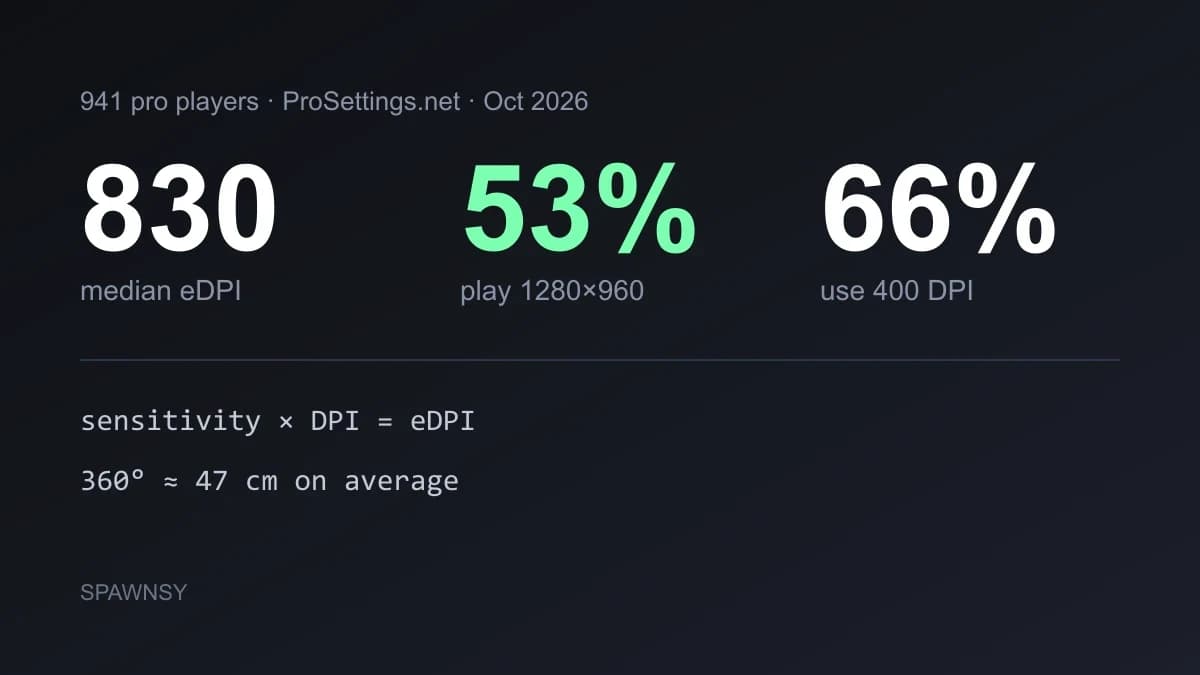
Settings guides for CS2 usually end with a table of values somebody decided were best, with no explanation of where they came from. Here we lean on one source of numbers, the ProSettings.net roundup from October 2026 that counted 941 professionals, and add what we checked ourselves in the game files from 1 October. After the Rush Hour update the menu gained a new Crosshair / Scopes tab and the default crosshair is now Dynamic Quad, so some older guides are out of date.
What most pros set
These are the choices of people who have played on tournament hardware for years. For most players they are a reference point, not a pattern to copy wholesale: 1280×960 makes sense for someone who picked it for the size of the player models, but it does not have to make sense on your monitor.
Mouse: DPI, sensitivity and eDPI
Sensitivity is compared through eDPI, which is mouse DPI multiplied by in-game sensitivity. The median of 830 is, for example, 400 DPI at a sensitivity of about 2.07 or 800 DPI at about 1.04. eDPI alone says little until you turn it into a distance: with the game's default turn rate (m_yaw 0.022) a full 360 degree turn takes about 69 cm for an eDPI of 600, 50 cm for 830, 42 cm for 1000 and 35 cm for 1200. According to the roundup, pros turn about 47 cm on average, but the spread is large because the choice depends on style: someone aiming mostly with the wrist looks for shorter distances than a player who moves the whole arm.
The practical rule is to fix one DPI and not change it along with sensitivity. Start at 800 DPI if your mouse works well there, or at 400 if you prefer the pro convention, and choose in-game sensitivity so that a 360 degree turn fits the comfortable part of your mousepad. Set the polling rate to 1000 Hz or higher if your mouse supports it.
How to pick sensitivity step by step
Start from a value near the median, an eDPI of about 800 to 850, and check how many centimetres of pad a 360 degree turn takes. If your hand reaches the edge of the pad on a quick turn, sensitivity is too low, and if small crosshair corrections jump too far, it is too high. Change it in small steps, around five to ten percent, and give each value a few days of play before you judge. Changing it too often leaves muscle memory no time to settle, and that matters more than any particular number.
Scope sensitivity is a separate matter. In CS2 the zoom multiplier is set with zoom_sensitivity_ratio_mouse. If you play a sniper and zooming feels faster than aiming without the scope, lower the multiplier, and if it feels slower, raise it.
Video
Everything about graphics settings, including which of them matter for FPS, is in our FPS guide. In short: V-Sync off, Reflex on, FSR off, shadows low with dynamic shadows on all, textures medium. Choose resolution yourself, but remember that since the 22 September update you need not fear changing it, because the crosshair scales with the screen and does not need redoing after every change.
Sound
ProSettings recommends the Crisp equaliser profile, which lifts high tones and makes it easier to locate an enemy by footsteps, and push-to-talk instead of an open mic. Many pros mute sounds that drown out footsteps: round start and end, MVP music, bomb and hostage cues. That is done in the sound menu or with commands, for example snd_mvp_volume 0 and snd_roundstart_volume 0. The full list of those commands and what they do is in our roundup of commands that work in 2026.
Game and interface
You enable the developer console in the game settings, on the Game tab. It is the single most useful setting, because it unlocks the radar, HUD and diagnostics commands, among them cl_showfps and the network telemetry. The radar is usually set to show as much of the map as possible (cl_radar_always_centered 0) and to turn square with the scoreboard (cl_radar_square_with_scoreboard 1), and ProSettings also lists boosting player contrast as a setting pros choose.
Settings in the game worth checking after installing
A few options on the Game tab have a real effect on everyday play. Hints for new players (gameinstructor_enable) can be turned off. The use key can open the buy menu in a buy zone (cl_use_opens_buy_menu), which speeds up buying. Snipers can rezoom automatically after a shot (cl_sniper_auto_rezoom), and cycling zoom levels by holding secondary fire can be disabled (cl_debounce_zoom). Player pings have their own sound option (cl_player_ping_mute). Each of these commands is described in the commands roundup, together with the values the game itself gives.
You save binds in autoexec.cfg as bind "key" "command". The engine runs this file by itself on every launch, so you need not add anything in Steam options. You can also define your own shortcuts with alias, for example switching to the knife with one key and returning to the previous weapon when you release it.
Crosshair and the new tab
In the 22 September patch Valve made crosshairs resolution independent, added the Crosshair / Scopes tab and changed the default crosshair to Dynamic Quad, which is meant to show weapon accuracy better. Thickness and length are now given in pixels, and later updates added the Static Quadrant style, an outline colour and scope dot settings. As a result some old codes stopped working. If you have an old crosshair saved, convert it in our code converter, and you will find ready-made pro crosshairs in the current format in the crosshair database.
Where the game saves settings and how to back them up
Changes from the menu go to the cs2_user_convars_0_slot0.vcfg file in Steam\userdata\<your id>\730\local\cfg, next to which sits a copy of the last version from the cloud, and video settings go to cs2_video.txt in the same place. If you want a backup before reinstalling the system or moving to another computer, copy that folder together with your own autoexec.cfg from game\csgo\cfg. Steam Cloud usually restores the menu settings, but your own commands file exists only with you.
Good CS2 settings come down to a few things: one DPI and a sensitivity matched to the distance on your pad, a resolution matched to your monitor and to whether you like stretching, V-Sync off, Reflex on and the cues that drown out footsteps muted. Everything else you can tune one change at a time.
Do not copy a pro's settings wholesale. Copy their crosshair if it suits you, but pick sensitivity and resolution for your own hardware and hand. A median eDPI of 830 is a starting point, not a goal.
After every major update check that your commands and codes still work, because Valve changed the crosshair format twice in one week. We will refresh the ProSettings numbers when the site publishes a new roundup.
Comments
Discussion
Join the conversation around this story.
Join the discussion
Sign in to comment and reply to other readers.
Sign inNo comments yet
Start the discussion first.