%22%20fill%3D%22rgb(0%2C0%2C0)%22%20d%3D%22M%201708.71%2032.0719%20L%201711.17%2032.1726%20L%201711.48%2033.8726%20C%201698.63%2068.7557%201678.15%20111.062%201663.25%20146.038%20L%201610.27%20270.222%20C%201600.68%20293.044%201548.56%20422.248%201540.04%20431.57%20C%201533.67%20438.547%201128.18%20599.98%201082.51%20618.503%20L%20896.13%20695.087%20C%20861.529%20708.971%20827.042%20723.139%20792.674%20737.591%20C%20773.372%20745.745%20749.086%20754.449%20732.134%20766.537%20C%20692.666%20794.684%20697.752%20841.911%20698.601%20884.356%20C%20699.702%20939.367%20740.841%20953.958%20782.454%20976.677%20L%20861.67%201020.18%20L%201099.89%201152.37%20C%201107.22%201156.5%201119.88%201164.35%201127.14%201167.58%20C%201169.86%201186.61%201146.74%201195.41%201117.9%201208.29%20C%201100.37%201216.11%201079.03%201225.42%201060.64%201233.58%20C%201010.18%201256.26%20959.538%201278.54%20908.726%201300.43%20C%20894.529%201306.71%20881.754%201312.22%20867.258%201317.69%20C%20862.804%201316.04%20858.4%201314.27%20854.051%201312.36%20C%20836.181%201304.32%20811.094%201289.47%20793.048%201279.86%20L%20667.457%201213.33%20L%20559.157%201156.4%20C%20524.558%201137.94%20487.124%201123.47%20472.687%201083.79%20C%20469.558%201074.97%20467.621%201065.77%20466.927%201056.43%20C%20465.765%201038.59%20466.66%201011.98%20466.668%20993.332%20L%20466.359%20873.615%20C%20465.984%20815.652%20463.947%20757.728%20465.485%20699.747%20C%20465.795%20688.052%20466.054%20675.662%20467.175%20664.054%20C%20469.31%20640.858%20475.406%20618.2%20485.2%20597.064%20C%20517.254%20527.676%20568.707%20508.151%20633.929%20480.324%20L%20726.507%20441.167%20L%201040.13%20310.018%20L%201452.31%20137.782%20L%201616.93%2069.4204%20C%201646.93%2057.0612%201678.5%2043.152%201708.71%2032.0719%20z%22%2F%3E%0D%0A%3Cpath%20transform%3D%22translate(0%2C0)%22%20fill%3D%22rgb(0%2C0%2C0)%22%20d%3D%22M%201180.36%20731.182%20C%201195.24%20733.945%201233.7%20756.876%201248.98%20765.026%20L%201364.16%20826.126%20L%201484.37%20889.381%20C%201498.57%20896.955%201532.42%20914.303%201544.52%20923.261%20C%201557.39%20932.823%201567.44%20945.681%201573.6%20960.477%20C%201577.74%20970.613%201580.28%20981.333%201581.12%20992.25%20C%201582.2%201006.88%201581.3%201032.21%201581.31%201047.95%20L%201581.63%201160.97%20C%201582.26%201211.62%201582.57%201262.29%201582.57%201312.95%20C%201582.44%201333.48%201582.84%201362.18%201581%201382.38%20C%201579.14%201403.66%201573.97%201424.53%201565.69%201444.23%20C%201551.08%201479.78%201525.53%201509.75%201492.74%201529.79%20C%201460.17%201549.9%201412.55%201568.06%201376.2%201583.68%20C%201297.89%201617.01%201219.4%201649.9%201140.72%201682.34%20L%20334.313%202018.15%20C%20339.936%202006.05%20344.516%201995.06%20349.5%201982.67%20C%20380.898%201908.42%20413.985%201834.57%20445.11%201760.02%20C%20459.052%201725.94%20473.375%201692.02%20488.076%201658.26%20C%20492.996%201647.05%20502.305%201624.37%20508.527%201614.93%20C%20525.371%201606.59%20557.563%201594.41%20575.732%201586.98%20L%20705.864%201534%20C%20845.58%201478.27%20984.961%201421.71%201124%201364.32%20L%201246.78%201313.94%20C%201290.4%201295.55%201343.27%201280.12%201348.5%201224.17%20C%201350.49%201202.85%201351.54%201164.6%201346.69%201143.96%20C%201344.6%201134.87%201340.77%201126.27%201335.41%201118.63%20C%201321.45%201099.1%201289.07%201084.29%201267.79%201072.67%20L%201188.51%201029.14%20L%20997.495%20923.267%20L%20933.233%20887.54%20C%20924.86%20882.894%20890.238%20867.795%20898.045%20858.391%20C%20907.874%20846.549%20953.243%20829.416%20967.235%20823.263%20L%201064.01%20780.291%20C%201087.5%20769.837%201111.05%20759.524%201134.65%20749.351%20C%201147.99%20743.555%201166.91%20734.741%201180.36%20731.182%20z%22%2F%3E%0D%0A%3C%2Fsvg%3E)
%22%20fill%3D%22rgb(255%2C255%2C255)%22%20d%3D%22M%201708.71%2032.0719%20L%201711.17%2032.1726%20L%201711.48%2033.8726%20C%201698.63%2068.7557%201678.15%20111.062%201663.25%20146.038%20L%201610.27%20270.222%20C%201600.68%20293.044%201548.56%20422.248%201540.04%20431.57%20C%201533.67%20438.547%201128.18%20599.98%201082.51%20618.503%20L%20896.13%20695.087%20C%20861.529%20708.971%20827.042%20723.139%20792.674%20737.591%20C%20773.372%20745.745%20749.086%20754.449%20732.134%20766.537%20C%20692.666%20794.684%20697.752%20841.911%20698.601%20884.356%20C%20699.702%20939.367%20740.841%20953.958%20782.454%20976.677%20L%20861.67%201020.18%20L%201099.89%201152.37%20C%201107.22%201156.5%201119.88%201164.35%201127.14%201167.58%20C%201169.86%201186.61%201146.74%201195.41%201117.9%201208.29%20C%201100.37%201216.11%201079.03%201225.42%201060.64%201233.58%20C%201010.18%201256.26%20959.538%201278.54%20908.726%201300.43%20C%20894.529%201306.71%20881.754%201312.22%20867.258%201317.69%20C%20862.804%201316.04%20858.4%201314.27%20854.051%201312.36%20C%20836.181%201304.32%20811.094%201289.47%20793.048%201279.86%20L%20667.457%201213.33%20L%20559.157%201156.4%20C%20524.558%201137.94%20487.124%201123.47%20472.687%201083.79%20C%20469.558%201074.97%20467.621%201065.77%20466.927%201056.43%20C%20465.765%201038.59%20466.66%201011.98%20466.668%20993.332%20L%20466.359%20873.615%20C%20465.984%20815.652%20463.947%20757.728%20465.485%20699.747%20C%20465.795%20688.052%20466.054%20675.662%20467.175%20664.054%20C%20469.31%20640.858%20475.406%20618.2%20485.2%20597.064%20C%20517.254%20527.676%20568.707%20508.151%20633.929%20480.324%20L%20726.507%20441.167%20L%201040.13%20310.018%20L%201452.31%20137.782%20L%201616.93%2069.4204%20C%201646.93%2057.0612%201678.5%2043.152%201708.71%2032.0719%20z%22%2F%3E%0D%0A%3Cpath%20transform%3D%22translate(0%2C0)%22%20fill%3D%22rgb(255%2C255%2C255)%22%20d%3D%22M%201180.36%20731.182%20C%201195.24%20733.945%201233.7%20756.876%201248.98%20765.026%20L%201364.16%20826.126%20L%201484.37%20889.381%20C%201498.57%20896.955%201532.42%20914.303%201544.52%20923.261%20C%201557.39%20932.823%201567.44%20945.681%201573.6%20960.477%20C%201577.74%20970.613%201580.28%20981.333%201581.12%20992.25%20C%201582.2%201006.88%201581.3%201032.21%201581.31%201047.95%20L%201581.63%201160.97%20C%201582.26%201211.62%201582.57%201262.29%201582.57%201312.95%20C%201582.44%201333.48%201582.84%201362.18%201581%201382.38%20C%201579.14%201403.66%201573.97%201424.53%201565.69%201444.23%20C%201551.08%201479.78%201525.53%201509.75%201492.74%201529.79%20C%201460.17%201549.9%201412.55%201568.06%201376.2%201583.68%20C%201297.89%201617.01%201219.4%201649.9%201140.72%201682.34%20L%20334.313%202018.15%20C%20339.936%202006.05%20344.516%201995.06%20349.5%201982.67%20C%20380.898%201908.42%20413.985%201834.57%20445.11%201760.02%20C%20459.052%201725.94%20473.375%201692.02%20488.076%201658.26%20C%20492.996%201647.05%20502.305%201624.37%20508.527%201614.93%20C%20525.371%201606.59%20557.563%201594.41%20575.732%201586.98%20L%20705.864%201534%20C%20845.58%201478.27%20984.961%201421.71%201124%201364.32%20L%201246.78%201313.94%20C%201290.4%201295.55%201343.27%201280.12%201348.5%201224.17%20C%201350.49%201202.85%201351.54%201164.6%201346.69%201143.96%20C%201344.6%201134.87%201340.77%201126.27%201335.41%201118.63%20C%201321.45%201099.1%201289.07%201084.29%201267.79%201072.67%20L%201188.51%201029.14%20L%20997.495%20923.267%20L%20933.233%20887.54%20C%20924.86%20882.894%20890.238%20867.795%20898.045%20858.391%20C%20907.874%20846.549%20953.243%20829.416%20967.235%20823.263%20L%201064.01%20780.291%20C%201087.5%20769.837%201111.05%20759.524%201134.65%20749.351%20C%201147.99%20743.555%201166.91%20734.741%201180.36%20731.182%20z%22%2F%3E%0D%0A%3C%2Fsvg%3E)


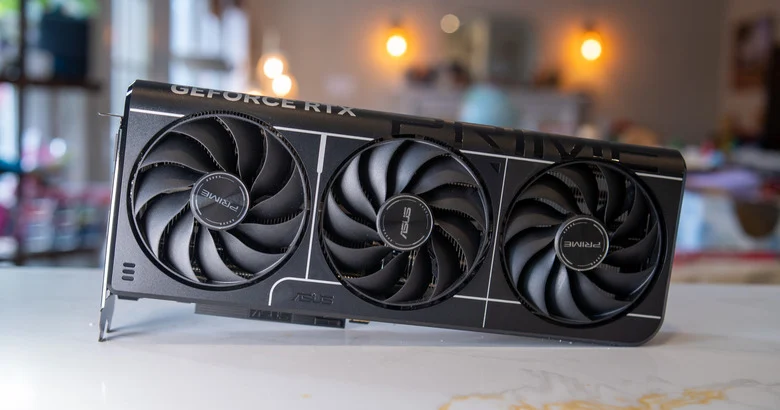
If a graphics card sits at 68C in game and still starts dropping clocks, the first assumption is usually simple: something about monitoring is off. With parts of the GeForce RTX 5070 Ti discussion, the problem looks worse than that, because monitoring may only be telling part of the truth. The loudest criticism around this card is no longer just about performance. It is about a situation where the user sees safe temperatures while the hottest point on the die may still be pushing the card into thermal throttling.
That is not some niche complaint for hardware forums. It is a normal consumer issue. People look at HWiNFO, GPU-Z, or Afterburner and assume they have a meaningful picture of the card’s state. What has made the RTX 5070 Ti story so uncomfortable is the growing suggestion from service-side discussion and hardware reporting that hotspot visibility on Blackwell is less straightforward than it used to be, while some cards can still behave like they are under hidden thermal pressure.
This is not a one-graph argument. It is a trust problem.
In a normal use case, players rely on a simple set of readings: GPU temperature, clock speed, power draw, and fan speed. They build their diagnosis from those values. If the card reports something in the mid-60s, most people rule out thermals immediately. That is exactly why the RTX 5070 Ti conversation became so tense. The point is not merely that hotspot temperature can be high. The point is that the standard picture may be incomplete.
On earlier generations, a big gap between edge temperature and hotspot temperature usually gave users a clear lead. On Blackwell, that lead appears far less obvious. The result is ugly: clock instability can look like random behavior instead of a cooling or contact issue concentrated in one part of the die.
That is a bad deal for the customer. Once diagnostic clarity drops, bad decisions multiply. Some users waste time chasing driver ghosts. Others lower power limits even though the card’s real issue is not excessive power but localized thermal pressure. Many simply start believing the model is “just like that,” because the numbers they can see never tell them otherwise.
Why a hotspot can run far above the average
A hotspot running much hotter than the average GPU reading is not mysterious. The die does not heat evenly. Some regions work harder, carry more thermal density, and expose weak heat transfer much earlier than the rest of the chip. In practice, all it takes is uneven contact pressure, mediocre TIM, or a material that degrades quickly across repeated heat cycles.
That is why so much of the RTX 5070 Ti discussion keeps circling back to the quality of factory thermal material and what happens after sustained load instead of a short benchmark. A card can look perfectly healthy for a few minutes. The problem begins once heat builds where it should not, and the safety behavior starts protecting the card before the user ever sees a clearly alarming temperature readout.
This also explains why some owners describe normal behavior in quick tests but a far less stable card in real gaming sessions. Longer play can reveal the issue more effectively than a short benchmark because it gives the thermal imbalance time to settle in. If the hottest point on the die reaches its limit, throttling does not care that the average reading still looks marketable.
The biggest failure is that users do not know where to look
In theory, a hardware issue is easier to tolerate than an information issue. If you know the card is throttling because of hotspot temperature, you can make a rational plan: inspect cooling contact, consider service, document behavior for RMA. If you do not know, you are left guessing. That is the strongest criticism of the whole situation. A card in this price class should not leave its owner asking why performance slips while every obvious temperature readout still looks fine.
Most buyers do not have a repair bench or any desire to dismantle a new GPU. They simply expect software to expose the problem clearly enough that a warranty claim makes sense. If the user has to infer the real issue from indirect behavior and deep hardware discussion, then the product has failed a basic transparency test.
This is not anti-NVIDIA posturing for the sake of it. It is a straightforward hardware standard. If a card is reducing performance because of temperature, the owner should be able to see that through normal diagnostics. Anything less turns monitoring into theater, with the most uncomfortable fact kept off stage.
How to recognize the pattern without guessing blindly
The most common warning sign is simple: the card stops sustaining its normal clocks after some time under load even though the standard GPU temperature remains unremarkable. It does not have to lose hundreds of MHz at once. Sometimes it is enough to notice that the card no longer holds the same boost behavior in the same game, same case, and same fan profile after a longer session.
That is why it helps to watch the system as a whole instead of one temperature figure. If fan behavior gets more aggressive, clocks become inconsistent, power draw stops behaving predictably, and performance is clearly worse after fifteen or twenty minutes than it was at the beginning, the card is no longer acting like a stable part. It is acting like something is being contained beneath the surface.
In that situation, the smartest first move is not immediate DIY tuning. It is comparison, logging, and documentation. The more expensive the GPU, the less sense it makes to normalize unexplained instability as something the buyer should just work around.
If thermal material or mounting is the cause, the story gets worse
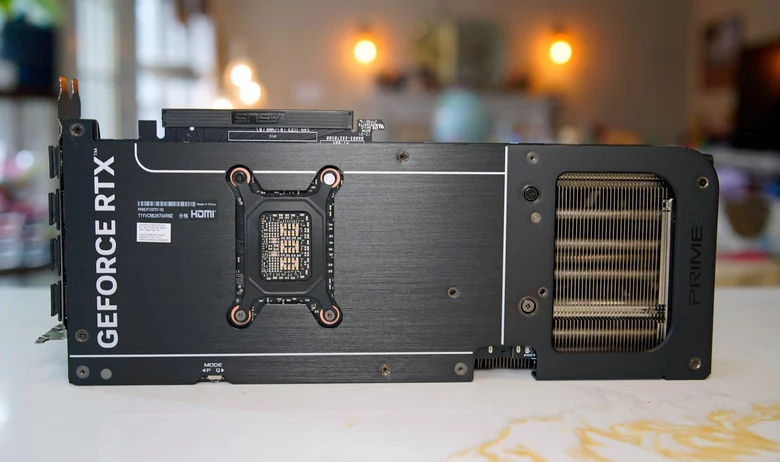
Hotspot discussions always lead back to assembly quality, and for good reason. If one area of the die runs dramatically hotter than the rest, heat transfer in that region is usually the first suspect. That can mean the thermal interface material, contact pressure, or both.
For the manufacturer, that is a rough look. This is not a minor cosmetic issue. It is a scenario where a premium graphics card can behave like a unit that needs corrective work shortly after it leaves the box. Even if the issue does not affect every card, the uncertainty alone is enough to damage confidence in the model.
Replacing thermal material or moving to a more stable phase-change option may help in theory, but that should not become the expected path for a new GPU owner. If a product requires repair-shop habits to maintain stable high-end behavior, then the manufacturer did not close the loop where it was supposed to: on assembly quality and quality control.
This is more damaging than a typical early-life flaw
Premium hardware always carries some launch noise. That alone is not unusual. What makes this story worse is the gap between the symptom and the visible explanation. A card can throttle for thermal reasons while the owner never gets a clear software-level signal explaining why. That makes the problem feel slippery in a way buyers should not have to accept at this price.
People do not want to wonder whether a performance drop came from a patch, a driver, a game bug, or a hidden thermal issue in the card itself. They want a reliable answer. If normal monitoring cannot provide one, the entire model starts to feel like hardware asking for more trust than a new premium GPU has any right to demand.

Comments
Discussion
Join the conversation around this story.
Join the discussion
Sign in to comment and reply to other readers.
Sign inNo comments yet
Start the discussion first.