%22%20fill%3D%22rgb(0%2C0%2C0)%22%20d%3D%22M%201708.71%2032.0719%20L%201711.17%2032.1726%20L%201711.48%2033.8726%20C%201698.63%2068.7557%201678.15%20111.062%201663.25%20146.038%20L%201610.27%20270.222%20C%201600.68%20293.044%201548.56%20422.248%201540.04%20431.57%20C%201533.67%20438.547%201128.18%20599.98%201082.51%20618.503%20L%20896.13%20695.087%20C%20861.529%20708.971%20827.042%20723.139%20792.674%20737.591%20C%20773.372%20745.745%20749.086%20754.449%20732.134%20766.537%20C%20692.666%20794.684%20697.752%20841.911%20698.601%20884.356%20C%20699.702%20939.367%20740.841%20953.958%20782.454%20976.677%20L%20861.67%201020.18%20L%201099.89%201152.37%20C%201107.22%201156.5%201119.88%201164.35%201127.14%201167.58%20C%201169.86%201186.61%201146.74%201195.41%201117.9%201208.29%20C%201100.37%201216.11%201079.03%201225.42%201060.64%201233.58%20C%201010.18%201256.26%20959.538%201278.54%20908.726%201300.43%20C%20894.529%201306.71%20881.754%201312.22%20867.258%201317.69%20C%20862.804%201316.04%20858.4%201314.27%20854.051%201312.36%20C%20836.181%201304.32%20811.094%201289.47%20793.048%201279.86%20L%20667.457%201213.33%20L%20559.157%201156.4%20C%20524.558%201137.94%20487.124%201123.47%20472.687%201083.79%20C%20469.558%201074.97%20467.621%201065.77%20466.927%201056.43%20C%20465.765%201038.59%20466.66%201011.98%20466.668%20993.332%20L%20466.359%20873.615%20C%20465.984%20815.652%20463.947%20757.728%20465.485%20699.747%20C%20465.795%20688.052%20466.054%20675.662%20467.175%20664.054%20C%20469.31%20640.858%20475.406%20618.2%20485.2%20597.064%20C%20517.254%20527.676%20568.707%20508.151%20633.929%20480.324%20L%20726.507%20441.167%20L%201040.13%20310.018%20L%201452.31%20137.782%20L%201616.93%2069.4204%20C%201646.93%2057.0612%201678.5%2043.152%201708.71%2032.0719%20z%22%2F%3E%0D%0A%3Cpath%20transform%3D%22translate(0%2C0)%22%20fill%3D%22rgb(0%2C0%2C0)%22%20d%3D%22M%201180.36%20731.182%20C%201195.24%20733.945%201233.7%20756.876%201248.98%20765.026%20L%201364.16%20826.126%20L%201484.37%20889.381%20C%201498.57%20896.955%201532.42%20914.303%201544.52%20923.261%20C%201557.39%20932.823%201567.44%20945.681%201573.6%20960.477%20C%201577.74%20970.613%201580.28%20981.333%201581.12%20992.25%20C%201582.2%201006.88%201581.3%201032.21%201581.31%201047.95%20L%201581.63%201160.97%20C%201582.26%201211.62%201582.57%201262.29%201582.57%201312.95%20C%201582.44%201333.48%201582.84%201362.18%201581%201382.38%20C%201579.14%201403.66%201573.97%201424.53%201565.69%201444.23%20C%201551.08%201479.78%201525.53%201509.75%201492.74%201529.79%20C%201460.17%201549.9%201412.55%201568.06%201376.2%201583.68%20C%201297.89%201617.01%201219.4%201649.9%201140.72%201682.34%20L%20334.313%202018.15%20C%20339.936%202006.05%20344.516%201995.06%20349.5%201982.67%20C%20380.898%201908.42%20413.985%201834.57%20445.11%201760.02%20C%20459.052%201725.94%20473.375%201692.02%20488.076%201658.26%20C%20492.996%201647.05%20502.305%201624.37%20508.527%201614.93%20C%20525.371%201606.59%20557.563%201594.41%20575.732%201586.98%20L%20705.864%201534%20C%20845.58%201478.27%20984.961%201421.71%201124%201364.32%20L%201246.78%201313.94%20C%201290.4%201295.55%201343.27%201280.12%201348.5%201224.17%20C%201350.49%201202.85%201351.54%201164.6%201346.69%201143.96%20C%201344.6%201134.87%201340.77%201126.27%201335.41%201118.63%20C%201321.45%201099.1%201289.07%201084.29%201267.79%201072.67%20L%201188.51%201029.14%20L%20997.495%20923.267%20L%20933.233%20887.54%20C%20924.86%20882.894%20890.238%20867.795%20898.045%20858.391%20C%20907.874%20846.549%20953.243%20829.416%20967.235%20823.263%20L%201064.01%20780.291%20C%201087.5%20769.837%201111.05%20759.524%201134.65%20749.351%20C%201147.99%20743.555%201166.91%20734.741%201180.36%20731.182%20z%22%2F%3E%0D%0A%3C%2Fsvg%3E)
%22%20fill%3D%22rgb(255%2C255%2C255)%22%20d%3D%22M%201708.71%2032.0719%20L%201711.17%2032.1726%20L%201711.48%2033.8726%20C%201698.63%2068.7557%201678.15%20111.062%201663.25%20146.038%20L%201610.27%20270.222%20C%201600.68%20293.044%201548.56%20422.248%201540.04%20431.57%20C%201533.67%20438.547%201128.18%20599.98%201082.51%20618.503%20L%20896.13%20695.087%20C%20861.529%20708.971%20827.042%20723.139%20792.674%20737.591%20C%20773.372%20745.745%20749.086%20754.449%20732.134%20766.537%20C%20692.666%20794.684%20697.752%20841.911%20698.601%20884.356%20C%20699.702%20939.367%20740.841%20953.958%20782.454%20976.677%20L%20861.67%201020.18%20L%201099.89%201152.37%20C%201107.22%201156.5%201119.88%201164.35%201127.14%201167.58%20C%201169.86%201186.61%201146.74%201195.41%201117.9%201208.29%20C%201100.37%201216.11%201079.03%201225.42%201060.64%201233.58%20C%201010.18%201256.26%20959.538%201278.54%20908.726%201300.43%20C%20894.529%201306.71%20881.754%201312.22%20867.258%201317.69%20C%20862.804%201316.04%20858.4%201314.27%20854.051%201312.36%20C%20836.181%201304.32%20811.094%201289.47%20793.048%201279.86%20L%20667.457%201213.33%20L%20559.157%201156.4%20C%20524.558%201137.94%20487.124%201123.47%20472.687%201083.79%20C%20469.558%201074.97%20467.621%201065.77%20466.927%201056.43%20C%20465.765%201038.59%20466.66%201011.98%20466.668%20993.332%20L%20466.359%20873.615%20C%20465.984%20815.652%20463.947%20757.728%20465.485%20699.747%20C%20465.795%20688.052%20466.054%20675.662%20467.175%20664.054%20C%20469.31%20640.858%20475.406%20618.2%20485.2%20597.064%20C%20517.254%20527.676%20568.707%20508.151%20633.929%20480.324%20L%20726.507%20441.167%20L%201040.13%20310.018%20L%201452.31%20137.782%20L%201616.93%2069.4204%20C%201646.93%2057.0612%201678.5%2043.152%201708.71%2032.0719%20z%22%2F%3E%0D%0A%3Cpath%20transform%3D%22translate(0%2C0)%22%20fill%3D%22rgb(255%2C255%2C255)%22%20d%3D%22M%201180.36%20731.182%20C%201195.24%20733.945%201233.7%20756.876%201248.98%20765.026%20L%201364.16%20826.126%20L%201484.37%20889.381%20C%201498.57%20896.955%201532.42%20914.303%201544.52%20923.261%20C%201557.39%20932.823%201567.44%20945.681%201573.6%20960.477%20C%201577.74%20970.613%201580.28%20981.333%201581.12%20992.25%20C%201582.2%201006.88%201581.3%201032.21%201581.31%201047.95%20L%201581.63%201160.97%20C%201582.26%201211.62%201582.57%201262.29%201582.57%201312.95%20C%201582.44%201333.48%201582.84%201362.18%201581%201382.38%20C%201579.14%201403.66%201573.97%201424.53%201565.69%201444.23%20C%201551.08%201479.78%201525.53%201509.75%201492.74%201529.79%20C%201460.17%201549.9%201412.55%201568.06%201376.2%201583.68%20C%201297.89%201617.01%201219.4%201649.9%201140.72%201682.34%20L%20334.313%202018.15%20C%20339.936%202006.05%20344.516%201995.06%20349.5%201982.67%20C%20380.898%201908.42%20413.985%201834.57%20445.11%201760.02%20C%20459.052%201725.94%20473.375%201692.02%20488.076%201658.26%20C%20492.996%201647.05%20502.305%201624.37%20508.527%201614.93%20C%20525.371%201606.59%20557.563%201594.41%20575.732%201586.98%20L%20705.864%201534%20C%20845.58%201478.27%20984.961%201421.71%201124%201364.32%20L%201246.78%201313.94%20C%201290.4%201295.55%201343.27%201280.12%201348.5%201224.17%20C%201350.49%201202.85%201351.54%201164.6%201346.69%201143.96%20C%201344.6%201134.87%201340.77%201126.27%201335.41%201118.63%20C%201321.45%201099.1%201289.07%201084.29%201267.79%201072.67%20L%201188.51%201029.14%20L%20997.495%20923.267%20L%20933.233%20887.54%20C%20924.86%20882.894%20890.238%20867.795%20898.045%20858.391%20C%20907.874%20846.549%20953.243%20829.416%20967.235%20823.263%20L%201064.01%20780.291%20C%201087.5%20769.837%201111.05%20759.524%201134.65%20749.351%20C%201147.99%20743.555%201166.91%20734.741%201180.36%20731.182%20z%22%2F%3E%0D%0A%3C%2Fsvg%3E)

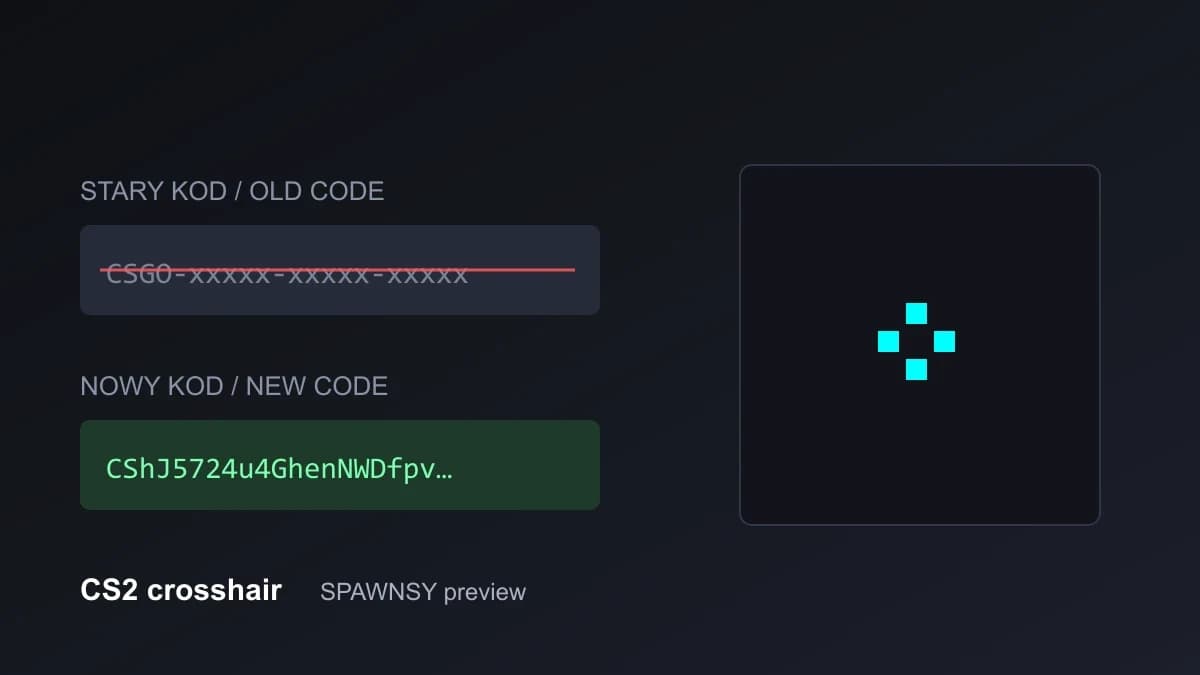
If you pasted a crosshair code from a guide or a player page into CS2 and the game rejected it without explanation, you are not doing anything wrong. Valve changed how the crosshair is stored twice within a week: first in the Rush Hour update on the night of 22 to 23 September, then in the patch of 1 October. As a result, some codes that circulated online for years stopped working, and codes in the new format look completely different. Below we explain what changed, how to recognise your code and how to move an old crosshair into the current version of the game. The September update itself is covered in a separate article.
Which format your code is in
Crosshair codes now come in three generations, and each can be told apart by eye. The oldest, known from CS:GO, start with CSGO- and have five groups of five characters separated by dashes. Codes of that kind saved before the 22 September update are no longer accepted by the game. Codes with newer field layouts also start with CSGO- but can still be imported. Finally, since 1 October a code is a string starting with the letters CS, with no dashes, 46 characters in total.
The CSGO- prefix alone therefore does not mean a code is dead. Which layout it is only shows after decoding, and that is what our CS2 crosshair code converter is for: you paste a code, and the tool shows the detected format, the new code, a preview and the console commands. If the code is already in the current format, the converter simply confirms it.
How to move an old crosshair into the new game
The procedure is short. Paste the old code into the converter and choose the height of the screen you play on, for example 1080 for a 1920×1080 resolution. Copy the generated code. In the game, open the settings, go to the Crosshair / Scopes tab, use the share/import button next to the preview, paste the code and confirm. After the import, check the preview: it should look the way it does on the page.
The screen height matters because the new code holds values in pixels together with the height they were set for. The game converts them to the screen of whoever loads the code and rounds each value separately. That is why the same crosshair now has different codes for players on different resolutions, and a code copied from a player on 1080p gives you a crosshair with the same proportions on a 1440p monitor, though not always the same numbers in the settings.
Why the code looks different after you import and export
This question comes up most often: you loaded someone's code, exported it from your own settings and got a completely different string. The cause is the screen height mentioned above. On import the game converts the values to your resolution, and on export it writes them together with your height, so the resulting code is different even though the crosshair looks the same. It is not a bug and it does not mean anything about the crosshair itself changed.
For the same reason, pro player crosshair pages show each player's code at their own resolution, since that is the code the game would export on their machine. If a player was on 1080p and you play on 1440p, import their code and leave the rest to the game: it will fit the pixels to your screen.
Import fails: what to check, in order
If the game keeps rejecting the code, go through four things. First, check in the converter that it is not the oldest format with the CSGO- prefix. Second, make sure you copied the whole code: cut-off endings are a common cause, especially when copying from a table or a chat message. Third, paste the code in the "share or import" window in the Crosshair / Scopes tab and confirm it with the button in that window. Fourth, if extra text or a stray whitespace came along with the code from the page, remove it by hand.
What changed in the crosshair itself
The updates added several things old codes did not know about. There is a new style, Static Quadrant, which draws four arcs around the centre instead of four lines. The outline now has its own colour rather than only black taken from the crosshair opacity, and it can be full or half. There are also scope dot settings, including its size and whether it uses the crosshair colour. For old codes the consequence is that after conversion the outline is black and the scope dot settings are the defaults.
The behaviour of dynamic crosshairs changed as well. We measured it in the game after the 1 October patch, standing still with a Glock on a 1080p screen, and the results are in the table. These are our measurements on one weapon, not Valve documentation, so in other conditions the differences may show up.
The most practical difference concerns Dynamic Cross: its resting gap is fixed, so moving the Gap slider changes nothing in it. If you want control over how wide the crosshair is when you stand still, pick Classic or a static style. Ready-made crosshairs in the current format are in the pro player crosshair database, where the codes come from match demos.
Where to get codes so you do not land on a dead one
The simplest rule: a code that starts with CS and is 46 characters long is current and the game will take it without conversion. A CSGO- code from a guide written before September is worth running through the converter before you start looking for the cause in the game. If you copy from a web page, make sure the code was not shortened by the page or pasted with extra spaces. The converter trims whitespace at the start and the end, and reports a code with a missing piece as unreadable.
The format change is annoying but justified: the earlier format could not cope with new options and different resolutions, and the new one adjusts the crosshair to the screen of whoever loads it. For an ordinary player the cost is a one-off: one conversion and one import.
If you have a favourite crosshair stored as an old code, convert it now and write the new code down together with your screen height. If you copy a pro player's crosshair, take the code from a database in the current format, because only then are you sure the game will accept it and that the values match the demo.
One caveat: our measurements describe the game after the 1 October patch. Valve changed the crosshair's format and behaviour twice within a week, so more fixes are possible. When they arrive, we will update the converter and the crosshair database.


Comments
Discussion
Join the conversation around this story.
Join the discussion
Sign in to comment and reply to other readers.
Sign inNo comments yet
Start the discussion first.